Nuvo-7000LP: Intel 9/8th-Gen Core i7/i5 Fanless Controller with 6x GbE Ports, MezIO
Nuvo-7000LPStarting at $1,350.00
Main Features
- Intel® 9th/ 8th-Gen Core™ i hexa-core 35W/ 65W LGA1151 CPU
- Low-profile chassis with hot-swappable 2.5” HDD/ SSD tray
- MezIO™ interface for easy function expansion
- Rugged, -25°C to 70°C fanless operation
- Up to 6x GigE ports, supporting 9.5 KB jumbo frame
- M.2 2280 M key socket (Gen3 x4) supporting NVMe SSD or Intel® Optane™ memory
- 4x USB 3.1 Gen2 ports and 4x USB 3.1 Gen1 ports
- VGA/ DVI/ DP triple independent display, supporting 4K2K resolution

Frequently Asked Questions
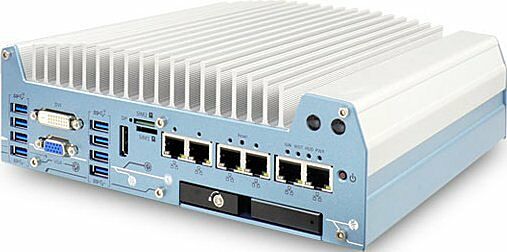
The Nuvo-7000LP front panel provides:
- 4x USB 3.1 Gen2 (10Gbps) ports
- 4x USB 3.1 Gen1 (5Gbps) ports
- 1x VGA connector (up to 1920x1200)
- 1x DVI-D connector (up to 1920x1200)
- 1x DisplayPort connector (up to 4096x2304)
- 2x Micro-SIM (3FF) slots
- Up to 6x Gigabit Ethernet ports (2x on Nuvo-7002LP, 6x on Nuvo-7006LP)
On the rear panel: 1x MezIO™ expansion port, a 4-pole 3.5mm headphone/microphone jack, 4x COM ports (COM1-4), a 3-pin terminal block for DC/ignition input, and a 3-pin remote on/off control connector.
The system accepts 8~35VDC via a 3-pin pluggable terminal block, which also supports ignition signal input. Supplying voltage over 35V will damage the system.
Maximum power consumption depends on the installed CPU (35W TDP mode):
- i7-8700T: 72W (Max.) @ 24V
- i5-8500T: 68.4W (Max.) @ 24V
- i3-8100T: 62.64W (Max.) @ 24V
With a 35W CPU, operating temperature is -25°C to 70°C. With a 65W CPU, it is -25°C to 70°C when configured for 35W TDP, or -25°C to 50°C when configured for 65W TDP. Storage temperature is -40°C to 85°C, humidity 10%~90% non-condensing.
The system is rated for MIL-STD-810G vibration (Method 514.6, Category 4) and shock (Method 516.6, Procedure I, Table 516.6-II), and carries CE/FCC Class A EMC compliance (EN 55032 & EN 55024) and UL62368-1/IEC62368-1 safety certification.
Note: for i7-8700/i7-9700E running at 65W mode, operating temperature is limited to 50°C and thermal throttling may occur under sustained full load. For sub-zero operation, a wide-temperature HDD or SSD is required.
Storage interfaces include:
- 1x front-accessible, hot-swappable 2.5" HDD/SSD tray (up to 9.5mm thickness)
- 1x internal SATA port for 2.5" HDD/SSD (up to 15mm thickness)
- RAID 0/1 support combining the internal drive and hot-swap tray
- 1x M.2 2280 M key socket (PCIe Gen3 x4) for NVMe SSD or Intel® Optane™ memory
- 1x full-size mSATA port (mux with mini-PCIe)
Memory: up to 64GB DDR4 2666/2400 SDRAM across two SODIMM slots (each slot supports up to 32GB).
Expansion: 1x full-size mini PCI Express socket with internal SIM socket (mux with mSATA), 1x M.2 2242 B key socket with dual front-accessible SIM sockets, and 1x MezIO™ expansion port for Neousys MezIO™ modules.
The system has been tested with:
- Microsoft Windows 10 (x64)
- Fedora 29
- Ubuntu 16.04.5 LTS & Ubuntu 18.04.0 LTS
For other Linux distributions, the kernel should be upgraded to 4.15.18 or later. On Linux, users may need to manually compile/install drivers for Intel graphics or the I210 GbE controller. Graphics driver and RAID functionality may not be fully implemented on some Linux distributions.
A "Drivers & Utilities" DVD is included, offering one-click automatic driver installation for Windows, or drivers can be installed manually in a specified sequence (chipset, graphics, audio, LAN, ME).
Dimensions: 240 mm (W) x 225 mm (D) x 79 mm (H). Weight: 3.1 kg. Mounting: wall-mounting (standard) or DIN-rail mounting (optional).
Yes. The system has a mini-PCIe socket (mux with mSATA) with an internal SIM socket, and an M.2 2242 B key socket with dual front-accessible Micro-SIM (3FF) sockets, supporting installation of 3G/4G modules. Dual SIM functionality is only available when a Sierra Wireless EM7455/7430 module is installed; for other 4G modules, SIM slot 1 is the default functioning slot. SMA antenna apertures are available on the front and rear panels.
The Nuvo-7000LP features a low-profile chassis (79 mm height) and a front-accessible, hot-swappable 2.5" HDD/SSD tray, which is unique to the LP series. In contrast, the Nuvo-7000E/P have a 90 mm chassis height with PCIe or PCI expansion Cassette modules, and the Nuvo-7000DE has a 110.5 mm chassis height with dual PCIe Cassette slots. The LP series does not include a Cassette expansion module.
The Nuvo-7006LP-PoE variant supports optional IEEE 802.3at PoE+ as a Power Sourcing Equipment (PSE) on GbE ports 3~6, with a 100W total power budget and up to 25W delivered per port. The 2-port Nuvo-7002LP does not include PoE+.
How-to Guides
- Pull the handle on the 2.5" external hot-swappable slot to open it.
- With the label side facing upward, insert the SATA connector side of the 2.5" HDD/SSD into the slot first. You may feel resistance when the SATA connectors meet; push firmly until the drive is fully inserted.
- Push the handle into the 2.5" slot until it snaps into position. A key (provided in the accessory box) can be used to lock the external slot.
Note: the hot-swap tray supports up to 9.5mm thickness HDD/SSD.
- Refer to the section for disassembling the system to gain access to internal components.
- Locate the two SO-DIMM memory module slots on the motherboard.
- Insert the gold fingers of the module into the slot at a 45-degree angle, then push down to clip the module into position.
- Push the memory module down until it is fully clipped in.
- Repeat for the second module if needed.
- Reinstall the system enclosure and panel when done.
- Refer to the section for disassembling the system; you may not need to completely dismantle the system to gain access to the M.2 slot.
- Insert the module into the M.2 2280 M key slot at a 45-degree angle.
- Gently press down and secure the module with an M2.5 P-head screw.
- Reinstall the system enclosure and panel when done.
- Refer to the Intel Optane Memory BIOS Setup and Driver Installation section for hard drive acceleration setup.
- Remove the four rubber stands at the bottom of the enclosure if attached.
- Take the two wall mount brackets and four M4 screws from the accessory box, and fix the brackets to the system enclosure using the M4 screws.
- Place the system on a flat surface portion of the wall and secure it with four M4 pan screws.
- When wall mounting, place the heatsink fins perpendicular to the ground for better heat dissipation efficiency.
- Press F2 at boot to enter BIOS setup utility.
- Go to Advanced > SATA And RST Configuration > SATA Mode Selection, select "Intel RST Premium With Intel Optane System Acceleration" and press ENTER.
- Go to Boot, select "Legacy Boot Type" and press ENTER.
- Press F10 to save and exit, then reboot.
- When the system reboots, press Ctrl+I to enter the RAID Configuration Utility.
- Highlight "Create RAID Volume" and press ENTER.
- Enter a volume name, then select RAID Level (RAID0/Stripe or RAID1/Mirror).
- For RAID0, select a Stripe Size (4KB to 128KB).
- Enter the desired capacity (default is maximum).
- Highlight "Create Volume" and press ENTER, then confirm the data deletion warning to complete volume creation.
The Neousys Nuvo-7000LP series is powered by Intel® 9th/ 8th-Gen Core™ i processors with up to 6-core/ 8-core architecture that offer a significant performance improvement over previous 6th or 7th-Gen platforms.
Nuvo-7000LP series is a derivative of Nuvo-7000 series that features the same level of ruggedness and versatility in a 79 mm low-profile chassis. In addition to effective fanless design, proprietary MezIO™ interface and plethora of on-board I/O interfaces, Nuvo-7000LP series features one front-accessible, hot-swappable HDD/ SSD tray which can be configured as RAID 0/1 when combined with the internal SATA port. It also leverages cutting-edge M.2 NVMe SSD technology for over 2000MB/s disk read/ write speed, or install an Intel® Optane™ memory for the ultimate system acceleration.
Neousys Nuvo-7000LP series consolidates the latest Intel® hexa/octa-core CPU, high-speed I/O interfaces, super-fast disk access and flexible storage configuration to form a high-performance ruggedized embedded controller. In addition, you can also take advantage of the built-in MezIO™ interface to add on modules for application-specific I/Os.
| Manufacturer | Neousys |
|---|---|
| Short Description | Intel 9th/ 8th-Gen Core™ i7/ i5/ i3 Fanless Controller with 6x GbE Ports, MezIO™ Interface and Low-profile Chassis |
| Processor | Supporting Intel® 9th/ 8th-Gen CPU (LGA1151 socket, 65W/ 35W TDP)
Intel® Core™ i7-9700E/ i7-9700TE/ i7-8700/ i7-8700T
Intel® Core™ i5-9500E/ i5-9500TE/ i5-8500/ i5-8500T
Intel® Core™ i3-9100E/ i3-9100TE/ i3-8100/ i3-8100T
Intel® Pentium® G5400/ G5400T
Intel® Celeron® G4900/ G4900T |
| Graphics | Integrated Intel® UHD graphics 630 |
| Memory | Up to 64 GB DDR4 2666/ 2400 SDRAM (two SODIMM slots) |
| Chipset | Intel® Q370 platform controller hub |
| AMT | Supports AMT 12.0 |
| PoE | Optional IEEE 802.3at PoE+ PSE for Port 3 ~ Port 6 100 W total power budget |
| Video Port | 1x VGA, supporting 1920 x 1200 resolution |
| Audio | 1x 3.5 mm jack for mic-in and speaker-out |
| M.2 | 1x M.2 2242 B key socket with dual front-accessible SIM sockets |
| Mini PCI-E | 1x full-size mini PCI Express socket with internal SIM socket (mux with mSATA) |
| SATA HDD | 1x front-accessible, hot-swappable 2.5” HDD/ SSD tray 1x internal SATA port for 2.5” HDD/ SSD installation, supporting RAID 0/ 1 |
| mSATA | 1x full-size mSATA port (mux with mini-PCIe) |
| DC Input | 1x 3-pin pluggable terminal block for 8 to 35V DC input |
| Dimension | 240 mm (W) x 225 mm (D) x 79 mm (H) |
| Weight | 3.1 kg |
| Mounting | Wall-mounting (standard) or DIN-Rail mounting (optional) |
| Operating Temperature | With 35W CPU - 25°C ~ 70°C */** With 65W CPU - 25°C ~ 70°C */** (configured as 35W TDP)
- 25°C ~ 50°C */** (configured as 65W TDP)
|
| Storage Temperature | -40°C ~ 85°C |
| Humidity | 10% ~ 90% , non-condensing |
| Vibration | Operating, MIL-STD-810G, Method 514.6, Category 4 |
| Shock | Operating, MIL-STD-810G, Method 516.6, Procedure I, Table 516.6-II |
| EMC | CE/FCC Class A, according to EN 55032 & EN 55024 |
| CPU Cores | 6, 8 |
| CPU Family | Intel Core |
| Base CPU Speed | 2.1 to 3.0 GHz, 3.1 to 3.5 GHz |
| Video Output | Display Port, DVI-D, VGA |
| LAN Ports | 5-8 |
| Serial Ports | 3-4 |
| USB 3.1 | 5-8 |
| Max Memory | 64 GB |
| Operating System | Windows 10, Linux |
| Effective Memory Speed | 2400 MHz, 2666 MHz |
| Form Factor | Fanless |
| Native Storage Type | 2.5" SSD, mSATA Full, M.2 NVMe SSD, Hot Swap Capable |
| On/Ignition | Remote On/Off |