
Nuvo-7166GC: Ruggedized GPU Computing Platform Supporting an NVIDIA L4/T4/A2 and Intel 9th/8th-Gen Core Processor
Nuvo-7166GC SeriesStarting at $1,825.00
Nuvo-7166GC is a ruggedized AI inference platform designed for advanced inference acceleration applications such as voice, video, image, and recommendation services. It supports an NVIDIA L4/T4/A2 GPU to provide up to 242 TFLOPS in FP16 and 485 TOPs in INT8 for real-time inference based on a trained neural network model. In addition, it supports Intel 9th/8th-Gen Core 6-core/8-core CPU and 64 GB DDR4- 2666, offering a great balance between CPU, GPU, and memory performance.
- Supports NVIDIA L4/T4/A2 GPU
- One additional PCIe x16 slot for add-on card
- Dedicated heat dissipation for -25°C to 60°C wide temperature operation
- Intel 9th/8th-Gen Core hexa-core 35W/65W LGA1151 CPU
- 6x GigE ports, 802.3at PoE+ option available (ports 3~6)
- M.2 2280 M key NVMe (Gen3 x4) socket for fast storage access
- 4x USB 3.1 Gen2 ports and 4x USB 3.1 Gen1 ports
- Accommodates two 2.5” SATA HDD/ SSD with RAID 0/1 support
- MezIO interface for easy function expansion

Frequently Asked Questions
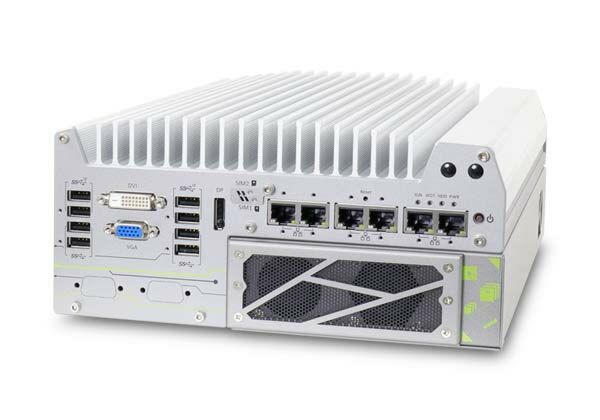
The Nuvo-7166GC provides:
- 6x Gigabit Ethernet ports (1x I219 + 5x I210), with optional IEEE 802.3at PoE+ on ports 3-6 (100W total power budget)
- 4x USB 3.1 Gen2 (10 Gbps) ports and 4x USB 3.1 Gen1 (5 Gbps) ports
- 1x VGA (up to 1920x1200), 1x DVI-D (up to 1920x1200), and 1x DisplayPort (up to 4096x2304)
- 2x software-programmable RS-232/422/485 ports (COM1/COM2) and 2x RS-232 ports (COM3/COM4)
- 1x 3.5 mm jack for mic-in and speaker-out
- 1x MezIO® expansion port for Neousys MezIO® modules
The system accepts 8 to 35V DC input via a 3-pin pluggable terminal block. There is also a separate 3-pin pluggable terminal block for remote control and PWR LED output.
With a 35W CPU, the system operates from -25°C to 60°C. With a 65W CPU, it operates from -25°C to 60°C in 35W TDP mode or -25°C to 50°C in 65W TDP mode (thermal throttling may occur above 50°C in 65W mode). Storage temperature is -40°C to 85°C, humidity 10%-90% non-condensing. In compliance with NVIDIA Tesla T4 warranty policy, systems with the T4 installed require an operating temperature of 0°C to 50°C. The system meets MIL-STD-810G vibration (Method 514.6, Category 4) and shock (Method 516.6, Procedure I, Table 516.6-II), and EMC certification CE/FCC Class A per EN 55032 & EN 55024/EN55035.
The Nuvo-7166GC supports up to 64 GB DDR4 2666/2400 SDRAM across two SODIMM slots. Storage options include 2x internal SATA ports for 2.5" HDD/SSD (supporting RAID 0/1), 1x M.2 2280 M-key NVMe socket (PCIe Gen3 x4, also usable for Intel Optane memory), and 1x full-size mSATA port (mux with mini-PCIe).
Neousys has tested the system with Microsoft Windows 10 (x64), Fedora 29, Ubuntu 16.04.5 LTS, and Ubuntu 18.04.0 LTS. For other Linux distributions, the kernel should be upgraded to 4.15.18 or later. A "Drivers & Utilities" DVD is provided for automatic driver installation, or drivers can be installed manually in a specific sequence (chipset, graphics, audio, LAN, then ME driver).
The system measures 240 mm (W) x 225 mm (D) x 111 mm (H) and weighs 4.5 Kg (including CPU, GPU, memory and HDD). It supports wall-mount (standard) or DIN-rail mounting (optional). An optional anti-vibration damping bracket is also available.
Yes. It has a full-size mini PCI Express socket with an internal SIM socket (mux with mSATA), and a M.2 2242 B-key socket with dual front-accessible SIM sockets supporting dual SIM mode when a compatible M.2 LTE module (e.g. Sierra Wireless EM7455/7430) is installed. SMA antenna apertures are located on the front and rear panels for 3G/4G/WiFi antennas.
Both systems support an NVIDIA Tesla T4 (or L4/A2 per the datasheet) GPU accelerator, but the Nuvo-7166GC has an additional PCIe x16 slot (2x PCIe x16 @ Gen3, 8-lanes) in its Cassette module, allowing installation of a second, application-oriented PCIe add-on card alongside the GPU. The Nuvo-7164GC has a single PCIe x16 slot @ Gen3, 16-lanes dedicated to the GPU only.
How-to Guides
- Power off the system, disconnect all cables, and place it on a flat sturdy surface. Do not remove the accelerator from its antistatic bag until ready to install, and remove the PCIe gold-finger protector if present.
- Turn the system upside-down, remove the four screws, and gently separate the Cassette module from the enclosure.
- Remove the screws to open the Cassette cover, then remove the cover and bezel cover(s).
- For Nuvo-7166GC, attach the supplied foam padding onto the bracket to ensure spacing for the additional PCIe card.
- Remove the air tunnel (and bracket, if applicable) by removing the indicated screws.
- Remove the Tesla accelerator from its static bag and insert it into the PCIe slot, ensuring the bezel is seated in the notch and the fan's 4-pin connector is attached to the PCB.
- Re-secure the air duct screws (and bracket screws where applicable).
- Reinstall the Cassette cover and secure it.
- Lower the Cassette module back onto the system, pressing firmly to engage the PCIe slot, and secure with screws.
- Refer to the disassembly procedure; you may not need to fully dismantle the system to access the M.2 slot.
- Insert the M.2 module into the slot at a 45-degree angle.
- Gently press the module down and secure it with an M2.5 P-head screw.
- Reinstall the system enclosure and panel.
- If using Intel Optane memory, refer to the Optane Memory BIOS Setup and Driver Installation procedure to enable acceleration.
- Confirm the DC power source is within the accepted 8 to 35V range before connecting; supplying over 35V will damage the system.
- Connect the DC power leads to the 3-pin pluggable terminal block using the screw clamping mechanism for a secure connection.
- If required for in-vehicle applications, the same terminal block can accept an ignition signal (IGN) input when an ignition control module such as MezIO-V20-EP is installed.
- Install at least two SATA hard drives or SSDs in the system.
- Enter BIOS setup (press F2 at boot) and go to Advanced > SATA And RST Configuration > SATA Mode Selection, then select 'Intel RST Premium With Intel Optane System Acceleration'.
- Go to Boot, select 'Legacy Boot Type', then press F10 to save and reboot.
- When the system reboots, press Ctrl+I to enter the RAID configuration utility.
- Select 'Create RAID Volume', enter a volume name, choose RAID Level (RAID0 or RAID1), select stripe size (RAID0 only), and set capacity.
- Confirm settings and select 'Create Volume'; enter Y at the data-deletion warning to proceed.
- Remove any rubber stands attached to the bottom of the enclosure.
- Take the two wall-mount brackets and four M4 screws from the accessory box, and fix the brackets to the enclosure with the M4 screws.
- Place the system on a flat surface and secure it with screws, or use the keyhole hangers to suspend it on a wall for easy removal.
- When wall mounting, orient the heatsink fins perpendicular to the ground for better heat dissipation.
Nuvo-7166GC is a ruggedized AI inference platform designed for advanced inference acceleration applications such as voice, video, image, and recommendation services. It supports an NVIDIA L4/T4/A2 GPU to provide up to 242 TFLOPS in FP16 and 485 TOPs in INT8 for real-time inference based on a trained neural network model. In addition, it supports Intel 9th/8th-Gen Core 6-core/ 8-core CPU and 64 GB DDR4-2666, offering a great balance between CPU, GPU, and memory performance.
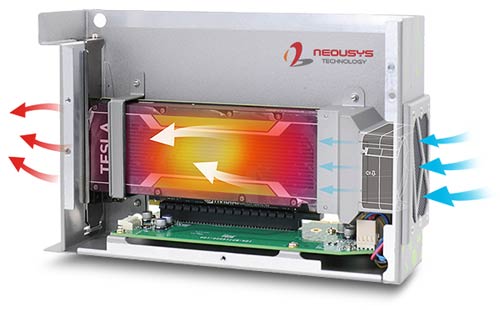
Thanks to Neousys' patented Cassette and air tunnel design, which guides the intake air to flow through the passive heat sink of NVIDIA L4/T4/A2, the heat generated by the GPU is effectively dissipated. This promising design guarantees system operation of up to 60°C ambient temperature with sustained 100% GPU loading. What distinguishes Nuvo-7166GC from Nuvo-7164GC is that it has one additional PCIe x16 slot in the Cassette module for a second add-on card installation, making it more flexible for specific applications.
Both systems incorporate cutting-edge I/O technologies to boost overall system flexibility, functionality, and performance. They feature an M.2 NVMe interface that supports disk read/write speeds over 2000 MB/s and USB 3.1/ GbE ports for fast data transfer, such as acquiring HD video data. With the combination of a fast CPU and inference accelerator GPU, Nuvo-7166GC is an ideal inference platform for artificial intelligence applications.
| Manufacturer | Neousys |
|---|---|
| Short Description | Nuvo-7166GC is a ruggedized AI inference platform designed for advanced inference acceleration applications such as voice, video, image, and recommendation services. It supports an NVIDIA L4/T4/A2 GPU to provide up to 242 TFLOPS in FP16 and 485 TOPs in INT8 for real-time inference based on a trained neural network model. In addition, it supports Intel 9th/8th-Gen Core 6-core/8-core CPU and 64 GB DDR4- 2666, offering a great balance between CPU, GPU, and memory performance. |
| Processor | Supporting Intel 9th/8th-Gen CPU(LGA1151 socket, 65W/35W TDP) - Intel Core i7-8700/i7-8700T/i7-9700E/i7-9700TE - Intel Core i5-8500/i5-8500T/i5-9500E/i5-9500TE - Intel Core i3-8100/i3-8100T/i3-9100E/i3-9100TE |
| Graphics | Integrated Intel UHD graphics 630 |
| Memory | Memory Up to 64 GB DDR4 2666/2400 SDRAM (two SODIMM slots) |
| Chipset | Intel Q370 platform controller hub |
| AMT | Suppors AMT 12.0 |
| Video Port | 1x VGA connector, supporting 1920 x 1200 resolution|1x DVI-D connector, supporting 1920 x 1200 resolution|1x DisplayPort connector, supporting 4096 x 2304 resolution |
| Audio | 1x 3.5 mm jack for mic-in and speaker-out |
| PCI Express | 1x PCIe x16 slot@Gen3, 16-lanes PCIe signal in Cassette for installing NVIDIA® Tesla P4/T4 GPU |
| M.2 | 1x M.2 2242 B key socket with dual front-accessible SIM sockets, supporting dual SIM mode with selected M.2 LTE module |
| Mini PCI-E | 1x full-size mini PCI Express socket with internal SIM socket (mux with mSATA) |
| SATA HDD | 2x internal SATA ports for 2.5" HDD/ SSD installation, supporting RAID 0/1 |
| mSATA | 1x full-size mSATA port (mux with mini-PCIe) |
| DC Input | 1x 3-pin pluggable terminal block for 8VDC~35VDC input |
| Remote Ctrl. & Status Output | 1x 3-pin pluggable terminal block for remote control and PWR LED output |
| Dimension | 240mm (W) x 225mm (D) x 110.5mm (H) |
| Weight | 4.5 Kg (including CPU, GPU, memory and HDD) |
| Mounting | Wall-mount mounting bracket or optional DIN-Rail mounting |
| Operating Temperature | with 35W CPU and NVIDIA® Tesla P4/ T4|-25°C ~ 60°C|With 65W CPU and NVIDIA® Tesla P4/T4|-25°C ~ 60°C (configured as 35W TDP)|-25°C ~ 50°C (configured as 65W TDP) |
| Storage Temperature | -40°C ~ 85°C |
| Humidity | 10%~90% , non-condensing |
| Vibration | Operating, MIL-STD-810G, Method 514.6, Category 4 |
| Shock | Operating, MIL-STD-810G, Method 516.6, Procedure I, Table 516.6-II |
| EMC | CE/FCC Class A, according to EN 55022 & EN 55024 |
| CPU Cores | 6, 8 |
| CPU Family | Intel Core |
| Base CPU Speed | 2.1 to 3.0 GHz |
| Video Output | Display Port, DVI-D, VGA |
| LAN Ports | 5-8 |
| Serial Ports | 3-4 |
| USB 3.1 | 5-8 |
| Max Memory | 64 GB |
| Operating System | Windows 10, Linux |
| Effective Memory Speed | 2400 MHz, 2666 MHz |
| Form Factor | Fanless |
| Native Storage Type | 2.5" SSD, mSATA Full, M.2 NVMe SSD |
| On/Ignition | Remote On/Off |