
Nuvo-7200VTC: Neousys Intel 8th-Gen Core i In-Vehicle Fanless Embedded Controller with EN50155 Certification
Nuvo-7200 VTCStarting at $1,990.00
- Supports Intel® 9th / 8th Core™ i7/ i5/ i3 LGA1151 socket-type CPU
- 4x or 8x 802.3at Gigabit PoE+ ports via M12 or RJ45 connectors
- Onboard isolated CAN bus for in-vehicle communication
- 4-CH isolated DI and 4-CH isolated DO
- 2x hot-swappable SATA HDD trays, supporting RAID 0/1
- 2x M.2 B key and 3x full-size mini-PCIe sockets
- 8~35V wide-range DC input with built-in ignition power control
- Patented Cassette for PCIe add-on card accommodation*
- E-Mark and EN 50155 certificate


Frequently Asked Questions
The Nuvo-7200VTC provides:
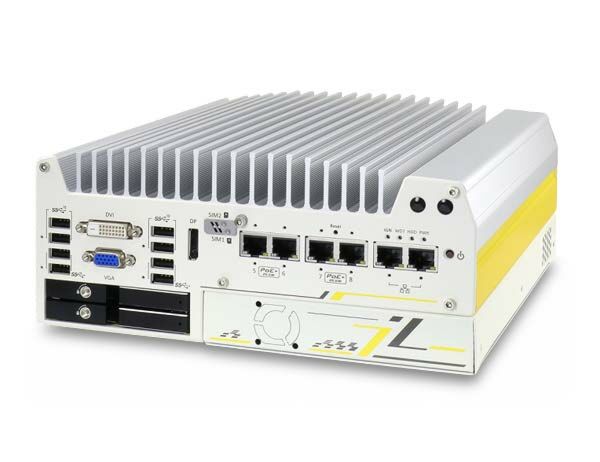
- 4x USB 3.1 Gen2 (10Gbps) ports and 4x USB 3.1 Gen1 (5Gbps) ports
- 1x VGA (up to 1920x1200), 1x DVI-D (up to 1920x1200), 1x DisplayPort (up to 4096x2304)
- 2x software-programmable RS-232/422/485 ports (COM1/COM2) and 2x RS-232 ports (COM3/COM4)
- 1x mic-in and 1x speaker-out
- 2x Gigabit Ethernet ports (Intel I219/I210) plus 4x IEEE 802.3at Gigabit PoE+ ports (M12 x-coded on Nuvo-7200VTC, RJ45 on Nuvo-7204VTC)
- 1x isolated CAN 2.0 port
- 4x isolated digital inputs and 4x isolated digital outputs
The system accepts 8 to 35VDC wide-range DC input via a 3-pin pluggable terminal block, which also supports ignition (IGN) signal input for in-vehicle deployments. Supplying a voltage over 35V will damage the system.
Maximum power consumption depends on the installed CPU: 72W (Max.) @ 24V with i7-8700T, 68.4W (Max.) @ 24V with i5-8500T, and 62.64W (Max.) @ 24V with i3-8100T, all in 35W TDP mode.
Operating temperature is -40°C to 70°C, and storage temperature is -40°C to 85°C. Humidity tolerance is 10%-90%, non-condensing.
For CPUs running above 35W TDP, maximum operating temperature is limited to 50°C and thermal throttling may occur under sustained full load; CPU power can be configured in BIOS to allow higher operating temperature. For sub-zero operation, a wide-temperature HDD or SSD is required.
The system is certified to E-Mark and EN 50155/EN45545, and complies with CE/FCC Class A per EN 55032 & EN 55024. Vibration and shock are rated per IEC61373:2010 Category 1, Class B Body mounted (part of EN50155) per the datasheet, and MIL-STD-810G Method 514.6/516.6 per the user manual specification tables.
Memory: up to 64GB DDR4 2666/2400 SDRAM across two SODIMM slots.
Storage: 2x hot-swappable 2.5" HDD/SSD trays supporting RAID 0/1, plus a full-size mSATA port (mux with mini-PCIe) and a M.2 2280 M-key socket (PCIe Gen3 x4) for an NVMe SSD or Intel Optane memory.
Expansion: 1x PCIe x16 slot @ Gen3 (16 lanes) in the patented Cassette module, 1x full-size mini-PCIe socket with internal SIM socket (mux with mSATA), 2x full-size mini-PCIe sockets (USB signals only) with internal SIM sockets, and 2x M.2 2242 B-key sockets (one with dual front-accessible SIM, supporting dual SIM mode with a compatible M.2 LTE module).
Neousys has tested the Nuvo-7000VTC series (which includes the Nuvo-7200VTC) with Microsoft Windows 10 (x64), Fedora 29, and Ubuntu 16.04.5 LTS / 18.04.0 LTS. For other Linux distributions, the kernel should be upgraded to 4.15.18 or later. On Linux, users may need to manually compile and install drivers for the Intel graphics or I210 GbE controller if not already embedded in the kernel.
Dimensions are 240 mm (W) x 225 mm (D) x 103 mm (H), and weight is approximately 3.5-3.7 kg depending on source. Mounting is via Neousys' patented damping bracket (standard) or an optional DIN-rail mounting kit.
Yes. The system provides 2x M.2 2242 B-key sockets and 3x full-size mini-PCIe sockets that can simultaneously accommodate 3G/4G, WIFI, GPS, and CAN modules. One M.2 socket supports dual front-accessible SIM slots for dual SIM mode when using a compatible Sierra Wireless EM7455/7430 M.2 LTE module. Neousys also offers an optional Cat. 6 LTE embedded socket modem (NSIO-LTE-7455) certified to work with a major US telecom carrier.
All three share the same core platform and Cassette module, but differ in PoE+ port count and connector type:
- Nuvo-7200VTC: 4x IEEE 802.3at PoE+ ports via M12 x-coded connectors
- Nuvo-7204VTC: 4x IEEE 802.3at PoE+ ports via RJ45 connectors
- Nuvo-7208VTC: 8x IEEE 802.3at PoE+ ports via RJ45 connectors
Each IEEE 802.3at PoE+ port can deliver up to 25.5W (25W per the datasheet) to a connected Powered Device, with a combined total power budget of 100W across all PoE+ ports on the system.
How-to Guides
- Turn the system upside-down and remove the four screws securing the Cassette module.
- Gently wiggle the Cassette module and separate it from the system enclosure.
- Remove the screws holding the Cassette cover and open it.
- Remove the bezel cover and insert the PCIe card into the PCIe slot, ensuring the bezel seats properly in the notch and the card is secured with a screw.
- Secure the indicated screw on the card bracket.
- Lower the Cassette module back onto the system enclosure and secure it with the screws.
Warning: Do not remove the PCIe card from its antistatic bag until it is ready to be installed.
- Refer to the disassembly procedure; you may not need to fully dismantle the system to reach the M.2 slot.
- Insert the M.2 module into the slot at a 45-degree angle.
- Gently press the module down and secure it with an M2.5 P-head screw.
- Reinstall the system enclosure and panel.
- If using Intel Optane memory, complete the BIOS setup and driver installation steps for Optane acceleration.
- Disassemble the system enclosure per the disassembly procedure.
- Locate the two SO-DIMM memory slots on the motherboard.
- Insert the memory module's gold-finger edge into the slot at a 45-degree angle.
- Push down on the module until it clips into position.
- Repeat for the second module if installing two.
- Reinstall the system enclosure and panel.
Note: Changing DRAM modules can cause a 30-60 second delay on the next boot.
- Locate the 3-pin pluggable terminal block on the rear panel (labeled IGN/GND/V+), which accepts 8 to 35VDC.
- Connect the vehicle Battery+ line (12V for cars, 24V for trucks/buses) to V+.
- Connect the vehicle Battery-/GND line to GND.
- Connect the vehicle ACC (ignition) line to IGN.
- Ensure the DC power source and IGN signal share the same ground reference.
Warning: Supplying a voltage higher than 35VDC will damage the system.
- Take the two wall mount brackets and six M4 screws from the accessory box.
- Fix the wall mount brackets to both sides of the system enclosure using the M4 screws.
- Place the system on a flat surface, insert the sleeves into the anti-vibration grommets, and secure with M4 screws.
- When wall mounting, orient the heatsink fins perpendicular to the ground for better heat dissipation.
Note: DIN-rail mounting is not applicable to the Nuvo-7200VTC series.
| Manufacturer | Neousys |
|---|---|
| Processor |
|
| Graphics | Integrated Intel® |
| Memory | Up to 64 GB DDR4 2666/ 2400 SDRAM (two SODIMM slots) |
| Chipset | Intel® Q370 platform controller hub |
| AMT | Supports AMT 12.0 |
| PoE | 4x IEEE 802.3at (25.5W) Gigabit PoE+ ports by Intel® I210 - M12 x-coded connector (Nuvo-7200VTC); - RJ45 connector (Nuvo-7204VTC) 8x IEEE 802.3at (25.5W) Gigabit PoE+ ports by Intel® I210 - RJ45 connector (Nuvo-7208VTC) |
| Ethernet Standard | Intel® I219 and I210 |
| Video Port |
|
| Audio | 1x Mic-in and 1x speaker-out |
| PCI Express | 1x PCIe x16 slot@Gen3, 16-lanes PCIe signals in Cassette |
| M.2 |
|
| Mini PCI-E |
|
| SATA HDD | 2x hot-swappable HDD tray for 2.5” HDD/ SSD installation |
| mSATA | 1x full-size mSATA port (mux with mini-PCIe) |
| 2.5" Drive | 2x hot-swappable HDD tray for 2.5” HDD/ SSD installation |
| DC Input | 1x 3-pin pluggable terminal block for 8~35V DC input (IGN/ GND/ V+) |
| Power Adapter | 120W AC/DC Adapter |
| Power Input Voltage | 8~35V DC input |
| Power Type | DC |
| Fan | option in cassette |
| Remote Ctrl. & Status Output | 1x 3-pin pluggable terminal block for remote control and PWR LED output |
| Dimension | 240 mm (W) x 225 mm (D) x 103mm (H) |
| Weight | 3.7kg |
| Mounting | Neousys’ patented damping bracket (standard) or optional DIN-rail mounting |
| Operating Temperature | -40°C ~ 70°C ** * For i7-8700 running at 65W mode, the highest operating temperature shall be limited to 50°C and thermal throttling may occur when sustained full-loading applied. Users can configure CPU power in BIOS to obtain higher operating temperature. ** For sub-zero operating temperature, a wide temperature HDD or Solid State Disk (SSD) is required |
| Storage Temperature | -40°C ~ 85°C |
| Humidity | 10%~90% , non-condensing |
| Vibration | Operating, MIL-STD-810G, Method 514.6, Category 4 |
| Shock | Operating, MIL-STD-810G, Method 516.6, Procedure I, Table 516.6-II |
| EMC | EN 50155 (Nuvo-7200VTC), E-Mark (Nuvo-7208VTC) CE/FCC Class A, according to EN 55022 & EN 55024 |
| CPU Cores | 6, 8 |
| CPU Family | Intel Core, Intel Xeon |
| Base CPU Speed | Under 2.0 Ghz, 2.1 to 3.0 GHz, 3.1 to 3.5 GHz, Over 3.5 GHz |
| Video Output | Display Port, DVI-D, VGA |
| PoE Ports | 4, 8 |
| LAN Ports | 1-4 |
| Serial Ports | 3-4 |
| USB 2.0 | 1-2 |
| USB 3.0 | 3-4 |
| USB 3.1 | 1-4 |
| Max Memory | 64 GB |
| Operating System | Windows 10, Linux |
| Effective Memory Speed | 2400 MHz, 2666 MHz |
| Form Factor | Fanless |
| Native Storage Type | 2.5" SSD, M.2 NVMe SSD |
| On/Ignition | Remote On/Off |