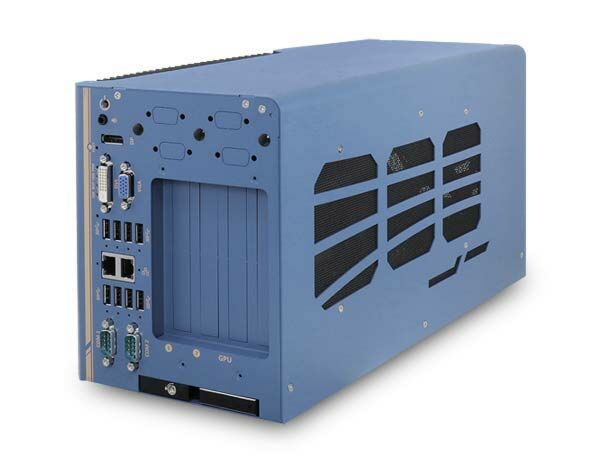
Nuvo-8108GC: Industrial Edge AI Platform Supporting 250W NVIDIA Graphics Card
Nuvo-8108GC SeriesStarting at $1,870.00
Main Features:
- Supports 250W NVIDIA® graphics card up to 14 TFLOPS in FP32
- Supports Intel® Xeon® E or 8th/ 9th-Gen Core™ i7/ i5 LGA1151 CPU
- Up to 128GB ECC/ non-ECC DDR4 2133 (4x SODIMM)
- One x 16 (8-lanes), two x 8 (4-lanes), Gen3 PCIe slots for add-on cards
- 2 x M.2 B key and 3 x full-size mini-PCIe sockets
- 8~35V wide-range DC input with built-in ignition power control
- Patented thermal design for -25°C to 60°C rugged operation
- Patented damping brackets to withstand 1 Grms vibration

Frequently Asked Questions
The front I/O panel provides the following ports:
- 4x USB 3.1 Gen2 (10 Gbps) ports
- 4x USB 3.1 Gen1 (5 Gbps) ports
- 1x internal USB 2.0 port (for dongle use)
- 1x VGA connector (up to 1920 x 1200)
- 1x DVI-D connector (up to 1920 x 1200)
- 1x DisplayPort connector (up to 4096 x 2304)
- 2x Gigabit Ethernet ports (Intel I219-LM and Intel I210-IT)
- 2x software-programmable RS-232/422/485 COM ports (COM1/COM2)
- 1x 3.5mm 4-pole speaker-out/microphone-in jack
- 1x 2.5" HDD/SSD hot-swappable slot
The Nuvo-8108GC-XL variant additionally provides 4x isolated DI and 4x isolated DO.
Power is supplied via a 2x 4-pin pluggable terminal block that also carries the ignition control signal. The Nuvo-8108GC and Nuvo-8108GC-QD accept 8~48V DC input, while the Nuvo-8108GC-XL accepts 8~35V DC input. When system load is under 100W, the required DC input range is 8V to 48V; for system load between 100W and 480W (single GPU), the required input range is 18V to 48V. Supplying voltage above 48V will damage the system.
With a 35W CPU and an NVIDIA 250W GPU, operating temperature is -25°C to 60°C. With a 65W-or-higher CPU and a 250W GPU, the range is -25°C to 60°C when configured in 35W TDP mode, or -25°C to 50°C when configured in 65W TDP mode. Storage temperature is -40°C to 85°C. For sub-zero operation, a wide-temperature HDD or SSD is required.
The Nuvo-8108GC is CE/FCC Class A certified per EN 55022 and EN 55024. It has been tested for vibration per MIL-STD-810G Method 514.6, Category 4, and shock per MIL-STD-810G Method 516.6, Procedure I, Table 516.6-II. Humidity range is 10%~90%, non-condensing.
The system has four 260-pin SODIMM slots supporting up to 128GB of ECC or non-ECC DDR4-2133 memory (each slot supports up to 32GB). For storage, it provides one hot-swappable 2.5" HDD/SSD tray, one internal SATA port for a 2.5" HDD/SSD (RAID 0/1 supported), one M.2 2280 M-key slot (PCIe Gen3 x4) for an NVMe SSD or Intel Optane memory, and 2x full-size mSATA ports (mux with mini-PCIe).
Neousys has tested the system with Microsoft Windows 10 (x64), Fedora 29, Ubuntu 16.04.5 LTS, and Ubuntu 18.04.0 LTS. For other Linux distributions, the kernel should be upgraded to at least 4.15.18. A "Drivers & Utilities" DVD is included that offers one-click automatic driver installation for Windows, or drivers can be installed manually in a specific sequence (chipset, graphics, audio, LAN, ME).
Dimensions and weight vary by model: Nuvo-8108GC is 170 (W) x 202 (H) x 360 (D) mm and weighs approximately 5 Kg; Nuvo-8108GC-XL is 193 (W) x 388 (D) x 198 (H) mm and weighs 5.2 Kg; Nuvo-8108GC-QD is 170.2 (W) x 360 (D) x 201.8 (H) mm and weighs 5.8 Kg. All models come standard with Neousys' patented damping brackets, and wall-mount brackets are included in the accessory box.
Yes. The system has 2x full-size mini-PCIe sockets with SIM card support for 3G/4G modules, and an M.2 2242 B-key socket that supports dual SIM mode with a selected M.2 LTE module (dual-SIM functionality requires a Sierra Wireless EM7455/7430 solution). Multiple SMA antenna apertures are provided on the front and rear panels for wireless communication.
All three share the same CPU/chipset platform, but differ in GPU support: the Nuvo-8108GC supports a 250W NVIDIA graphics card; the Nuvo-8108GC-XL supports an NVIDIA RTX 30 series graphics card (up to RTX 3080) and additionally offers 4x isolated DI and 4x isolated DO; the Nuvo-8108GC-QD supports an NVIDIA Quadro RTX A6000/A5000/A4000 graphics card. Power input range also differs: the GC and QD accept 8~48V DC, while the XL accepts 8~35V DC.
How-to Guides
- Disassemble the system enclosure as described in the disassembling section.
- Locate the four SODIMM memory slots on the motherboard; install into the slots indicated in blue first, then the slots indicated in red.
- Insert the gold fingers of the memory module into the slot at a 45-degree angle.
- Push down on the memory module until it clips into position.
- Repeat for additional modules.
- Reinstall the system enclosure and panel.
- Refer to the disassembling section; you may not need to fully dismantle the system to access the M.2 slot.
- Insert the M.2 module into the slot at a 45-degree angle.
- Gently press down and secure the module with an M2.5 P-head screw.
- Reinstall the system enclosure and panel.
- If using Optane memory for hard drive acceleration, refer to the Intel Optane Memory BIOS Setup and Driver Installation section.
- Locate the 4-pin pluggable terminal block that carries both DC power and the ignition (IGN) signal.
- Connect the car's Battery+ line (12V for sedan, 24V for bus/truck) to V+.
- Connect the car's Battery-/GND line to GND.
- Connect the ACC (accessory) line to IGN.
- Ensure the DC power source and IGN signal share the same ground.
- Note that IGN input accepts 8~48VDC; supplying a voltage higher than 48VDC may damage the system.
- Open Windows power button settings.
- Locate the option "When I press the power button".
- Set this option to "Shut down" instead of the default sleep (S3) behavior.
- Save the setting so the ignition control module can properly detect a completed shutdown and avoid a forced hard-off after 10 minutes.
- Press F2 at boot to enter BIOS setup.
- Go to Advanced > SATA And RST Configuration > SATA Mode Selection, and select "Intel RST Premium With Intel Optane System Acceleration".
- Go to Boot, highlight "UEFI Boot Type", and press ENTER.
- Press F10 to save changes and reboot.
- When the system reboots, press F3 to enter the Configuration Utility, then select "Intel Rapid Storage Technology".
- Select "Create RAID Volume", name the volume, choose RAID Level (RAID-0 or RAID-1), select at least two disks, choose a stripe size (RAID-0 only), set capacity, then select "Create Volume".
- Press F10 to save and Esc to exit the utility.
| Manufacturer | Neousys |
|---|---|
| Short Description | The Nuvo-8108 GC by Neousys is an in-vehicle rugged PC with support for the range of high-end NVIDIA graphics cards for AI applications. This in-vehicle PC is designed for autonomous driving applications, surveillance/ security, and vision inspection. Perhaps the most impressive aspect of the Nuvo-8108 GC is the thermal design, including features such as heat dissipation, GPU press bar, and damping brackets. This allows the Nuvo-8108 GC to continue operating flawlessly in most rugged environments. |
| Processor | i5-9500E, 9500TE, 8500, 8500TE; I7-9700E, 9700TE, 8700, 8700T; Xeon E2176G, 2278G |
| Graphics | Integrated Intel UHD graphics 630, or Independent GPU via x16PEG port and power connector |
| Memory | up to 128GB DDR4 2133 SDRAM over 4 Slots |
| Chipset | Intel C246 Platform Controller Hub |
| AMT | AMT 12.0 |
| PoE | via expansion card PCIe-PoE354at or PoE342at |
| Ethernet Standard | I219LM, I-210IT |
| Video Port | 1 VGA, 1 Display Port, 1 DVI-D |
| Audio | 1x 3.5mm jack |
| DIO | via expansion card |
| PCI Express | 2x PCIe x16 slots@Gen3, 8 lanes, 2x PCIe x8 slots@Gen3, 4 lanes |
| M.2 | 1x M.2 M Key NVMe storage, 1x M.2 B key with dual SIM for LTE |
| Mini PCI-E | 2x full mPCIe expansion sockets mux mSATA |
| mSATA | 2x full mSATA mux with mPCIe |
| 2.5" Drive | 1x hot swap tray for 2.5" SSD/HDD, 1x internal for SSD/HDD |
| DC Input | 2x 4 pin pluggable terminal block for 8-48VDC input with ignition cotrol |
| Power Adapter | recommended 480W AC-DC Adapter |
| Power Type | DC |
| Dimension | 18" x 12.5" x 12.5" |
| Weight | 5kg |
| Mounting | wall mount with damping brackets |
| Operating Temperature | varies with equipment - see specifications sheet |
| Storage Temperature | -40-85C |
| Humidity | 10-90% non-condensing |
| Vibration | MIL STD 810G |
| Shock | MIL STD 810G |
| EMC | CE/FCC Class A, according to IEC 60068-2-64 |
| CPU Cores | 4, 6, 8 |
| CPU Family | Intel Core, Intel Xeon |
| Base CPU Speed | 2.1 to 3.0 GHz, 3.1 to 3.5 GHz, Over 3.5 GHz |
| Video Output | Display Port, DVI-I, VGA |
| LAN Ports | 1-4 |
| Serial Ports | 1-2 |
| USB 3.0 | 3-4 |
| USB 3.1 | 1-4 |
| Max Memory | 128 GB |
| Operating System | Windows 10, Linux |
| Effective Memory Speed | 2400 MHz, 2666 MHz |
| Form Factor | Shoebox |
| Native Storage Type | 2.5" SSD, mSATA Full, M.2 NVMe SSD |
| On/Ignition | Built In Ignition Control |