
Nuvo-8240GC: Edge AI Platform Supporting Dual Tesla T4 GPUs
Nuvo-8240GC SeriesStarting at $2,085.00
Main Features:
- Supports dual NVIDIA® Tesla T4 GPU
- Supports Intel® Xeon® E or 9th/ 8th-Gen Core™ i7/ i5 LGA1151 CPU
- Up to 128GB ECC/ non-ECC DDR4 2133 (4x SODIMM)
- Two x8 (4-lanes), Gen3 PCIe slots for add-on cards
- 1x M.2 M key, 1x M.2 B key and 2x full-size mini-PCIe sockets
- 8~48V wide-range DC input with built-in ignition power control
- Proven thermal design for -25°C to 60°C rugged operation*
- Patented damping brackets* to withstand 3 Grms vibration

Frequently Asked Questions
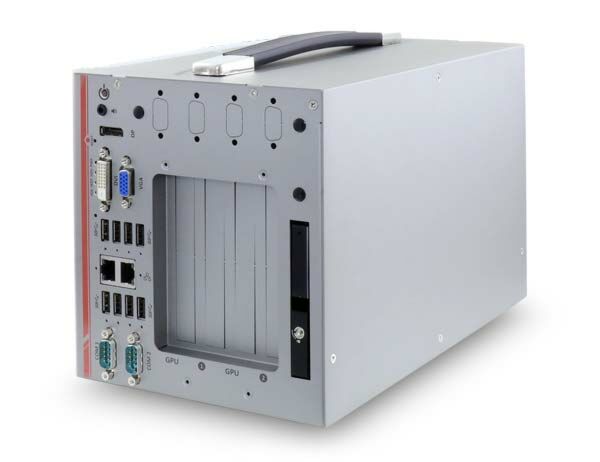
The system provides the following external I/O:
- 4x USB 3.1 Gen2 (10 Gbps) ports
- 4x USB 3.1 Gen1 (5 Gbps) ports
- 1x internal USB 2.0 port (for dongle use)
- 2x Gigabit Ethernet ports (Intel® I219-LM and Intel® I210-IT)
- 1x VGA connector (up to 1920x1200)
- 1x DVI-D connector (up to 1920x1200)
- 1x DisplayPort connector (up to 4096x2304)
- 2x software-programmable RS-232/422/485 ports (COM1/COM2)
- 1x 3.5mm audio jack for mic-in and speaker-out
The system accepts 8~48V DC wide-range input via a 4-pin pluggable terminal block with built-in ignition control. Supplying a voltage over 48V will damage the system.
With a 35W CPU, the operating temperature range is -25°C to 60°C. With a 65W CPU, the range is -25°C to 60°C when configured in 35W TDP mode, or -25°C to 50°C when configured in 65W TDP mode. Note: systems with an NVIDIA® Tesla T4 installed require an operating temperature of 0°C to 50°C per NVIDIA's Tesla T4 warranty policy. Storage temperature range is -40°C to 85°C. For sub-zero operating temperature, a wide temperature HDD or SSD is required.
The system is rated for CE/FCC Class A compliance according to EN 55022 and EN 55024. It has also been tested to MIL-STD-810G Method 514.6 (vibration, Category 4, 3 Grms) and MIL-STD-810G Method 516.6, Procedure I (shock).
The Nuvo-8240GC supports up to 128 GB ECC/non-ECC DDR4-2133 SDRAM across four SODIMM slots. Storage options include a hot-swappable 2.5" HDD/SSD tray, an internal 2.5" SATA port (supports RAID 0/1), an M.2 2280 M key socket (PCIe Gen3 x4) for NVMe SSD or Intel® Optane memory, and 2x full-size mSATA ports (mux with mini-PCIe).
Neousys has tested the system with Microsoft Windows 10 (x64), Fedora 29, Ubuntu 16.04.5 LTS, and Ubuntu 18.04.0 LTS. For other Linux distributions, the kernel should be upgraded to 4.15.18 or later. The system ships with a Drivers & Utilities DVD offering one-click automatic driver installation, or drivers can be installed manually in a specific sequence (chipset, graphics, audio, LAN, ME).
The system includes a dual mode mSATA/mini-PCIe socket with Mini-SIM card support for 3G/4G connectivity, and an M.2 2242 B key socket that works with dual SIM slots (4G+3G) for 3G/4G modules. Reserved SMA antenna apertures are available on the I/O panel for wireless (WiFi/3G/4G) communication. Note: dual SIM functionality on the M.2 slot is only available with a Sierra Wireless EM7455/7430 module; other modules default to SIM slot 1.
The Nuvo-8240GC measures 190mm (W) x 270mm (D) x 198mm (H) and weighs 5 kg. It uses Neousys' patented damping brackets as a standard mounting feature.
Yes. The system supports up to two NVIDIA® Tesla T4 inference accelerators via its dual PCIe x16 slots (Gen3, 8-lanes). It also provides two additional PCIe x8 slots (Gen3, 4-lanes) for other expansion cards.
How-to Guides
- Refer to the enclosure disassembly procedure; you may not need to fully dismantle the system to access the M.2 slot.
- Locate the M.2 2280 slot on the motherboard.
- Insert the module at a 45-degree angle.
- Gently press down and secure the module with an M2.5 P-head screw.
- Reinstall the system enclosure and panel when done.
- If using Intel® Optane memory for hard drive acceleration, refer to the Optane Memory BIOS Setup and Driver Installation section.
- Pull the handle on the 2.5" external hot-swappable slot to open it.
- With the label side facing upward, insert the SATA connector side of the drive into the slot first. Push firmly until the drive is fully inserted.
- Push the handle into the slot until it snaps into position. A key is provided in the accessory box to lock the slot.
- Disassemble the system enclosure as described in the disassembly section.
- Locate the SODIMM memory module slots on the motherboard.
- Insert the gold fingers of the module into the slot at a 45-degree angle, then push down to clip the module into position.
- Push the memory module down until it is fully clipped in.
- Repeat for additional modules.
- Reinstall the system enclosure and panel when done.
- Disassemble the system enclosure.
- Locate the PCIe x16 slots on the daughter board (indicated in red and blue); install the initial card into the red slot for easier second-card installation.
- Remove the corresponding enclosure bezel(s) for the PCIe slot you wish to use.
- Remove the Tesla T4 from its antistatic bag and gently lower it into the PCIe slot, ensuring the gold fingers meet and the graphics card panel is properly inserted.
- Secure the accelerator's bezel.
- Repeat for a second accelerator if needed.
- Reinstall the enclosure when done.
- Connect the car Battery+ line (12V for sedan, 24V for bus/truck) to V+ on the 4-pin terminal block.
- Connect the car Battery-/GND line to GND.
- Connect the ACC line to IGN.
- Ensure the DC power source and IGN signal share the same ground. The IGN input accepts 8~48VDC; supplying a voltage higher than 48VDC may damage the system.
Nuvo-8240GC is a rugged edge AI platform designed specifically to support dual NVIDIA® Tesla T4s for advanced inference acceleration applications.
It features NVIDIA multi-precision Turing Tensor Cores and new RT Cores while offering tremendous GPU power up to 130 TFLOPS in FP16 and 520 TOPS in INT4 for emerging GPU-accelerated edge computing and advanced AI inference. In addition, Nuvo-8240GC is powered by Intel® Xeon® E or 9th/ 8th-Gen Core™ CPU up to 8-core/ 16-thread coupled with workstation-grade Intel® C246 chipset to support up to 128 GB ECC or non-ECC DDR4 memory.
The system incorporates one internal 2.5" SATA HDD/ SSD slot and one hot-swappable 2.5" tray for easy HDD/ SSD replacement. There is also an M.2 2280 socket for the ultimate PCIe NVMe SSD. Its front-accessible GbE and USB 3.1 Gen1/ Gen2 ports feature screw-lock mechanisms for secure cable connections. In addition to the dual x16 PCIe slots (8-lanes) for graphics card installation, Nuvo-8240GC has other two x8 PCIe slots (4-lanes)for expansion cards to extend function sets, making it that much more flexible for specific applications such as data collection, analytics and communication.
Nuvo-8240GC has a brand new power delivery design to accept 8~48V wide-range DC input with built-in ignition control. Mechanical wise, Nuvo-8240GC incorporates Neousys' proven heat dissipation design, damping brackets* for withstanding 3 Grms vibration, making it steady and rocksolid in various conditions. The Nuvo-8240GC is Neousys' response to the never-ending performance demand in industrial edge AI platforms and now with double the inference power, Nuvo-8240GC is ready to take it to the next level.
| Manufacturer | Neousys |
|---|---|
| CPU Cores | 4, 8 |
| CPU Family | Intel Core, Intel Xeon |
| Base CPU Speed | 2.1 to 3.0 GHz, 3.1 to 3.5 GHz |
| LAN Ports | 1-4 |
| Serial Ports | 1-2 |
| USB 2.0 | 1-2 |
| USB 3.0 | 3-4 |
| USB 3.1 | 1-4 |
| Max Memory | 128 GB |
| Operating System | Windows 7, Windows 10, Linux |
| Effective Memory Speed | 2400 MHz |
| Form Factor | Shoebox |
| Native Storage Type | 2.5" SSD, M.2 NVMe SSD, Hot Swap Capable |
| On/Ignition | Remote On/Off, Built In Ignition Control |