
Nuvo-9160GC: Ruggedized AI Inference Platform Supporting NVIDIA RTX GPU
Nuvo-9160GC SeriesStarting at $1,880.00
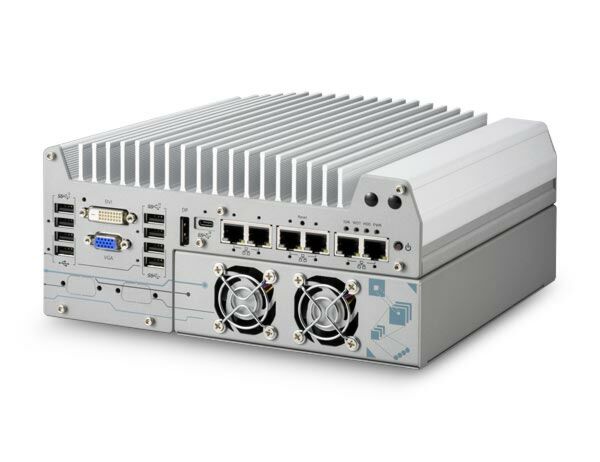
Nuvo-9160GC is a rugged edge AI computer that delivers superior CPU and GPU performance by leveraging Intel 14th/13th/12th-Gen 35W/65W CPUs and an NVIDIA RTX GPU card up to 150W. The system's standard and optional GPU brackets can accommodate selected GPU cards including NVIDIA RTX Pro 2000 , RTX 2000E Ada, and RTX Pro 4000 SFF. The GPU bracket is designed to secure the GPU card to provide excellent shock and vibration resistance in volatile conditions.
- Supports Intel 14th/13th/12th-Gen 35W/65W CPUs
- Supports NVIDIA RTX series GPU card up to 150W TDP
- -25°C to 60°C wide temperature rugged operation
- 5x 2.5GbE and 1xGbE with optional PoE+ (ports 3 to 6)
- 1x USB 3.2 Gen2x2 type-C and 6x USB 3.2 type-A ports
- M.2 2280 M key socket (Gen4x4) supporting NVMe SSD
- Accommodates two 2.5" SATA HDD/ SSD with RAID 0/ 1 support MezIO interface for add-on expansion

Frequently Asked Questions
The Nuvo-9160GC front and rear panels provide the following interfaces:
- 5x 2.5GbE (Intel I225-IT) and 1x GbE (Intel I219-LM), all with screw-lock, ports 3-6 optionally support IEEE 802.3at PoE+ (100W total budget)
- 1x USB 3.2 Gen2x2 (20Gbps) Type-C port with screw-lock
- 4x USB 3.2 Gen2x1 (10Gbps) Type-A ports
- 2x USB 3.2 Gen1x1 (5Gbps) Type-A ports
- 2x USB 2.0 ports
- 1x VGA, 1x DVI-D, 1x DisplayPort (triple independent display support)
- 2x software-configurable RS-232/422/485 ports (COM1/COM2) and 2x RS-232 ports (COM3/COM4)
- 1x 3.5mm 4-pole audio jack (mic-in/speaker-out)
The system accepts 8 to 48VDC via a 3-pin pluggable terminal block, which also supports ignition signal input for in-vehicle use with an optional ignition control module. Supplying more than 48V will damage the system. Depending on system load, the required DC input range varies: below 100W load requires 8-48V, 100-180W load requires 12-48V, and 180-360W load (single GPU) requires 24-48V.
With a 35W CPU and 130W GPU, the system operates from -25°C to 60°C. With a 65W CPU, it operates -25°C to 60°C when configured for 35W TDP, or -25°C to 50°C when configured for 65W TDP (thermal throttling may occur under sustained full load at higher temperatures). Storage temperature is -40°C to 85°C, with 10-90% non-condensing humidity. The system meets MIL-STD-810G vibration (Method 514.6, Category 4) and shock (Method 516.6, Procedure I) with the optional damping bracket, and carries CE/FCC Class A EMC compliance per EN 55032 & EN 55035. A wide-temperature HDD or SSD is required for sub-zero operation.
The system supports up to 64GB DDR5-4800 across two SODIMM slots (up to 32GB per module). For storage, it has one M.2 2280 M-key (PCIe Gen4x4) socket for an NVMe SSD offering up to 7000 MB/s, plus two internal 2.5" SATA ports (up to 15mm thickness) supporting RAID 0/1.
Neousys has tested the system with Microsoft Windows 10 LTSC 2021 (x64) and Ubuntu 20.04.5 LTS, 22.04 LTS, 22.04.1 LTS, or other Linux distributions with kernel version 5.15 or later. On Linux, users may need to manually compile and install drivers for the Intel graphics or I225/I226 GbE controllers, and features such as triple independent display and RAID may have restrictions depending on the distribution.
The system measures 240mm (W) x 225mm (D) x 110.5mm (H) and weighs approximately 4.4kg without a graphics card (per the user manual) or 3.89kg per the datasheet. It ships with a standard wall-mount bracket, and an optional patented anti-vibration damping bracket is available, rated up to 1Grm with HDD or 5Grm with SSD.
Yes. The system includes a full-size mini PCIe socket with a Mini-SIM slot for 3G/4G modules, and a separate M.2 2242/3042/3052 B-key socket with a SIM slot for 4G/5G modules. SMA antenna apertures are provided on the front and rear panels for these wireless modules.
The Nuvo-9160GC's Cassette module houses a PCIe x16 Gen3 slot supporting an NVIDIA RTX graphics card up to 130W TDP (max card dimensions 188mm(L) x 131mm(W), dual-slot). Confirmed compatible cards include RTX 3050, RTX 4060 (Leadtek WinFast single fan), NVIDIA RTX A2000, RTX 2000 Ada, and RTX 4000 SFF Ada. Dedicated GPU bracket kits are available for these cards.
The Nuvo-9160GC supports an NVIDIA RTX graphics card up to 130W via a single PCIe x16 Gen3 slot (16 PCIe lanes) in its Cassette module. The Nuvo-9166GC instead supports the data-center-grade NVIDIA L4 inference accelerator via two PCIe x16 Gen3 slots (8 PCIe lanes each) that can also accommodate one additional PCIe card. The Nuvo-9166GC's DC input is 8-48V (24V for the -UL variant), and it uses MIL-STD-810H vibration/shock ratings versus MIL-STD-810G on the Nuvo-9160GC.
How-to Guides
- Refer to the disassembly procedure to access the M.2 slot; you may not need to fully dismantle the system.
- Insert the M.2 module into the Gen4 x4 PCIe M.2 2280 slot at a 45-degree angle.
- Gently press the module down and secure it with an M2.5 P-head screw.
- Remove the protective film from the thermal pad at the bottom of the enclosure panel for the NVMe module.
- Reinstall the system enclosure and panel when done.
- Turn the system upside-down and remove the four screws at the bottom of the Cassette module, then separate the Cassette module from the system.
- Remove the screws to open the Cassette cover.
- Prepare the card per its bracket requirements (e.g. Poron-C pads for MSI/PNY cards, rubber cubes for PNY, or dedicated brackets for Leadtek RTX 4060 or NVIDIA A2000/SFF 4000 Ada).
- If replacing an existing card, remove the I/O panel screws, unplug the 8-pin power cable, press the release notch, and lift the card out of the PCIe slot.
- For first-time installation, remove the bezel cover and insert the card into the PCIe slot, ensuring the bezel and gold fingers seat properly.
- Secure the card with screws and reconnect the 8-pin power cable.
- Replace the Cassette cover and secure it with screws.
- Lower the Cassette module back onto the system enclosure and secure it with screws.
- Install the wall-mount bracket onto the bottom of the enclosure to ensure proper airflow for GPU cooling.
- Install at least two SATA HDDs/SSDs in the system.
- Press F2 at boot to enter BIOS setup, then go to Advanced > System Agent (SA) Configuration > VMD setup menu.
- Enable the VMD controller and press F10 to save and reboot.
- On reboot, press F3 to enter the Device Manager configuration utility and select Intel Rapid Storage Technology.
- Select Create RAID Volume, name the volume, choose RAID Level (RAID-0 or RAID-1), and select the disks (minimum two).
- For RAID-0, choose a stripe size; RAID-1 does not offer stripe size options.
- Set the capacity (default is full capacity) and select Create Volume.
- Press F10 to save and Esc to exit.
- When installing Windows on the RAID volume, load the f6vmdflpy-x64 driver from a prepared USB drive during setup using the Load Driver option, selecting the Intel RST VMD Controller 467F driver.
- Remove the four rubber stands at the bottom of the enclosure if attached.
- Take the two wall-mount brackets and four M4 screws from the accessory box, and fix the brackets to the system enclosure with the M4 screws.
- Place the system on a flat wall surface and secure it with four M4 screws.
- Orient the system so the heatsink fins are perpendicular to the ground for better heat dissipation.
- Disassemble the system enclosure to access the motherboard.
- Locate the two SO-DIMM memory slots on the motherboard.
- Insert the memory module's gold fingers into the slot at a 45-degree angle, then push down to clip it into position.
- Repeat for the second module if installing two.
- Remove the thermal pad protective film on the enclosure's bottom panel before reinstalling.
- Reinstall the system enclosure and panel.
Nuvo-9160GC is a rugged edge AI computer that delivers superior CPU and GPU performance by leveraging Intel 14th/13th/12th-Gen 35W/65W CPUs and an NVIDIA RTX GPU card up to 150W. The system's standard and optional GPU brackets can accommodate selected GPU cards including NVIDIA RTX Pro 2000 , RTX 2000E Ada, and RTX Pro 4000 SFF. The GPU bracket is designed to secure the GPU card to provide excellent shock and vibration resistance in volatile conditions.
Benefiting from the cutting-edge Intel 7 photolithography, Intel's 14th/13th/12th-Gen processors offer up to 24 cores/32 threads to provide up to double the performance when compared to previous Intel 11th/ 10th Gen CPUs. In addition, the latest Intel Core processor (Series 2) with P-cores introduces a P-core only architecture with up to 12 P-cores and no E-cores, allowing applications to leverage more high-performance cores for enhanced computing capability. The latest NVIDIA 150W RTX GPUs fuel real-time AI inference applications involving multiple cameras such as production line vision inspection, intelligent video analytics for surveillance or ITS, or autonomous mobile robot (AMR).
Nuvo-9160GC has a proven thermal design to guarantee reliable system operation from -25°C to 60°C. It features a passive-cooling design for the motherboard and the expansion cassette design for the 150W GPU card. The support of six GigE cameras (or IP cameras) and eight USB3 cameras makes Nuvo-9160GC ideal for various vision-based AI application deployments. It also provides flexible data storage options, including one M.2 2280 Gen4x4 NVMe providing up to 7000 MB/s extreme read/write speeds and two 2.5" SATA HDD/SSD to expand storage capacity.
With performance enhancements and comprehensive I/Os, Nuvo-9160GC is the perfect edge AI inference platform for industrial environments from factory automation, smart agriculture, and autonomous machines.
| Manufacturer | Neousys |
|---|---|
| Short Description | Nuvo-9160GC is a rugged edge AI computer that delivers superior CPU and GPU performance by leveraging Intel 14th/13th/12th-Gen 35W/65W CPUs and an NVIDIA RTX GPU card up to 150W. The system's standard and optional GPU brackets can accommodate selected GPU cards including NVIDIA RTX Pro 2000 , RTX 2000E Ada, and RTX Pro 4000 SFF. The GPU bracket is designed to secure the GPU card to provide excellent shock and vibration resistance in volatile conditions. |
| Processor | Supporting Intel 14/13/12th-Gen Core CPU (LGA1700 socket, 65W/ 35W TDP) |
| Graphics | Integrated Intel UHD Graphics 770 (32EU) / 730 (24EU) |
| Memory | Up to 64 GB DDR5 4800 SDRAM (two SODIMM slots) |
| Chipset | Intel Q670E Platform Controller Hub |
| AMT | Supports Intel vPro/ AMT 16.0 |
| PoE | Optional IEEE 802.3at PoE+ PSE for Port 3 ~ Port 6. 100W total power budget |
| Video Port | 1x VGA connector, supporting 1920 x 1200 resolution 1x DVI-D connector, supporting 1920 x 1200 resolution 1x DisplayPort connector, supporting 4096 x 2304 resolution |
| Audio | 1x 3.5 mm jack for mic-in and speaker-out |
| PCI Express | 1x PCIe x16 slot@Gen3, 16-lanes PCIe signals in Cassette for installing an NVIDIA graphics card up to 130W TDP (Max. graphics card dimension is 188 mm(L) x 131 mm(W), dual slot allocation) |
| M.2 | 1x M.2 2280 M key socket (PCIe Gen4 x4) for NVMe SSD 1x M.2 3042/3052 B key socket with SIM slot for M.2 4G/ 5G module |
| Mini PCI-E | 1x full-size mini PCI Express socket |
| SATA HDD | 2x internal SATA port for 2.5" HDD/ SSD installation, supporting RAID 0/ 1 |
| DC Input | 1x 3-pin pluggable terminal block for 8 to 48V DC input |
| Remote Ctrl. & Status Output | 1x 3-pin pluggable terminal block for remote control and PWR LED output |
| Dimension | 240 mm (W) x 225 mm (D) x 110.5 mm (H) |
| Weight | 3.89 kg |
| Mounting | Wall-mount (standard) or damping bracket (optional) |
| Operating Temperature | With 35W CPU and 130W GPU -25°C to 60°C** With 65W CPU and 130W GPU -25°C to 60°C**/*** (configured as 35W TDP) -25°C to 50°C**/*** (configured as 65W TDP) |
| Storage Temperature | -40°C to 85°C |
| Humidity | 10% to 90% , non-condensing |
| Vibration | Operating, MIL-STD-810G, Method 514.6, Category 4 (with optional damping bracket) (pending) |
| Shock | Operating, MIL-STD-810G, Method 516.6, Procedure I, Table 516.6-II (with optional damping bracket) (pending) |
| EMC | CE/FCC Class A, according to EN 55032 & EN 55035 (pending) |
| CPU Cores | 12 |
| Base CPU Speed | 3.1 to 3.5 GHz |
| Video Output | Display Port |
| PoE Ports | 4 |
| LAN Ports | 5-8 |
| Serial Ports | 3-4 |
| USB 2.0 | 1-2 |
| USB 3.2 | 5 - 8 |
| Max Memory | 64 GB |
| Effective Memory Speed | 4800 MHz |
| Form Factor | Fanless |
| Native Storage Type | M.2 NVMe SSD |
| On/Ignition | Remote On/Off |