
Nuvo-9650AWP Series: IP66 Waterproof Computer with Intel 13th-Gen Core CPU
Nuvo-9650AWP Series- Intel 13th-Gen Core 16C/24T 65W CPU
- Affordable IP66-rated design for waterproof and dustproof
- 32GB DDR5 5600 SODIMM (by dual 16GB)
- -25°C to 70°C wide-temperature fanless operation
- 3x 2.5Gb and 1x Gb Ethernet ports via M12 X-coded connectors, with 802.3at PoE+ option
- 1x waterproof USB3.2 Type-C port supporting alternative mode for DisplayPort and USB3.2 dual output
- 8V to 48V DC input with built-in ignition power control


Frequently Asked Questions
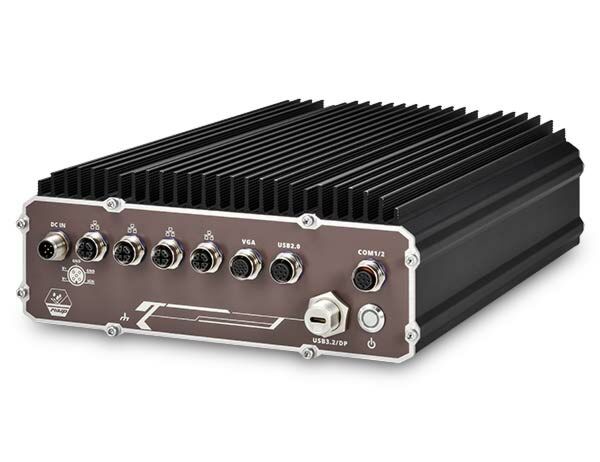
The Nuvo-9650AWP provides the following ports, all via waterproof M12 connectors:
- 1x Gigabit Ethernet (M12 X-coded, Intel I219-LM)
- 3x 2.5GbE Ethernet (M12 X-coded, Intel I226-IT), with optional IEEE 802.3at PoE+ across all 4 Ethernet ports (100W total power budget)
- 1x USB 3.2 Gen1 (5Gbps) Type-C waterproof port, supporting alternate mode for DisplayPort output (up to 4096 x 2304) or simultaneous USB3/DisplayPort via a Type-C hub
- 1x reserved USB 3.2 Gen1 Type-A connector and 1x reserved DisplayPort (rear side)
- 2x USB 2.0 (M12 A-coded) plus 1x internal USB 2.0
- 1x VGA (M12 A-coded), up to 1920x1200@60Hz
- 1x isolated RS-232 (COM1) and 1x isolated RS-422/485 (COM2), both with 15kV ESD protection, via M12 A-coded connectors
The system accepts 8V to 48V DC input via an M12 connector (A-coded on Nuvo-9650AWP, L-coded on Nuvo-9650AWP-PoE) with built-in ignition power control. Supplying more than 48V will damage the system.
Typical power consumption figures listed in the manual include: i7-12700 (65W mode) 141.4W at 24V / 146.4W at 48V; i7-12700TE (35W mode) 106.6W at 24V / 111.8W at 48V; i5-12400 (35W mode) 105.1W at 24V / 110.9W at 48V; i5-12400 (65W mode) 120.5W at 24V / 126.2W at 48V.
With a 35W CPU, operating temperature is -25°C to 70°C. With a 65W CPU, it is -25°C to 70°C when configured in 35W TDP mode, or -25°C to 50°C when configured in 65W TDP mode. Storage temperature is -40°C to 85°C, and humidity tolerance is 10% to 90% non-condensing. Note that sub-zero operation requires a wide-temperature HDD or SSD.
The system is IP66-rated for waterproof and dustproof protection, and is compliant with MIL-STD-810H (Method 514.8 Category 4 for vibration, Method 516.8 Procedure I for shock) and CE/FCC Class A EMC certification (EN 55032 & EN 55035).
The system supports up to 96GB non-ECC DDR5 4800 SDRAM across two SODIMM slots. For storage, it offers 2x internal SATA ports for 2.5" HDD/SSD installation and 1x M.2 2280 M key socket (PCIe Gen4 x4) for an NVMe SSD.
The Nuvo-9650AWP includes 2x full-size mini PCI Express sockets (PCIe + USB2), and 1x M.2 2242/3052 B key socket with a SIM slot for an M.2 5G/4G module. The mini-PCIe sockets also support SIM card sockets for 4G/5G modem cards.
Neousys provides driver support for Microsoft Windows 10 Enterprise LTSC 2021 64-bit and Windows 11 IoT Enterprise 22H2 64-bit. For Linux, kernel version 5.15 or later is required (tested on Ubuntu 20.04.5 LTS, 22.04 LTS, 22.04.1 LTS). On Linux, users may need to manually compile and install drivers for the Intel graphics or I226 controller if not already included in the kernel.
The system measures 225mm (W) x 286mm (D) x 90mm (H) and weighs 5.25 kg. It supports optional wall mounting via a wall mount bracket accessory (Wmkit-Nuvo9650AWP).
Nuvo-9650AWP uses an M12 A-coded DC input connector, while Nuvo-9650AWP-PoE uses an M12 L-coded DC input connector and adds IEEE 802.3at PoE+ power sourcing (100W total budget) across its 4x 2.5GbE/GbE ports. Both models share the same dimensions and most other I/O.
The ignition power control module monitors an IGN signal (8V-48V DC accepted) shared with the DC power input. When DC power is present, an MCU monitors the ignition signal at under 2mW standby power. Once the ignition signal is active, a configurable power-on delay begins before the system boots; once ignition goes inactive, a configurable power-off delay begins before the system performs a soft shutdown. A rotary switch on the motherboard selects one of 16 operation modes with different power-on/power-off delay combinations, and a hard-off timeout (typically 10 minutes) forces a power cut if the system fails to shut down normally.
How-to Guides
- Disassemble the system enclosure by turning the unit upside down, placing it on a secure flat surface, and unfastening the bottom panel screws in the specified order, then gently opening the panel.
- Locate the M.2 2280 M key slot once the enclosure is open.
- Insert the M.2 M key module at a 45-degree angle.
- Secure the module by fastening its screw.
- Reinstall the system enclosure, making sure the O-ring is seated properly in the groove, and secure the panel screws with a torque of 8.1-9.9 kgf to maintain waterproofing.
- Disassemble the system enclosure to access the mini-PCIe slot and SIM card socket.
- If installing a SIM card, slide the SIM bracket in the indicated direction, lift the bracket, and insert the SIM card with pins facing up. Press and slide the bracket back to secure it.
- Insert the mini-PCIe card at a 45-degree angle and secure it with a screw.
- If the module requires an antenna, clip the IPEX-to-SMA cable onto the module and secure the antenna to the panel (contact Neousys for a compatible waterproof enclosure panel due to the IP66 rating).
- Reinstall the system enclosure.
- Disassemble the system enclosure to locate the M.2 2242/3052 B key slot and SIM slot.
- If installing a SIM card, slide and lift the SIM bracket, insert the SIM card with pins facing up, then slide the bracket back to secure it.
- Insert the M.2 B key module at a 45-degree angle.
- Press down and secure the module with an M2.5 P-head screw.
- Clip the IPEX-to-SMA cable onto the module and secure the antenna to the panel (contact Neousys for a compatible waterproof enclosure panel).
- Reinstall the system enclosure and panel.
- Turn the system upside down on a secure flat surface and unfasten the bottom panel screws in the specified order, then open the panel.
- Locate the HDD/SSD brackets under the panel, place the drive into a bracket, and secure it with two screws on each side.
- Connect the SATA/power cable from the accessory box to the motherboard and to the drive.
- Repeat for a second drive if needed.
- Reposition the enclosure so the O-ring sits properly in the groove, place the panel back on, and secure the screws in order with a torque of 8.1-9.9 kgf to maintain the IP66 rating.
- Locate the M12 A-coded (Nuvo-9650AWP) or M12 L-coded (Nuvo-9650AWP-PoE) DC-in connector.
- Connect the vehicle Battery+ line (12V for sedan, 24V for bus/truck) to V+.
- Connect the vehicle Battery-/GND line to GND.
- Connect the vehicle ACC line to IGN.
- Ensure the DC power source and IGN signal share the same ground. The IGN input accepts 8V-48V DC; do not exceed 48VDC.
- In Windows, set "When I press the power button" to "Shut down" so the OS performs a full shutdown that the ignition control module can detect.
- Use the rotary switch on the motherboard to select the desired operation mode (0-15) for power-on/power-off delay behavior.
Nuvo-9650AWP is a cost-effective IP66 waterproof computer with an Intel 13th-Gen Core processor designed for harsh and demanding environments. Thanks to its streamlined waterproof chassis and standardized cable kit, Nuvo-9650AWP redefines affordable total cost of ownership (TCO) for industrial computing with significant enhancements, including ruggedness against extended operating temperature, intensive shock and vibration, dust, humidity, and salinity.
Nuvo-9650AWP offers abundant I/O functionality for generic application requirements, including multiple 2.5GbE/ GbE, USB 2.0 and isolated RS-232 and RS-422/485 ports, all through waterproof M12 connectors. It also has a specialized waterproof Type-C connector supporting Type-C alternative mode, or it can enable both 5 Gbps USB3 data transmission speed and 4K DisplayPort video output via a Type-C hub. Moreover, Nuvo-9650AWP is equipped with an 8- 48V wide-range DC input with ignition power control, and is compliant with MIL-STD-810H shock/ vibration certification for in-vehicle installation, such as mining trucks and farming vehicles.
The integration of IP66 waterproof capability with an embedded computer eliminates environmental limitations where exposure to dust or liquids may be of concern. Its affordable, waterproof design further reduces the gap in TCO for budget-conscious projects, which is defining a new category of embedded computer that strikes a sweet spot between ruggedness, performance, and cost.
| Manufacturer | Neousys |
|---|---|
| Short Description | Nuvo-9650AWP is a cost-effective IP66 waterproof computer with an Intel 13th-Gen Core processor designed for harsh and demanding environments. Thanks to its streamlined waterproof chassis and standardized cable kit, Nuvo-9650AWP redefines affordable total cost of ownership (TCO) for industrial computing with significant enhancements including ruggedness against extended operating temperature, intensive shock and vibration, dust, humidity, and salinity. |
| Processor | Supporting Intel 13th-Gen Core CPU (LGA1700 socket, 65W/ 35W TDP) |
| Graphics | Integrated Intel UHD Graphics 770 (32EU) /730 (24EU) |
| Memory | Up to 96 GB DDR5 4800 SDRAM (two SODIMM slots) |
| Chipset | Intel H610E platform controller hub |