
POC-300 Series: Intel Apollo Lake Ultra-Compact Controller
POC-300 SeriesStarting at $590.00
The POC-300 Series delivers a major performance upgrade for compact industrial computing. Built on the Intel Apollo Lake platform and powered by Pentium N4200 or Atom x7-E3950 quad-core processors, it delivers up to 1.5x CPU and 3x GPU performance improvements over the previous Atom E3845, enabling faster processing and improved graphics at the edge.
- Intel Apollo Lake Pentium N4200 and Atom E3950 quad-core CPU
- Fanless and rugged, wide temperature operation (-25 °C to 70 °C)
- One GbE port and two Gigabit PoE+ ports
- Two USB 3.1 Gen1 and two USB 2.0 ports
- DVI + VGA dual display outputs
- Front I/O access DIN-mounting design
- MezIO compatible

Frequently Asked Questions
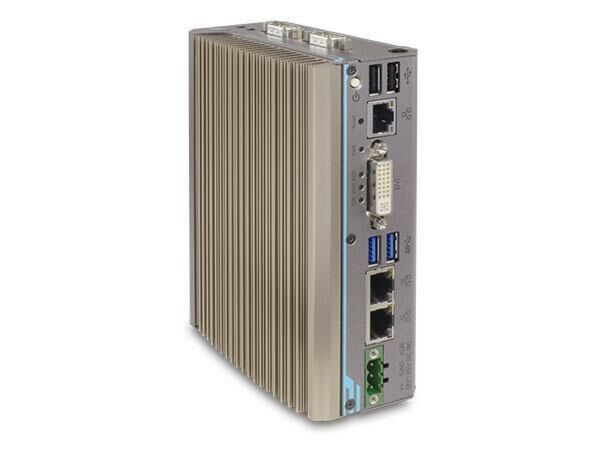
The front panel provides three Gigabit Ethernet ports (Intel I210 controller), two USB 3.0/3.1 Gen1 ports, two USB 2.0 ports, one DVI-I connector (supports VGA via adapter or DVI/VGA Y-cable, up to 1920 x 1200), and a 3-pin terminal block for DC power/ignition input. On the top panel there is one software-programmable RS-232/422/485 port (COM1), three additional ports that can be configured as 3-wire RS-232 (COM2/3/4) or a single RS-422/485 port (COM2), a 3.5mm microphone-in jack, a 3.5mm speaker-out jack, and two SMA antenna openings.
On the POC-300 and POC-320 models, GbE ports #1 and #2 are IEEE 802.3at PoE+ ports, delivering up to 25W per port (50W total power budget). The POC-310 and POC-330 models do not have PoE; those two ports are standard Gigabit Ethernet.
The system accepts 8 to 35V DC via a 3-pin pluggable terminal block. Supplying more than 35V will damage the system. Maximum power consumption is 19.68W (0.82A@24V) for the E3950-based POC-300/POC-310, and 14.16W (0.59A@24V) for the N4200-based POC-320/POC-330.
The system operates from -25°C to 70°C with an SSD installed under 100% CPU loading, or -10°C to 50°C with an HDD under 100% CPU loading. Storage temperature is -40°C to 85°C. It is rated for humidity of 10%-90% non-condensing, and is EMC certified to CE/FCC Class A according to EN 55022 and EN 55024 (and EN 55032 per the datasheet). A wide-temperature HDD or SSD is required for sub-zero operation.
The system has one SO-DIMM socket supporting DDR3L-1866 memory up to 8GB, one half-size mSATA port for SSD storage, and one full-size mini-PCIe slot with a USIM socket for wireless modules. It also includes a MezIO expansion interface for Neousys MezIO modules, which can add functions such as a SATA port for a 2.5" HDD/SSD (MezIO-R11/R12), extra serial ports, isolated DI/DO, or ignition power control.
The system has been tested with Microsoft Windows 10 Professional 64-bit, Microsoft Windows 10 IoT Enterprise 64-bit, and Ubuntu 16.04.3 LTS or other Linux distributions with kernel version 4.10 or later. For Linux, you may need to manually compile drivers for the Intel graphics or I210 GbE controller if not already included in the kernel. A driver DVD is provided with an automatic one-click installer for Windows, or drivers can be installed manually in a specific order (chipset, graphics, audio, LAN, TXE).
The POC-300 series measures 56mm (W) x 108mm (D) x 153mm (H) and weighs 0.96 kg. DIN-rail mounting is standard, using a DIN-rail clip shipped with the system. Optional wall-mount brackets (WM-300V vertical, WM-300H horizontal) are available for wall-mount applications.
The system has one full-size mini-PCIe slot with a USIM socket, compliant with mini-PCIe spec rev. 1.2. With a SIM card installed and a compatible mini-PCIe module, the system can access 3G/4G networks. Two SMA antenna openings on the top panel are provided for antenna installation to support wireless modules such as 3G, 4G, GPS, or WiFi.
POC-300 (Atom E3950) and POC-320 (Pentium N4200) each have 1x GbE plus 2x PoE+ ports and 2x USB 3.1 ports. POC-310 (Atom E3950) and POC-330 (Pentium N4200) have 3x GbE ports (no PoE) and 2x USB 3.1 ports. All four models share the same chassis, memory, storage, and MezIO expansion options.
How-to Guides
- Disassemble the system enclosure by unfastening the three screws on one side and two screws on the other, then gently slide the L-shaped enclosure open.
- Locate the SO-DIMM slot once the enclosure is removed.
- Insert the gold-finger end of the SO-DIMM at a 45-degree angle into the slot and gently push it down until it clips into place.
- Reinstall the system enclosure.
- Disassemble the system enclosure.
- Locate the mini-PCIe and USIM slots once the enclosure is removed.
- Insert the mini-PCIe module's gold finger at a 45-degree angle into the socket, press down, and secure it with a screw.
- Open the SIM card slot by sliding the top section away from the battery and flipping it open.
- Insert the SIM card, close the slot, and slide the top section back toward the battery to secure it.
- Clip on the mini-PCIe module's antenna cables per the module's manual.
- Remove the antenna cover from the enclosure and secure the SMA antennae as illustrated.
- Reinstall the system enclosure and attach the external antennae.
- Disassemble the system enclosure.
- Locate the half-size mSATA slot once the enclosure is removed.
- Insert the half-size mSATA module at a 45-degree angle.
- Gently press the card down and secure it with a screw.
- Reinstall the system enclosure.
- On the MezIO module, locate the SATA port and the four support stands.
- Match the 2.5" HDD/SSD SATA connector to the SATA port on the module and gently insert the drive into place.
- Secure the drive with the four supplied flathead screws, inserted from the same side as the MezIO connector.
- Once secured, install the module into the system following the MezIO Module Installation procedure.
- Secure the DIN rail clip onto the rear of the system enclosure using the two M4 screws provided.
- To attach the mount plate to the DIN rail, come over the top of the rail, tilt downward, and overlap the top clip edge of the mount plate onto the DIN rail.
- Firmly press the bottom-front of the enclosure to clip the bottom edge of the mount plate onto the rail.
- Confirm the mount plate has clipped securely onto the DIN rail.
The POC-300 Series delivers a major performance upgrade for compact industrial computing. Built on the Intel Apollo Lake platform and powered by Pentium N4200 or Atom x7-E3950 quad-core processors, it delivers up to 1.5x CPU and 3x GPU performance improvements over the previous Atom E3845, enabling faster processing and improved graphics at the edge.
The system features a DIN-rail-mountable chassis with front-accessible I/O in an ultra-compact enclosure measuring 5.6 × 15 × 11 cm. Despite its small footprint, it offers rich PC-class connectivity, including Gigabit Ethernet, USB 3.1 Gen 1 and USB 2.0, COM ports, and mSATA storage.
Two of the three GbE ports support IEEE 802.3at PoE+, allowing direct power delivery to cameras for machine vision and surveillance while reducing cabling complexity. The integrated MezIO expansion interface enables flexible function expansion through modular add-ons. With a proven fanless design and high I/O density, the POC-300 Series is an ideal embedded controller for industrial automation, machine vision, surveillance, and edge computing.
| Short Description | The POC-300 Series delivers a major performance upgrade for compact industrial computing. Built on the Intel Apollo Lake platform and powered by Pentium N4200 or Atom x7-E3950 quad-core processors, it delivers up to 1.5x CPU and 3x GPU performance improvements over the previous Atom E3845, enabling faster processing and improved graphics at the edge. |
|---|---|
| Processor | POC-300/310 POC-320/330 |
| Graphics | Integrated Intel HD Graphics 505 |
| Memory | Up to 8GB DDR3L-1866 (single SODIMM slot) |
| PoE | POC-300 POC-320 |
| Video Port | VGA and DVI dual display outputs via DVI-I |
| Audio | 1x mic-in and 1x speaker-out |
| Mini PCI-E | 1x full-size mini PCI Express slot with USIM socket |
| mSATA | 1x half-size mSATA port |
| DC Input | 1x 3-pin pluggable terminal block for 8 to 35V DC input |
| Fan | Fanless |
| Dimension | 56 mm (W) x 108 mm (D) x 153 mm (H) |
| Weight | 0.96 kg |
| Mounting | DIN-rail mount (standard) or Wall-mount (optional) |
| Operating Temperature | -25°C to 70°C with SSD, 100% CPU loading * |
| Storage Temperature | -40°C to 85°C ** |
| Humidity | 10% to 90% , non-condensing |
| Vibration | Operating, 5 Grms, 5-500 Hz, 3 Axes (w/ SSD, according to IEC60068-2-64) |
| Shock | Operating, 50 Grms, Half-sine 11 ms Duration (w/ SSD, according to IEC60068-2-27) |
| EMC | CE/FCC Class A, according to EN 55022, EN 55024 & EN 55032 |