
POC-40: Intel Elkhart Lake Atom x6211E Extreme-Compact Embedded Computer with 2x GbE and 2x USB 3.1
POC-40 SeriesStarting at $515.00
- Intel Elkhart Lake Atom x6211E dual-core processor
- 49 x 89 x 112 mm extremely compact form factor
- Rugged -25°C to 70°C fanless wide-temperature operation
- Two GigE ports, two USB 3.1 Gen1 ports and two USB2.0 ports
- M.2 2280 M key SATA storage interface
- One M.2 B key socket supporting 5G/ 4G 3042/ 3052 modules
- One M.2 E key socket for WiFi 5/ WiFi 6 modules
- One COM port with RS-232/ 422/ 485 modes and three RS-232 COM ports

Frequently Asked Questions
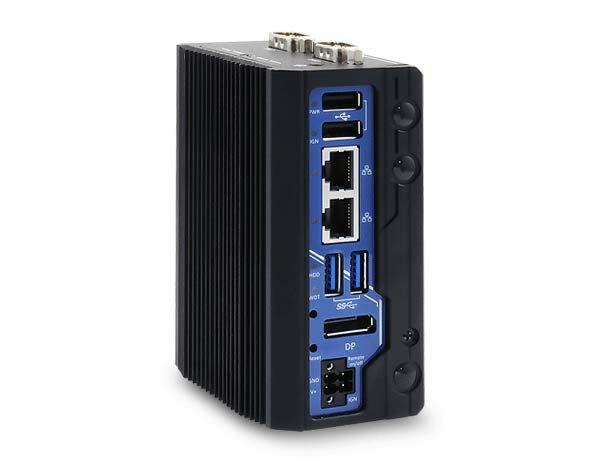
The front panel includes two USB 2.0 ports, two Gigabit Ethernet ports (Intel I210 controller), two USB 3.1 Gen1 (5 Gbps) ports, one DisplayPort output (up to 4096 x 2160 @ 60Hz), a reset button, and a 4-pin pluggable terminal block for DC input/ignition. The top panel adds a power button and serial ports: COM1 is a software-programmable RS-232/422/485 port, and COM2 is either three 3-wire RS-232 ports (POC-40) or one isolated RS-422/485 port with 15kV ESD protection (POC-40+).
The system accepts 12-20V DC via a 4-pin pluggable terminal block. Supplying voltage over 20V will damage the system. The terminal block can also carry an ignition signal or remote on/off switch input.
The POC-40 Series operates from -25°C to 70°C (fanless) and can be stored from -40°C to 85°C, with 10%-90% non-condensing humidity. It has passed MIL-STD-810G vibration (Method 514.6, Category 4) and shock (Method 516.6, Procedure I, Table 516.6-II) testing, and is CE/FCC Class A certified according to EN 55032 and EN 55035. Note: sub-zero operation requires a wide-temperature HDD or SSD.
The system supports up to 32 GB of DDR4-3200 SDRAM via a single SO-DIMM socket. For storage, it has one M.2 2280 M key slot supporting SATA-signal SSDs only (NVMe is not supported).
The POC-40 provides an M.2 2230 E key socket (PCIe Gen3 x1 and USB 2.0 signal) for WiFi 5/WiFi 6 modules on both POC-40 and POC-40+. For cellular, the POC-40 has an M.2 3042/3052 B key socket with an internal SIM card socket for 4G/5G modules, while the POC-40+ instead uses a full-size mini-PCIe slot with an internal SIM socket for 4G/3G modules. Three SMA antenna apertures are located on the front panel for these modules.
Neousys provides tested driver support for Microsoft Windows 10 Professional 64-bit, Windows 10 IoT Enterprise 64-bit, and Ubuntu 20.04.2 LTS (or other distributions with kernel 5.8 or later). On Linux, users may need to manually compile/install graphics or I210 GbE drivers if not already in the kernel. Drivers are provided on a "Drivers & Utilities" DVD with an automatic one-click installer, or can be installed manually in a specific sequence (chipset, graphics, LAN, then TXE).
The POC-40 Series measures 52 mm (W) x 89 mm (D) x 112 mm (H) and weighs 0.6 kg. It supports DIN-rail mounting as standard, with wall-mounting available as an optional accessory.
POC-40 uses the dual-core Intel Atom x6211E processor (1.2/1.3GHz base, 3.0GHz burst, 6W) and offers an M.2 3042/3052 B key socket for 4G/5G modules plus three 3-wire RS-232 ports for COM2/3/4. POC-40+ uses the quad-core Intel Atom x6413E processor (1.5GHz base, 3.0GHz burst, 9W) and instead offers a full-size mini-PCIe slot for 4G/3G modules, one isolated RS-422/485 port (15kV ESD protected) for COM2, and standard 4-ch isolated digital input/4-ch isolated digital output (optional on base POC-40).
The POC-40+ and POC-40-DIO models include 4-channel isolated digital input and 4-channel isolated digital output as standard (optional on the base POC-40). Digital inputs accept a logic high of 5-24V and logic low of 0-1.5V, with 2500 Vrms isolation and 1kΩ input resistance. Digital outputs support 500 mA sink current per channel with 1500 Vrms isolation, operating in polling mode.
How-to Guides
- Disassemble the system enclosure (remove COM port panel screws, front panel screw, slide open the L-shaped enclosure, remove the side panel, and remove the top daughter board).
- Locate the SO-DIMM slot once the enclosure and top daughter board have been removed.
- Insert the gold-finger end of the SO-DIMM at a 45-degree angle into the slot.
- Gently push the SO-DIMM down until it clips into place.
- Reinstall the system enclosure.
- Disassemble the system enclosure.
- Locate the M.2 2280 M key slot once the enclosure has been removed.
- Insert the M.2 2280 SATA SSD at a 45-degree angle, gently press it down, and secure it with a screw.
- Remove the thermal pad protection film on the L-shaped enclosure before reinstalling.
- Reinstall the system enclosure.
- Disassemble the system enclosure.
- Locate the M.2 B key module slot (blue) and micro SIM slot (red).
- Open the micro SIM slot by sliding the cover toward the center of the system and flipping it open; place the SIM card in position, then slide the cover back toward the enclosure wall to secure it.
- Insert the M.2 B key module's gold finger at a 45-degree angle into the socket, press down, and secure with a screw.
- Clip on the module's antenna cable per the module's manual.
- Attach two stacked 20x20mm thermal pads to the marked location on the L-shaped enclosure wall.
- Remove an antenna cover from the enclosure and install the SMA antenna connector body.
- Reinstall the system enclosure and attach the external antennae.
- Connect the vehicle's Battery+ line to the V+ terminal.
- Connect the vehicle's Battery-/GND line to the GND terminal.
- Connect the vehicle's ACC line to the IGN terminal.
- Ensure the DC power source and IGN signal share the same ground; the IGN input accepts 12-20VDC and voltage above 20VDC may damage the system.
- In Windows, set "When I press the power button" to "Shut down" so the ignition control logic can detect a completed shutdown.
- Use the rotary switch to select an operation mode (0-15) that matches your required power-on/power-off delay behavior.
- Secure the DIN rail clip onto the rear of the system enclosure using the two M4 screws provided.
- Position the mount plate over the top of the DIN rail, tilting downward, and overlap the top clip edge of the mount plate onto the rail.
- Firmly press the bottom-front of the enclosure to clip the bottom edge of the mount plate onto the rail.
POC-40 is an extremely compact fanless controller with dimensions measuring just 49 x 89 x 112 mm. It features Elkhart Lake Atom processor and is designed for space-restricted applications such as factory data collection, rugged edge computing and mobile gateway.
Utilizing Intel’s 10nm process technology, the new Elkhart Lake Atom® x6211E dual-core processor can deliver up to 1.7 times the performance boost over its previous generation. In comparison to POC-200, POC-40 provides 1.9 times computing performance at only half the size. It features generic I/O functions, such as two Gigabit Ethernet ports, four USB 3.1 Gen1/ 2.0 ports, four COM ports and optional isolated digital I/Os for industrial communication and control. In addition, by adopting dedicated M.2 B key and E key slots, the POC-40 can fully harness the bandwidth of 5G and WiFi 6 wireless communications to provide wide-area coverage and real-time data transmission for industrial and mobile gateway applications.
With a similar footprint as a PICO-ITX motherboard, Neousys’ POC-40 is perfect for projects that require above par performance in an extremely compact package. Ideal for both edge computing and gateway applications, it is a low power consumption and lightweight fanless controller that offers wide-temperature operation for harsh environments.
| Product Available On | Jan 20, 2021 |
|---|---|
| Manufacturer | Neousys |
| Short Description | The POC-40 Extreme Compact Embedded Controller is powered by the Intel Elkhart Lake Atom x6211E dual-core processor and is offered in an extremely small form factor. The POC-40 has a wide operating temperature of -25°C to 70°C due to its fanless cooling system. This embedded controller is designed to operate with most industrial pcs, and complete rugged tasks. This more powerful alternative to a NUC is more flexible and equally affordable. |
| Processor | Intel E;khart Lake Atom x6211E |
| Graphics | Integrated Intel UHD |
| Memory | up to 32GB DDR-4 3200MHz |
| Ethernet Standard | I210 |
| Video Port | 1 DisplayPort |
| Audio | 1x 3.5mm mic in/spkr oout |
| M.2 | Storage M Key SATA 4G/5G B Key WiFi E Key |
| DC Input | 12-20 VDC |
| Power Adapter | 60W recommended |
| Power Input Voltage | 12-20 VDC |
| Power Type | DC |
| Fan | none |
| Weight | 5 lbs estimate |
| Mounting | DIN standard Wall Optional |
| Operating Temperature | -25-70C |
| Storage Temperature | -40-85C |
| Humidity | 10-90% |
| Vibration | Operating, MIL-STD-810G, Method 514.6, Category 4 |
| Shock | Operating, MIL-STD-810G, Method 516.6, Procedure I, Table 516.6-II |
| EMC | CE/FCC Class A, according to EN 55032 & EN 55024 |
| CPU Cores | 2 |
| CPU Family | Intel Atom |
| Base CPU Speed | Under 2.0 Ghz |
| Video Output | Display Port |
| LAN Ports | 1-4 |
| Serial Ports | 1-2 |
| USB 2.0 | 1-2 |
| USB 3.1 | 1-4 |
| Max Memory | 32 GB |
| Operating System | Windows 10, Linux |
| Effective Memory Speed | 3200 MHz |
| Form Factor | Fanless |
| Native Storage Type | M.2 SATA S80 |
| On/Ignition | Remote On/Off |