POC-551VTC: Neousys AMD Ryzen V1000 Ultra-Compact In-Vehicle Controller with PoE+, DIO, and Isolated CAN Bus
POC-551VTCStarting at $1,305.00
- AMD Ryzen embedded V1605B quad-core 15W CPU
- -40°C to 70°C rugged wide temperature fanless operation
- Four IEEE 802.3at PoE+ ports with screw-lock
- One isolated CAN bus port for in-vehicle communication
- One M.2 socket and three mPCIe sockets
- M.2 2280 M key NVMe (Gen3 x2) socket for fast storage access
- 4-CH isolated DI and 4-CH isolated DO
- 8~35V DC input with built-in ignition power control
- E-Mark and EN 50155/ EN 45545 certificate


Frequently Asked Questions
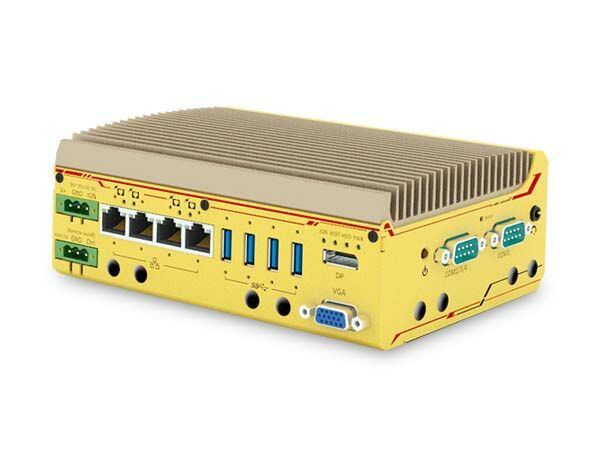
The front panel provides four Gigabit Ethernet ports with IEEE 802.3at PoE+ (screw-lock), four USB 3.1 Gen1 ports (screw-lock), one VGA port (up to 1920x1200), one DisplayPort (up to 4096x2160), a 3-pin terminal block for DC input/ignition, and a 3-pin remote on/off and PWR LED terminal block. The COM panel adds one software-programmable RS-232/422/485 port (COM1), three 3-wire RS-232 ports or one RS-422/485 port (COM2/3/4), a 3.5mm mic-in/speaker-out jack, and a CAN 2.0 port plus 4-channel isolated DI and 4-channel isolated DO.
Each of the four IEEE 802.3at Gigabit PoE+ ports can deliver up to 25W to a powered device such as an IP camera. The total PoE power budget for the system is 80W.
The system accepts 8 to 35V DC input through a 3-pin pluggable terminal block. This terminal block also supports an ignition (IGN) signal input for in-vehicle applications. Supplying more than 35V will damage the system.
The system supports -40°C to 70°C fanless operation. Note that for sub-zero or over 60°C operation a wide-temperature/industrial mSATA (or SSD/HDD) module is required, and if mini-PCIe, M.2, and mSATA are all populated (full-function use), the recommended operating temperature is -25°C to 60°C. Storage temperature is -40°C to 85°C, with 10%-90% non-condensing humidity.
The system is certified to EN 50155 and EN 45545 for rail/in-vehicle use, and carries E-Mark certification. It also meets CE/FCC Class A EMC requirements per EN 55032 & EN 55024, and IEC 61373:2010 Category 1, Class B (Body mounted) for vibration and shock.
The system has one 260-pin SO-DIMM socket supporting up to 16GB DDR4-2400 memory. Storage options include one M.2 2280 M-key slot for NVMe SSD (PCIe Gen3 x2) and one full-size mSATA port. Expansion is further provided via three full-size mini-PCIe sockets with internal SIM socket and one M.2 2242 B-key socket (with USIM support) for 3G/4G modules.
Yes. The system has one M.2 2242 B-key socket for optional 3G/4G modules with USIM support, and three full-size mini-PCIe sockets with an internal SIM socket that can accept WiFi, 3G, or 4G modules. SMA antenna openings are provided on the front IO and COM port panels for external antennas.
The system has driver support for Windows 10 64-bit. For Linux, Neousys recommends kernel versions no later than 4.10. Tested operating systems include Microsoft Windows 10 IoT 2019 LTSC Value, Microsoft Windows 10 Professional 64-bit RS5, and Ubuntu 18.04.1 LTS (4.10 kernel). On Linux, the driver for AMD Vega graphics or the Intel I350-AM4 GbE controller may need to be manually compiled if not embedded in the kernel.
The system supports wall-mount installation using the included bracket (standard), or optional DIN-rail mounting using a DIN rail clip that mounts the enclosure vertically. A vertical wall mount bracket option is also available.
The built-in ignition power control module is an MCU-based system that monitors the ignition (IGN) signal from a vehicle and turns the system on/off according to a predefined power-on/power-off delay. It supports low battery detection (shutdown if input voltage stays below 9V for 12VDC input or 18V for 24VDC input for 60 seconds), guarded power-on/off delay cancellation, a hard-off safety timeout, and 16 selectable operation modes (via rotary switch or BIOS) with different delay timings, including two "smart off-delay" modes with very long power-off delays.
How-to Guides
- Disassemble the system enclosure.
- Locate the SO-DIMM slot on the motherboard.
- Insert the gold finger end of the SO-DIMM at a 45 degree angle into the slot and gently push it down until it clips into place.
- Reinstall the enclosure when done.
- Disassemble the system enclosure.
- Locate the M.2 2280 M-key slot once the enclosure and heat spreader are removed.
- Insert the NVMe SSD into the slot at a 45 degree angle.
- Gently push it toward the motherboard and secure it with the supplied screw.
- Before reinstalling the heat spreader, remove the protective film from the thermal pads.
- Secure the heat spreader with its two screws.
- Reinstall the enclosure when done.
- Disassemble the system enclosure.
- Locate the mini-PCIe/SIM slots on the MezIO module and/or the mainboard.
- If needed, remove the three screws securing the MezIO module to access the mainboard mini-PCIe slot.
- Install the SIM card first, since it sits underneath the mini-PCIe module: slide the top section of the slot away from the VGA port, flip it open, and insert the SIM card, then close and slide it back toward the VGA port to secure it.
- Insert the mini-PCIe module's gold finger at a 45 degree angle into the socket, press it down, and secure it with a screw.
- Clip on the mini-PCIe module's antenna cable per the module's manual.
- Remove an antenna cover from the enclosure, secure the SMA antenna connector, and attach the external antenna.
- Reinstall the enclosure when done.
- Connect the vehicle's Battery+ line (12V for sedan, 24V for bus/truck) to the V+ terminal.
- Connect the vehicle's Battery-/GND line to the GND terminal.
- Connect the vehicle's ACC line to the IGN terminal.
- Ensure the DC power source and IGN signal share the same ground, and that the IGN input voltage stays within the 8~35VDC range to avoid damaging the system.
- Secure the DIN rail clip to the rear side panel of the enclosure using the provided M4 screws.
- Tilt the unit and overlap the top clip edge of the DIN rail clip onto the DIN rail, then firmly press the bottom-front of the enclosure to clip the bottom edge of the mount plate.
- Confirm the mount plate has clipped onto the DIN rail securely to complete installation.
POC-551VTC is the next generation ultra-compact, fanless in-vehicle controller offering performances never-seen-before in this form factor.
Featuring AMD Ryzen™ Embedded V1000 4-core/ 8-thread processor(V1605B), POC-551VTC delivers up to 3x times the CPU performance compared to previous POC series. It combines finesse performance, extraordinary reliability and affordability for versatile in-vehicle applications.
POC-551VTC offers four 802.3at PoE+ ports to supply 25W power to device such as IP cameras. As wireless connectivity is essential for modern invehicle application, POC-551VTC with built-in one M.2 and three mini-PCIe are more applicable for in-vehicle use nowadays. It also integrates CAN bus for in-vehicle communication, and isolated DIO for sensor/ actuator control.
Combining ignition power control and wide-range DC input along with superior performance, POC-551VTC can provides perfect solution for all your in-vehicle application needs in an extremely compact size!
| Manufacturer | Neousys |
|---|---|
| Short Description | The POC-551VTC is designed for various in-vehicle applications with stellar performance in a tiny form factor. This PC is powered by the AMD Ryzen Embedded V1000 4-core/8-thread processor which provides three times the computing power than the previous offerings in the POC series. This industrial PC is a lasting performer due to wide temperature performance in rugged environments, and fanless design. |
| Processor | POC-515: AMD Ryzen™ V1605B CPU (4C/ 8T, 2M Cache, 2.0/ 3.6 GHz,12W - 25W TDP)|POC-545: AMD Ryzen™ V1807B CPU (4C/ 8T, 2M Cache, 3.35/ 3.8 GHz,35W - 54W TDP) |
| Graphics | POC-515: Vega GPU with 8 compute units|POC-545: Vega GPU with 11 compute units |
| Memory | POC-515: Up to 16 GB DDR4-2400 SDRAMby one SODIMM socket|POC-545: Up to 16 GB DDR4-3200 SDRAM by one SODIMM socket |
| PoE | IEEE 802.3at PoE+ on port #1~ 4 |
| Video Port | 1x VGA connector, supporting 1920 x 1200 resolution|1x DisplayPort connector, supporting 4096 x 2160 resolution |
| Audio | 1x 3.5mm jack for mic-in and speaker-out |
| M.2 | 1x M.2 2280 M key NVMe socket (PCIe Gen3 x2)for NVMe SSD installation |
| Mini PCI-E | 1x full-size mini PCI Express socket with internal SIM socket |
| DC Input | 1x 3-pin pluggable terminal block for 8~35VDC DC input |
| Fan | POC-545: External-accessible 80mm x 80mm fan for system heat dissipation |
| Dimension | POC-515: 64(W) x116(D) x176(H) mm|POC-545: 81(W) x118(D) x176(H) mm |
| Weight | POC-515: 1.2kg|POC-545: 1.4kg |
| Operating Temperature | -25°C ~ 70°C*/** |
| Storage Temperature | -40°C ~85°C |
| Humidity | 10%~90% , non-condensing |
| Vibration | Operating, MIL-STD-810G, Method 514.6, Category 4 |
| Shock | Operating, MIL-STD-810G, Method 516.6, Procedure I, Table 516.6-II |
| EMC | CE/ FCC Class A, according to EN 55032 & EN 55024 |
| CPU Cores | 4 |
| CPU Family | AMD Ryzen |
| Base CPU Speed | Under 2.0 Ghz, 3.1 to 3.5 GHz |
| Video Output | Display Port, VGA |
| PoE Ports | 4 |
| LAN Ports | 1-4 |
| Serial Ports | 3-4 |
| USB 3.0 | 3-4 |
| Max Memory | 16 GB |
| Operating System | Windows 10, Linux |
| Effective Memory Speed | 2666 MHz, 3200 MHz |
| Form Factor | Fanless |
| Native Storage Type | M.2 NVMe SSD |
| On/Ignition | Remote On/Off |