
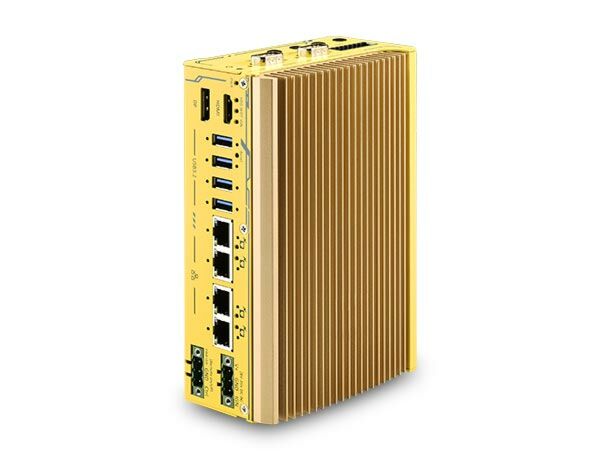
POC-751VTC: Intel Core i3-N305 Ultra-Compact In-Vehicle Computer with 4x PoE+, HDMI, SocketCAN, and mPCIe for WiFi/4G/5G Modules
POC-751VTC Series- Intel Alder Lake Core i3-N305 processor 15W with 8 E-Cores
- 4x GbE PoE+ ports/ 4x USB3.2 Gen 2 with screw-lock
- DP++/ HDMI 1.4b dual display outputs
- 2x isolated CAN 2.0 port, supporting SocketCAN in Linux
- 2x mPCIe for WiFi/ 4G/ 5G module with conduction-cooled heatsink
- 8-CH isolated DI & 8-CH isolated DO
- 8V - 35V DC input with built-in ignition power control
- E-Mark certified and EN 50155 EMC compliant


Frequently Asked Questions
The system provides four Gigabit Ethernet ports (Intel I350-AM4), each supporting IEEE 802.3at PoE+ delivering up to 25W per port; four USB 3.2 Gen2 ports with screw-lock; one DisplayPort++ (up to 4096 x 2160 @ 60Hz) and one HDMI 1.4b (up to 3840 x 2160 @ 30Hz); two isolated CAN 2.0 ports supporting SocketCAN in Linux; one software-programmable RS-232/422/485 port (COM1); three 3-wire RS-232 ports or one RS-422/485 port (COM2/3/4); and 8-channel isolated digital input plus 8-channel isolated digital output (4 channels each on the motherboard and 4 channels each on the MezIO module).
The system accepts a wide-range 8V to 35V DC input via a 3-pin pluggable terminal block, which also carries the ignition (IGN) signal. Applying voltage over 35V will damage the system. The unit includes built-in ignition power control for automotive deployments.
Operating temperature is -40°C to 70°C, with storage temperature of -40°C to 85°C and humidity tolerance of 10% to 90% non-condensing. A wide-temperature SSD is required for sub-zero or over-60°C operation. The system is E-Mark certified, complies with EN 50121 (EN 50155 EMC), and meets CE/FCC Class A per EN 55032 and EN 55035. It is also rated for EN 50155:2017/IEC 61373 Category I, Class B vibration and shock (body mounted).
The system has one SO-DIMM socket supporting up to 16GB of DDR5-4800 SDRAM, and one M.2 2280 M-key slot for SATA-only SSD storage (NVMe is not supported in this slot).
The POC-751VTC has two full-size mini-PCIe slots with conduction-cooled heatsinks for WiFi/4G/5G modules, each with a dedicated SIM card slot. SMA antenna openings are provided on the side panels for external antenna installation. Optional mPCIe-to-M.2 adapter cards (mPCIe-M2B, mPCIe-M2E, mPCIe-M2M) are available for installing M.2-format wireless or NVMe modules in the mini-PCIe slot.
The system has been tested with Microsoft Windows 10 LTSC 2021 (x64), Microsoft Windows 11 IoT Enterprise 22H2 64-bit, and Ubuntu 20.04.2 LTS or other Linux distributions with kernel version 5.19 or higher. For Linux, users may need to manually compile and install the graphics or Ethernet controller driver if not embedded in the kernel. Drivers, including the WDT_DIO package for watchdog timer and DIO control, are available for download from Neousys.
The system measures 176mm (W) x 116mm (D) x 64mm (H) and weighs 1.7kg. It supports horizontal-type wall mounting (standard) and vertical-type wall mounting (optional accessory).
Yes. The system provides API functions (GetStatusPoEPort, EnablePoEPort, DisablePoEPort) that let software turn each of the four PoE+ ports on or off individually, useful for power device fault-recovery or power reset. These functions are part of the Neousys WDT_DIO driver package.
Yes. The system includes a hardware watchdog timer (WDT) that resets the system if the timer expires without being reset by software. Neousys provides a WDT_DIO driver package with function APIs (InitWDT, SetWDT, StartWDT, ResetWDT, StopWDT) for Windows 10 x64 and WOW64. The WDT can also be configured in BIOS for boot-time supervision.
How-to Guides
- Disassemble the system enclosure by removing the front I/O panel screws, bottom screws, rear panel screws, DIO/COM port panel hex bolts, and separating the panels and MezIO module as described in the manual.
- Remove the two screws securing the DRAM/M.2 heat spreader and lift it off.
- Locate the SO-DIMM slot on the motherboard.
- Insert the gold-finger end of the SO-DIMM at a 45-degree angle into the slot and gently push down until it clips in.
- Remove the protection film from the thermal pad.
- Reinstall the DRAM/M.2 heat spreader and secure it to the system heatsink.
- Reassemble the enclosure.
- Disassemble the system enclosure and remove the heat spreader.
- Locate the M.2 2280 M-key slot on the motherboard.
- Insert the M.2 SSD into the slot at a 45-degree angle.
- Gently push the SSD toward the motherboard and secure it with the supplied screw.
- Remove the protective film on the thermal pad before reinstalling the heat spreader.
- Secure the heat spreader with the two screws.
- Reassemble the enclosure.
Note: this slot is SATA-signal only and does not support NVMe SSDs.
- Disassemble the system enclosure to access the mini-PCIe and SIM slots on the MezIO module.
- If the module requires a SIM card, push the SIM slot holder open, insert the SIM, then flip and push the holder closed to lock it in.
- Insert the mini-PCIe module's gold fingers into the socket at a 45-degree angle, press down, and secure with a screw.
- Clip on the module's antenna cable per the module's user manual.
- Remove the protective film from the thermal pad.
- Remove an antenna cover from the enclosure and secure the SMA antenna connector.
- Reassemble the enclosure and attach the external SMA antenna.
- Repeat for a second module if installing in the other mini-PCIe slot.
- Remove the rubber stands on the bottom of the enclosure to access the M4 tapped holes.
- Secure the wall mount bracket to the bottom of the system enclosure using the provided M4 screws.
- Press F2 during boot to enter BIOS setup.
- Go to
Advanced>Peripheral Configuration. - Set the
Set COM1 Mode asoption to the desired mode (RS-232, RS-422, or RS-485). - Optionally adjust
Slew Ratefor long-distance RS-422/485 runs and setRS-422/485 Terminationto match your wiring. - Press F10 to save and exit.
POC-751VTC is Neousys' next-generation ultra-compact in-vehicle computer with E-Mark certification for in-vehicle applications such as a mobile gateway, mobile surveillance, and passenger information system.
POC-751VTC utilizes the latest Intel Alder Lake i3-N305 with eight CPU cores and supports up to 16GB of DDR5-4800 memory, capable of delivering up to 1.3x the CPU performance when compared to previous POC-551VTC. And with Intel's UHD Graphics supporting Open Visual Inference and Neural network Optimization (OpenVINO), users can execute deep learning and inference models for light AI applications.
The system offers four 802.3at PoE+ ports to supply 25W power to compatible connected devices such as IP cameras. Internal expansion wise, the system features two heatsink cooled mini-PCIe slots for wireless communication module installation which is essential for future intelligent vehicle applications. There are also two isolated CAN 2.0 ports that support SocketCAN in Linux for in-vehicle communications, and isolated digital I/Os for sensor and actuator control. Power input wise, it accepts wide range 8V to 35V DC input with built-in ignition power control to suit a variety of vehicle deployments.
With the combination of ignition power control, wide-range DC input, rich I/Os, and edge AI capabilities, POC-751VTC is the perfect ultra-compact solution for modern intelligent in-vehicle applications.
| Manufacturer | Neousys |
|---|---|
| Short Description | POC-751VTC is Neousys' next-generation ultra-compact in-vehicle computer with E-Mark certification for in-vehicle applications such as a mobile gateway, mobile surveillance, and passenger information system. |
| Processor | Intel Alder Lake Core i3-N305 processor (8C/8T, 1.8/3.8 GHz, 15W TDP) |
| Graphics | Integrated Intel UHD Graphics with 32EUs |
| Memory | Up to 16 GB DDR5-4800 SDRAM (one SODIMM socket) |
| PoE | 4x IEEE 802.3at Gigabit PoE+ ports via RJ45 connector |
| Video Port | 1x DP++, supporting 4096 x 2160 @ 60Hz 1x HDMI1.4b, supporting 3840 x 2160 @ 30Hz |
| DIO | 4x isolated DI and 4x isolated DO (on MB) 4x isolated DI and 4x isolated DO (on MezIO) |
| M.2 | 1x M.2 2280 M key socket for SATA SSD storage |
| Mini PCI-E | 2x full-size mPCIe for WiFi/ 4G/ 5G module with conduction-cooled heatsink |
| DC Input | 1x 3-pin pluggable terminal block for 8V to 35V DC input (IGN/GND/V+) |
| Remote Ctrl. & Status Output | 1x 3-pin pluggable terminal block for remote control and PWR LED output |
| Dimension | 176mm (W) x 116mm (D) x 64mm (H) |
| Weight | 1.7kg |
| Mounting | Horizontal-type wall-mount (Standard) Vertical-type wall-mount (Optional) |
| Operating Temperature | -40°C to 70°C |
| Storage Temperature | -40°C to 85°C |
| Humidity | 10% to 90% , non-condensing |
| Vibration | EN 50155:2017/ IEC 61373, Category I, Class B - Body mounted |
| Shock | EN 50155:2017/ IEC 61373, Category I, Class B - Body mounted |
| EMC | E-Mark, EN 50121 (EN 50155 EMC) CE/FCC Class A, according to EN 55032 & EN 55035 |
| CPU Cores | 8 |
| CPU Family | Intel Core |
| Base CPU Speed | Under 2.0 Ghz |
| Video Output | Display Port, HDMI |
| PoE Ports | 4 |
| LAN Ports | 1-4 |
| Serial Ports | 3-4 |
| USB 3.2 | 1 - 4 |
| Max Memory | 16 GB |
| Operating System | Windows 10, Linux |
| Effective Memory Speed | 4800 MHz |
| Form Factor | Fanless |
| Native Storage Type | M.2 NVMe SSD |
| On/Ignition | Remote On/Off |