
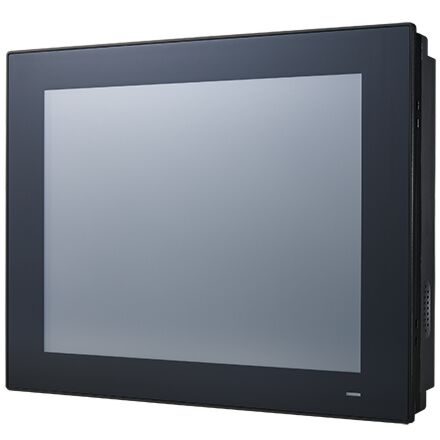
PPC-3120: Fanless 12.1" Panel PC with Intel Atom E3940 Processor
PPC-3120-RE9A- 12.1" XGA TFT LCD with resistive touchscreen
- Intel Atom E3940, 1.6 GHz, processor
- Up to 8 GB DDR3L 1600/1866 SDRAM
- Supports 1 x internal 2.5" SATA HDD and 1 x mSATA
- Fanless design with low power consumption
- Wide range DC support (9 ~ 32 VDC)
- 1 x isolated RS-422/485 with automatic flow control and dual Intel GbE
- Optional GPIO (8 channels, TTL level)
- Optional PCI/PCIe x1 expansion kit

Frequently Asked Questions
The PPC-3120-RE9A provides:
- 5 x serial ports: 4 x RS-232 and 1 x isolated RS-422/485 with automatic flow control (adjustable through BIOS)
- 4 x USB 3.0
- 1 x Line-out, 1 x Mic-in
- 1 x VGA, 1 x HDMI
- 2 x Intel GbE (Intel I225LM controllers, 10M/100M/1000M/2.5G)
- 1 x GPIO (8 channels, TTL level, internal, optional)
The unit accepts a wide-range DC input of 9 ~ 32 VDC. Power consumption is rated at 32W, based on a burn-in test (Burn-In 8.0) in Windows 10 64-bit. The system is intended to be supplied by a listed power adapter or DC source rated 9 ~ 32 VDC, 8.5 ~ 2.5A, 80W minimum, with TMA 60 °C.
Operating temperature range is -20 ~ 60 °C (-4 ~ 140 °F); storage temperature is -40 ~ 60 °C (-40 ~ 140 °F). Relative humidity is rated at 95% @ 40 °C, non-condensing. The unit carries CE, FCC Class B, EN 61000-6-2, BSMI, VCCI, UKCA (EMC) and CB, UL, CCC, UKCA (safety) certifications. The front panel is IP66 compliant.
The system supports 1 x SODIMM DDR3L 1600/1866 MHz memory (up to 8 GB), 1 x internal 2.5" SATA HDD bay, and 1 x mSATA bay.
The PPC-3120-RE9A supports Microsoft Windows 10 IoT LTSC (64-bit), Linux, and Android.
The unit measures 317 x 246 x 60.5 mm (12.4 x 9.7 x 2.4 in) and weighs 3.4 kg (7.5 lb). The panel cutout dimensions for panel mounting are 311 x 240 mm (12.24 x 9.44 in).
The PPC-3120-RE9A supports wall mounting, panel (flush) mounting, VESA arm mounting (100 mm interface pad), and stand mounting. Optional accessories include a wall mount kit (PPC-174T-WL-MTE), an ARM VESA mount (PPC-ARM-A03), and a stand (PPC-STAND-A1E).
The system has a Mini PCIe expansion slot that supports an optional wireless module. Advantech offers the PPC-WLAN-D1, an M.2 WiFi6 + BT5.2 (2T2R) module with antenna and a Mini PCIe adapter, as an accessory.
The system includes 1 x Mini PCIe slot, plus an optional PCIe x1 or PCI expansion kit (add-on box with riser card, part number 98R3P312000 / 98R3P30610E). A TPM 2.0 module (98R3P612100) is also available as an accessory.
How-to Guides
- Unscrew the eight retention screws and remove the rear cover.
- Unscrew the six retention screws and remove the HDD cover.
- Unscrew the four retention screws and remove the HDD bracket.
- Install the SATA HDD and affix it in place using four retention screws.
- Connect the SATA cable and replace the HDD bracket.
- Connect the SATA cable to the motherboard and replace the HDD cover.
- Insert the mSATA card into the socket.
- Secure the mSATA card in place using the two retention screws provided in the accessory box.
- Remove the rear cover and HDD cover.
- Unscrew the six retention screws to open the heatsink.
- Insert the memory card into the highlighted slot.
- Install the thermal pads for the memory card and CPU provided in the accessory box.
- For a full-size Mini PCIe card: insert the card into the socket and secure it with the two retention screws provided in the accessory box.
- For a half-size Mini PCIe card: insert the card into the socket at an angle, then insert the hexagonal screw provided in the accessory box into the notch on the printed circuit board and tighten it to secure the card.
- Connect the antenna cables and affix them to the brackets, following the cable routing shown in the manual.
- Remove the two plugs at the top of the rear cover.
- Install the external antennas.
- Select the location on the wall for the wall mount plate.
- Mark the locations of the two plate screw holes on the wall.
- Drill two pilot holes at the marked locations.
- Align the wall mount plate screw holes with the pilot holes and secure the plate with screws.
- Insert four M4 screws into the holes on the rear panel to secure the mounting bracket (ensure screw thread depth does not exceed 4 mm).
- Align the wall mount bracket on the panel PC with the wall mount plate and slide the panel PC downward to hang it on the plate.
- Secure the panel PC in place by tightening the screws in the wall mount bracket.
| Manufacturer | Advantech |
|---|---|
| Short Description | The PPC-3120 is a fanless 12.1" panel PC equipped with a high-performance Intel Atom E3940 quad-core processor that supports wide power input range (9 ~ 32 VDC). The provision of multiple I/O, including 4 x COM, 4 x USB 3.0, 1 x isolated RS-422/485, and dual Intel Gigabit Ethernet, ensures easy integration and connectivity. |
| CPU Cores | 4 |
| CPU Family | Intel Atom |
| Base CPU Speed | Under 2.0 Ghz |
| Brightness | 400+ nit |
| Resolution | 1024 x 768 |
| Screen Size | 10.1-15" |
| Video Output | VGA, HDMI |
| LAN Ports | 1-4 |
| Serial Ports | 5-6 |
| USB 3.0 | 3-4 |
| Max Memory | 8 GB |
| Operating System | Windows 10, Linux |
| Effective Memory Speed | 1600 MHz, 1866 MHz |
| Form Factor | Panel PC |
| Native Storage Type | 2.5" SSD, mSATA Full |
| Mounting | Wall, Vesa |
| CPU | Intel Atom E3940 quad core |
| Frequency | 1.6 GHz |
| L2 Cache | 2 MB |
| Memory | 1 x SODIMM DDR3L 1600/1866 MHz (max. 8 GB) |
| Storage | 1 x 2.5" SATA bay 1 x mSATA bay |
| Network (LAN) | 2 x Intel I225LM controller; Speed: 10M / 100M / 1000M / 2.5G |
| I/O | 5 x Serial ports: 4 x RS-232, 1 x isolated RS-422/485 (Adjustable through BIOS) 4 x USB 3.0 1 x Line-out, 1 x Mic-in 1 x VGA, 1 x HDMI 1 x GPIO (8 channels, TTL level, internal) |
| Expansion Slots | 1 x Mini PCIe 1 x PCIe x1 or 1 x PCI (optional) |
| Watchdog TImer | 255 timer levels, set up by software |
| Speaker | 2 x 1W |
| Display Type | TFT LED panel with LED backlight |
| Display Size | 12.1" |
| Max Resolution | 1024 x 768 |
| Luminance | 600 |
| Viewing Angle | 89 (left), 89 (right), 89 (up), 89 (down) |
| Backlight Lifetime | 50,000 hr (typical) |
| Contrast Ratio | 1000 |
| Light Transmission | 80±5% at 550nm wavelength |
| Type | 5-wire resistive touch |
| Controller | USB interface |
| Humidity | 95% @ 40 °C (non-condensing) |
| Operating Temperature | -20 ~ 60 °C (-4 ~ 140 °F) |
| Storage Temperature | -40 ~ 60 °C (-40 ~ 140 °F) |
| Shock | Operating 10 G peak acceleration (11 ms duration), follow IEC 60068-2-27 |
| Vibration Protection | Operating Random Vibration Test 5~500Hz, 2Grms @with SSD, follow IEC 60068-2-64 |
| EMC | CE, FCC Class B, EN 61000-6-2, BSMI, VCCI, UKCA |
| Safety | CB, UL, CCC, UKCA |
| Front Panel Protection | IP66 compliant |
| Power Input Voltage | 9 ~ 32 VDC |
| Power Consumption | 32W (Burn-in test 8.0 in Windows 10 64bit) |
| OS Support | Microsoft Win 10 IOT LTSC (64-bit), Linux, Android |
| Weight | 3.4 kg (7.5 lb) |
| Dimension | 317 x 246 x 60.5 mm (12.4 x 9.7 x 2.4 in) |