
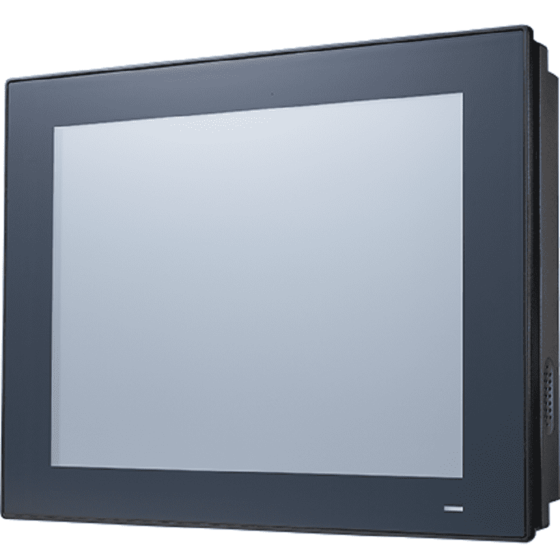
PPC-412: Fanless 12.1" Panel PC with Intel Core i5-7300U Processor
PPC-412Starting at $2,660.00
- 12.1" XGA TFT LCD with resistive touchscreen
- Intel Core i5-7300U(default); i7-7600U/i3-7100U(optional) processor with fanless system design
- 1 x isolated RS-422/485 with auto flow
- Wide input power range (9 ~ 32 VDC)
- Dual Gigabit Ethernet with IEEE1588 support
- 3 x Independent displays
- 1 x M.2 B key bay (2242) for storage and support SATA RAID 0/1
- 1 x TPM 2.0 internal support (optional)
- Supports VESA 75 mounting interface

Frequently Asked Questions
The PPC-412 provides the following I/O:
- 3 x RS-232
- 1 x isolated RS-422/485 (1K VDC isolation, auto flow support)
- 4 x USB 3.0
- 1 x Line-out, 1 x Mic-in
- 1 x DB15 VGA
- 1 x DisplayPort (1.2)
- 2 x Gigabit Ethernet (Intel I219LM and Intel I210AT/I211-AT)
An internal TPM 2.0 module is also supported as an option.
The PPC-412 accepts a wide DC input range of 9 ~ 32 VDC. Power consumption with the default i5-7300U CPU is 60 W, based on Advantech's burn-in test using Windows 10 64-bit.
The unit is intended to be supplied by a UL-certified power supply. Advantech notes two options: a 19 VDC/4.74 A adapter (rated for use up to 40°C ambient), or a 9-32 VDC/7-2 A supply rated for use up to 50°C ambient.
Operating temperature is 0 ~ 50 °C (32 ~ 122 °F) with SSD installed. Storage temperature is -20 ~ 60 °C (-4 ~ 140 °F). Relative humidity is rated up to 95% at 40°C, non-condensing.
Certifications include CE, FCC Class B, EN 61000-6-2, BSMI, UKCA (EMC) and CB, UL, CCC, UKCA (Safety). The front panel is IP66 compliant per the datasheet (the user manual lists IP65 for the front panel touchscreen).
The system supports one SODIMM DDR4 slot (1866/2133 MHz, max. 16 GB), one 2.5" SATA bay, and one M.2 2242 B-key slot for storage (SATA or NVMe interface, supporting SATA RAID 0/1). A Mini PCIe slot is also available for expansion, such as a wireless LAN card.
The PPC-412 supports Microsoft Windows 10 IoT LTSC (64-bit) and Linux. Drivers can be downloaded from the Advantech website.
The PPC-412 measures 317 x 246 x 60.5 mm (12.4 x 9.7 x 2.4 in) and weighs 3.4 kg (7.5 lb). It has four VESA mount holes (75 x 75 mm) on the rear panel; use M4 screws with a maximum 8 mm depth. Wall mount and stand kits are also available as accessories (PPC-174T-WL-MTE and PPC-STAND-A1E).
Yes. The PPC-412 has a Mini PCIe slot that can accommodate a wireless LAN card. Advantech offers a matching module: PPC-WLAN-C1E (per the user manual) or PPC-WLAN-D1, a WiFi6 + BT5.2, 2T2R M.2 module with Mini PCIe adapter and antenna (per the datasheet ordering table).
The PPC-412 supports 3 independent displays, using its onboard VGA and DisplayPort (1.2) outputs along with the built-in 12.1" panel.
How-to Guides
- Loosen the screws indicated on the rear cover.
- Press the red release areas to pull out the hooks and open the rear cover.
- Remove the yellow warning tag, then remove the screws holding the strength plate and CPU heat sink, and take them out.
- Apply the thermal grease provided in the accessory box before reattaching the CPU heat sink and strength plate after installing memory.
- Open the rear cover as described in the memory installation procedure.
- Remove the screws indicated in the SSD bay area.
- Install the SSD and secure it using the 4 screws from the accessory box, then attach the strength plate.
- Lock the HDD bracket and connect the HDD cable to the mainboard.
- Open the rear cover and remove the strength plate as described in the memory installation procedure.
- Plug the M.2 module into the mainboard interface.
- Secure it using the 2 M2.5x4 screws from the accessory box.
- Reattach the strength plate and rear cover.
- Open the rear cover and strength plate as described in the memory installation procedure.
- Insert the wireless LAN card into the Mini PCIe location. For a short card, secure it with a hexagonal screw from the accessory box; for a half-size card, also tighten the additional screw indicated.
- Connect the wireless card's antenna cable to the antenna bracket, noting correct cable and screw/cushion orientation.
- Remove the two plugs on the left and right sides of the rear cover to route the antenna cables.
- Reattach the rear cover and install the antenna onto the wireless card module.
- Press
Delat power-on to enter BIOS setup. - Go to the Advanced tab and select NCT6106D Super IO Configuration.
- Select Serial Port 3 Configuration.
- Set Serial Port 3 Mode to RS422 or RS485.
- If RS485 is selected, choose to enable or disable RS485 Auto Flow and Serial Port3 Terminal as needed.
- Press
F4to save and exit.
| Manufacturer | Advantech |
|---|---|
| Short Description | PPC-412 is a new generation industrial interactive panel PC with a 12.1" TFT LCD 1024 x 768 resolution, which features a flat, sleek design to greatly reduce maintenance effort. Pre-installed Intel Core i processor and designed fanless architecture, PPC-412 provide high performance and reliable system for factory automation or variety of industrial applications. Furthermore, with the provision of multiple I/O, dual Intel Gigabit ethernet, PPC-412 ensures easy integration and connectivity. |
| CPU Cores | 2 |
| CPU Family | Intel Core |
| Base CPU Speed | 2.1 to 3.0 GHz |
| Brightness | 400+ nit |
| Resolution | 1024 x 768 |
| Screen Size | 10.1-15" |
| Video Output | Display Port, VGA |
| LAN Ports | 1-4 |
| Serial Ports | 3-4 |
| USB 3.0 | 3-4 |
| Max Memory | 16 GB |
| Operating System | Windows 10, Linux |
| Effective Memory Speed | 1866 MHz, 2133 MHz |
| Form Factor | Panel PC |
| Native Storage Type | 2.5" SSD, M.2 NVMe SSD |
| Mounting | Wall, Vesa |
| CPU | Intel Core i5-7300U dual core (default); i7-7600U/i3-7100U (optional) |
| Frequency | 2.6 GHz, up to 3.5 GHz with turbo |
| L2 Cache | 3 MB |
| Memory | 1 x SODIMM DDR4 1866/2133 MHz, (max. 16 GB) |
| Storage | 1 x 2.5" SATA bay 1 x M.2 2242 B Key slot for Storage(SATA or NVME interface),support SATA RAID 0/1 |
| Network (LAN) | 2 x 10/100/1000 Mbps Ethernet (Intel I219LM; Intel I210AT) |
| I/O | 3 x RS-232, 1 x RS-422/485 with 1K VDC isolation 4 x USB 3.0 1 x Line-out, 1 x Mic-in 1 x DB15 VGA 1 x Display Port (1.2) 1 x TPM 2.0 internal(optional) |
| Expansion Slots | 1 x Mini PCIe |
| Watchdog TImer | 255 timer levels, set up by software |
| Speaker | 2 x 1W |
| Display Type | TFT LCD panel |
| Display Size | 12.1" |
| Max Resolution | 1024 x 768 |
| Luminance | 600 |
| Viewing Angle | 89 (left), 89 (right), 89 (up), 89 (down) |
| Backlight Lifetime | 50,000 hr (min.) |
| Contrast Ratio | 1000 |
| Light Transmission | 80±5% at 550nm wavelength |
| Type | 5-wire resistive |
| Controller | USB interface |
| Humidity | 95% @ 40 °C (Non-Condensing) |
| Operating Temperature | 0 ~ 50 °C (32 ~ 122 °F) |
| Storage Temperature | -20 ~ 60 °C (-4 ~ 140 °F) |
| Shock | Operating 10 G Peak Acceleration (11 ms Duration), Follows IEC 60068-2-27 |
| Vibration Protection | Operating Random Vibration Test 5 ~ 500Hz, 2Grms @with SSD, Follows IEC 60068-2-64 |
| EMC | CE, FCC Class B, EN 61000-6-2,BSMI, UKCA |
| Safety | CB, UL, CCC, UKCA |
| Front Panel Protection | IP66 compliant |
| Power Input Voltage | 9 ~ 32 VDC |
| Power Consumption | i5-7300U 60W (Burn-in test 8.0 in Windows 10 64bit) |
| OS Support | Microsoft Windows 10 IOT LTSC (64-Bit), Linux |
| Weight | 3.4 kg (7.5 lb) |
| Dimension | 317 x 246 x 60.5 mm (12.4 x 9.7 x 2.4 in) |