
SEMIL-1300GC Series: Wide-Temperature Fanless GPU Computer Including NVIDIA RTX 2000 Ada and Supporting Intel Xeon E or 9th/8th-Gen Core CPU with M12 Connectors
SEMIL-1300GC-ADA SeriesStarting at $5,995.00
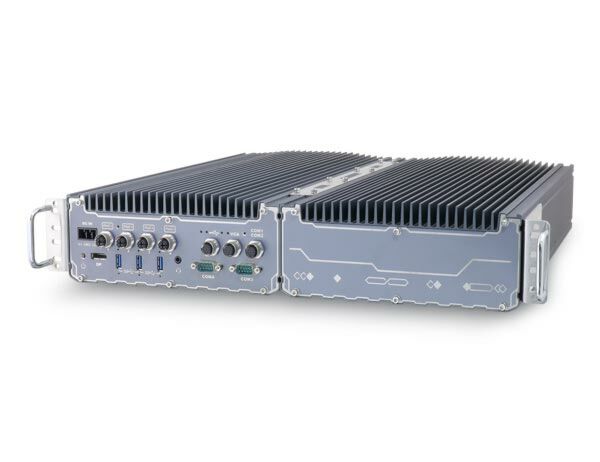
- Fanless GPU computer with NVIDIA RTX 2000 Ada
- Intel Xeon E or 9th/8th-Gen Core i7/ i5/ i3 CPU
- Patented 2U 19” chassis for rack or wall-mount
- Four 802.3at Gigabit PoE+ ports via M12 X-coded connectors
- VGA, USB 2.0, and COM ports via M12 A-coded connectors
- 1x DisplayPort and 3x USB 3.1 Gen1 ports
- 8 to 48V wide-range DC input with built-in ignition power control
- MIL-STD-810G and EN 50155 EMC compliant

Frequently Asked Questions
The system provides the following front-panel I/O:
- 4x Gigabit PoE+ ports (M12 X-coded), 25.5W per port, IEEE 802.3at compliant
- 1x DisplayPort supporting up to 4096 x 2304 resolution
- 1x VGA port (M12 A-coded) supporting up to 1920 x 1200 @60Hz
- 3x USB 3.1 Gen1 ports
- 2x USB 2.0 ports (M12 A-coded)
- 1x internal USB 2.0 port
- 2x 3-wire RS-232 COM1/COM2 (M12 A-coded)
- 1x software-configurable RS-232/422/485 COM3 (DB9)
- 1x RS-232 COM4 (DB9)
- 1x 3.5mm 4-pole audio jack
An optional 10GbE port (M12 X-coded, Intel X550AT) is available on the -10G-ADA variant, backwards compatible with 5Gb, 2.5Gb, and GbE.
The system accepts 8~48V DC input via a 3-pin pluggable terminal block. This same terminal block also carries the ignition (IGN) signal input for in-vehicle applications. Supplying a voltage over 48V will damage the system.
With a 35W CPU, the system operates from -40°C to 70°C. With a CPU of 65W or higher, it operates -40°C to 70°C when configured in 35W TDP mode, or -40°C to 50°C when configured in 65W TDP mode (thermal throttling may occur under sustained full load at 65W). For sub-zero operation, a wide-temperature HDD or SSD is required. Storage temperature range is -40°C to 85°C, with humidity 10%~90% non-condensing.
The system is certified to EN 50121 (EN 50155 EMC) and CE/FCC Class A according to EN 55032 & EN 55035. It has also passed vibration testing per MIL-STD-810G Method 514.6 Category 4 and shock testing per MIL-STD-810G Method 516.6 Procedure I, Table 516.6-II (both operating).
The system supports:
- 2x 260-pin SO-DIMM sockets, up to 64GB DDR4 2666/2400MHz SDRAM
- 2x internal SATA ports for 2.5" HDD/SSD, supporting RAID 0/1
- 2x full-size mSATA ports (mux with mini-PCIe)
- 1x M.2 2280 M key socket (PCIe Gen3 x4) for NVMe SSD or Intel Optane memory
- 2x full-size mini-PCIe sockets (mux with mSATA)
- 1x M.2 3042/3052 B key socket for M.2 4G/5G modules, with dual SIM slots
- 1x M.2 2242/2252 E key socket for WiFi modules
Neousys has tested the system with Microsoft Windows 10 (x64), Fedora 29, Ubuntu 16.04.5 LTS, and Ubuntu 18.04.0 LTS. For other Linux distributions, the kernel should be upgraded to 4.15.18 or later. On Linux, users may need to manually compile and install drivers for Intel graphics or the I210 GbE controller if not embedded in the kernel.
The system supports wireless expansion via its internal expansion slots: an M.2 3042/3052 B key slot with dual SIM slots for 4G/5G modules, an M.2 2242/2252 E key slot for WiFi modules, and two mini-PCIe sockets that can accept modules with 5G/4G, WiFi, GPS, or CAN bus capabilities. SMA antenna openings are located at the rear of the enclosure.
The system can be rack-mounted or wall-mounted. Its dimensions (excluding rack-mount bracket) are 440mm (W) x 310mm (D) x 90.5mm (H), and it weighs 12 kg. Wall-mount brackets and rack-mount brackets are both included in the accessory box.
Yes. The system supports Intel AMT 12.0 via its I219-LM Ethernet port, enabling remote management features such as SOL desktop and remote on/off control. It also has an on-board TPM 2.0 module, which is enabled by default in BIOS (requires 64-bit Windows 10 with UEFI boot mode).
Both models feature an NVIDIA RTX 2000 ADA GPU, 4x M12 PoE+ ports, and support for Intel Xeon E or 9th/8th-Gen Core CPUs. The SEMIL-1321GC-10G-ADA additionally includes a 10GbE port (Intel X550AT controller), which is a build option on the standard SEMIL-1321GC-ADA.
How-to Guides
- Disconnect all cables and shut down the system.
- Turn the system upside-down on a flat, sturdy surface.
- Unscrew the indicated bottom-panel screws in descending order and gently lift the panel off.
- If hard drives are installed, disconnect the SATA/power connector by pulling the connector body (not the cable).
- Identify the M.2 2242 slot (E key) and M.2 3042/3052 slot (B key), along with the two SIM card slots accessible via the B key module.
- Insert the M.2 module into the slot at a 45-degree angle, press down, and secure it with a screw and the corresponding copper standoff.
- Connect the antenna (IPEX-to-SMA cable) per the module's manual, and route the SMA connector through an antenna hole at the rear of the enclosure.
- Insert the SIM card (pins facing up) into the SIM holder before installing a 4G/5G module, then secure the holder.
- Tuck all cables back into the enclosure and reattach the bottom panel, securing screws in ascending order.
- Disconnect all cables and shut down the system.
- Turn the system upside-down on a flat, sturdy surface.
- Unscrew the indicated bottom-panel screws in descending order and lift off the panel.
- If hard drives are installed, disconnect the SATA/power connector by pulling the connector body (not the cable).
- Identify the mini-PCIe/M.2 slots and their respective SIM slots.
- If installing a 5G/4G mini-PCIe module, insert the SIM card (pins facing up) into the holder and secure it first.
- Insert the mini-PCIe module into the slot at a 45-degree angle, press down, and secure with a screw.
- Connect the antenna per the module's manual and route it through an antenna hole at the rear of the enclosure, securing the connector body.
- Tuck cables back into the enclosure and reattach the bottom panel, securing screws in ascending order.
- Disconnect all cables and shut down the system.
- Turn the system upside-down on a flat, sturdy surface.
- Unscrew the indicated bottom-panel screws in descending order and lift off the panel.
- If replacing an existing HDD, disconnect the SATA/power connector by pulling the connector body (not the cable), then remove the two screws on each side of the drive.
- Place the new hard drive between the brackets and secure it with screws on both sides. Repeat for a second HDD if installing one.
- Connect the SATA/power cable to the HDD(s).
- Tuck cables back into the enclosure and reattach the bottom panel, securing screws in ascending order.
- Connect the vehicle Battery+ line (12V for sedan, 24V for bus/truck) to the V+ terminal on the 3-pin pluggable terminal block.
- Connect the vehicle Battery-/GND line to the GND terminal.
- Connect the vehicle ACC line to the IGN terminal.
- Ensure the DC power source and IGN signal share the same ground. The IGN input accepts 8-48VDC; supplying more than 48VDC may damage the system.
- In Windows, set "When I press the power button" to "Shut down" so the OS performs a full shutdown recognized by the ignition control module (otherwise the system may hard-off after a 10-minute timeout).
- Use the rotary switch (accessible by removing the 10 backplate screws) to select one of the 16 operation modes with the desired power-on/power-off delay.
- Install at least two hard drives or SSDs in the system, and back up all existing data before proceeding.
- Press F2 at boot to enter BIOS setup, go to Advanced > SATA And RST Configuration > SATA Mode Selection, and select "Intel RST Premium With Intel Optane System Acceleration".
- Go to Boot, select "Legacy Boot Type", then press F10 to exit saving changes and reboot.
- When the system reboots, press Ctrl+I to enter the RAID configuration utility.
- Highlight "Create RAID Volume" and press ENTER, then enter a volume name.
- Select RAID Level (RAID0 Stripe or RAID1 Mirror).
- For RAID0, select a stripe size (4KB-128KB); RAID1 does not offer stripe size options.
- Enter the desired volume capacity (default is maximum) and press ENTER.
- Highlight "Create Volume", press ENTER, then confirm the data-deletion warning by entering "Y" to complete creation.
SEMIL-1300GC series is the world’s first wide-temperature fanless edge AI computer supporting NVIDIA 2000 Ada for demanding environments. Coupled with Intel Xeon E or 9th/ 8th-Gen Core CPU, the system delivers excellent CPU and GPU performances for modern edge AI applications. SEMIL-1300GC series features Neousys’ patented thermal system architecture* to guarantee -40°C to 70°C fanless operation in a rack-mountable or wall-mountable 2U 19” enclosure.
SEMIL-1300GC series features an advanced passive cooling design to ensure the CPU/ GPU does not throttle when operating in high-temperature environments. Compatible with an RTX 2000 Ada GPU, users can utilize the scalable GPU performance that offers up to 12.0 TFLOPS in FP32 or 191.9 TOPS in INT8. The system leverages M12 connectors for Gigabit PoE+, USB 2.0, VGA, and COM ports to offer rugged cable connectivity. Other high-speed computer I/Os include DisplayPort, USB 3.1 Gen1, optional 10G Ethernet, and storage interfaces such as an M.2 for NVMe SSD and SATA ports, making SEMIL-1300GC expandable and versatile.
The GPU-powered deep learning systems actualized real-time AI inference applications at the edge by thriving in rough conditions. Combining an RTX 2000 Ada, wide-temperature fanless design and rugged M12 connectors, the SEMIL-1300GC series reveals unprecedented possibilities of deploying AI to places that have yet to be reached.
| Manufacturer | Neousys |
|---|---|
| Short Description | SEMIL-1300GC series is the world’s first wide-temperature fanless edge AI computer supporting NVIDIA 2000 Ada for demanding environments. Coupled with Intel Xeon E or 9th/ 8th-Gen Core CPU, the system delivers excellent CPU and GPU performances for modern edge AI applications. SEMIL-1300GC series features Neousys’ patented thermal system architecture* to guarantee -40°C to 70°C fanless operation in a rack-mountable or wall-mountable 2U 19” enclosure. |
| Processor | Supporting Intel Xeon E and 9th/ 8th-Gen CPU (LGA1151 socket) - Xeon E 2278GE (8C/16T) / 2278GEL (8C/16T) / 2176G (6C/12T) - i7-9700E, i7-9700TE, i7-8700, i7-8700T - i5-9500E, i5-9500TE, i5-8500, i5-8500T - i3-9100E, i3-9100TE, i3-8100, i3-8100T |
| Graphics | Integrated Intel UHD Graphics 630 |
| Memory | Up to 64 GB ECC/ non ECC DDR4-2666/ 2400 SDRAM (two SODIMM sockets) |
| Chipset | Intel C246 platform controller hub |
| AMT | Supports AMT 12.0 |
| PoE | 1x IEEE 802.3at (25.5W) Gigabit PoE+ ports by Intel I219 (M12 X-coded) 3x IEEE 802.3at (25.5W) Gigabit PoE+ ports by Intel I210 (M12 X-coded) |
| Video Port | 1x VGA (M12 A-coded), supporting 1920 x 1200 resolution 1x DisplayPort connector, supporting 4096 x 2304 resolution |
| Audio | 1x 3.5 mm jack for mic-in and speaker-out |
| M.2 | 1x M.2 2280 M key socket (PCIe Gen3 x4) for NVMe SSD or Intel Optane memory installation |
| Mini PCI-E | 2x full-size mini PCI Express sockets (mux with mSATA) 1x M.2 3042/ 3052 B key socket for selected M.2 4G/ 5G module 1x M.2 2242/ 2252 E key for selected WiFi module |
| SATA HDD | 2x Internal SATA port for 2.5” HDD/ SSD installation, supporting RAID 0/1 |
| mSATA | 2x full-size mSATA port (mux with mini-PCIe) |
| DC Input | 8 to 48V DC input |
| Power Type | DC |
| Fan | Fanless |
| Dimension | 440mm (W) x 310mm (D) x 90.5mm (H) (excl. rack-mount bracket) |
| Weight | 12 kg |
| Mounting | Rack-mounting and wall-mounting |
| Operating Temperature | With 35W CPU: With >= 65W CPU: 2 For Xeon E 2176G/ 2278GE, i7-9700E, and i7-8700 running at 65W mode, the highest operating temperature shall be limited to 50°C and thermal throttling may occur when sustained full-loading applied. Users can configure CPU power in BIOS to obtain higher operating temperatures. |
| Storage Temperature | -40°C~85°C |
| Humidity | 10%~90% , non-condensing |
| Vibration | MIL-STD-810G, Method 514.7, Category 4 |
| Shock | MIL-STD-810G, Method 516.7, Procedure I |
| EMC | EN 50121 (EN 50155 EMC) EN-50155, CE/FCC Class A, according to EN 55032 & EN 55035 |
| CPU Cores | 6, 8 |
| CPU Family | Intel Core, Intel Xeon |
| Base CPU Speed | 3.1 to 3.5 GHz, Over 3.5 GHz |
| Video Output | Display Port, VGA |
| PoE Ports | 4 |
| Serial Ports | 3-4 |
| USB 2.0 | 3-4 |
| USB 3.0 | 3-4 |
| Max Memory | 64 GB |
| Operating System | Windows 10, Linux |
| Effective Memory Speed | 2400 MHz, 2666 MHz |
| Form Factor | Fanless |
| Native Storage Type | 2.5" SSD, mSATA Full, M.2 SATA S80 |
| On/Ignition | Built In Ignition Control |