
SEMIL-1700: Half-Rack IP67 Waterproof Computer Supporting Intel Xeon E or 9th/8th-Gen Core Processor with All M12 Connectors
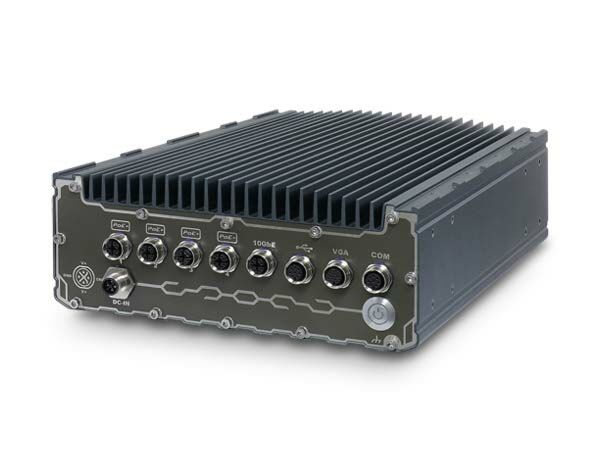
SEMIL-1700 SeriesSEMIL-1700 series is an extremely rugged 2U half-rack computer with an IP67-rated waterproof and dustproof design. Powered by an Intel Xeon E or 9th/8th-Gen Core CPU and a workstation-grade Intel C246 chipset, it can support up to 64 GB ECC/ non-ECC DDR4 memory. The 2U half-rack form-factor SEMIL-1700 series incorporates Neousys’ best-in-class thermal design and offers mounting flexibility where you can wall or rack-mount up to two SEMILs side by side.
- Intel Xeon E or 9th/8th-Gen Core i7/i5/i3 CPU
- Extremely rugged, IP67-rated waterproof and dustproof
- -40°C to 70°C wide-temperature fanless operation
- 2U 19” half-rack form-factor for rack or wall-mount
- Up to 8x 802.3at Gigabit PoE+ ports via M12 X-coded connectors
- VGA, USB 2.0 and COM ports via M12 A-coded connectors
- Patented SuperCAP-based uninterruptible power backup[1] (SEMIL-1710J)
- 8 to 48V wide-range DC input with built-in ignition power control
- MIL-STD-810G and EN 50155 EMC compliant

Frequently Asked Questions
The SEMIL-1700 series uses all M12 connectors for ruggedized connectivity. Depending on model, it includes up to 8x IEEE 802.3at Gigabit PoE+ ports (M12 X-coded), 1x VGA port supporting up to 1920x1200 resolution (M12 A-coded), 2x 3-wire RS-232 COM ports (M12 A-coded), and either 2x or 4x USB 2.0 ports (M12 A-coded) plus 1 internal USB 2.0 port. SEMIL-17x8 models add a mic-in/speaker-out audio port (M12 A-coded). An optional 10 GbE port (M12 X-coded, Intel X550AT) is available as a build option, and it is backwards compatible with 5Gb, 2.5Gb, and GbE connections.
The system accepts 8 to 48V DC input via an M12 S-coded connector. It includes built-in ignition power control using an IGN/GND signal delivered through the M12 serial port connector. Supplying voltage over 48V will damage the system.
The system supports fanless operation from -40°C to 70°C with a 35W CPU. With a CPU of 65W TDP or higher, the operating range is -40°C to 70°C when configured in 35W TDP mode, or -40°C to 50°C when configured in 65W TDP mode (thermal throttling may occur under sustained full load at 65W). Storage temperature is -40°C to 85°C, with humidity tolerance of 10%~90% non-condensing. The system is rated IP67 for waterproof/dustproof protection and complies with MIL-STD-810G (vibration Method 514.7 Category 4, shock Method 516.7 Procedure I), EN 50121 (EN 50155 EMC), and CE/FCC Class A per EN 55032 & EN 55035. For sub-zero operation, a wide-temperature HDD or SSD is required.
The system supports up to 64GB ECC/non-ECC DDR4-2666/2400 SDRAM across two 260-pin SO-DIMM sockets. Storage options include 2x internal SATA ports for 2.5" HDD/SSD (supporting RAID 0/1), 2x full-size mSATA ports (mux with mini-PCIe), and 1x M.2 2280 M-key socket (PCIe Gen3 x4) for an NVMe SSD or Intel Optane memory. For expansion, there are 2x full-size mini-PCIe sockets (mux with mSATA); SEMIL-17x8 models add 2 more full-size mini-PCIe sockets. mini-PCIe modules can add features like 5G/4G, WIFI, GPS, or CAN bus.
Neousys has tested the system with Microsoft Windows 10 (x64), Fedora 29, Ubuntu 16.04.5 LTS, and Ubuntu 18.04.0 LTS. For other Linux distributions, the kernel should be upgraded to 4.15.18 or later. A "Drivers & Utilities" DVD is provided for automatic driver installation, or drivers can be installed manually in a specific sequence (chipset, graphics, audio, LAN, then ME driver).
The SEMIL-1704/1708/1718J models measure 220mm (W) x 310mm (D) x 90.5mm (H), while the SEMIL-1714J measures 440mm (W) x 310mm (D) x 90.5mm (H). Weight ranges from 5.8 kg to 6.2 kg depending on model. The system is a 2U half-rack 19" form factor and supports both rack-mounting and wall-mounting; two units can be mounted side by side.
The SEMIL-1714J and SEMIL-1718J models include a patented SuperCAP-based uninterruptible power backup (R.O.C. Patent No. I598820) with 2500 watt-second stored energy. This allows the system to sustain operation or safely shut down during a power outage. The PB2500J Parameter Configurer utility lets users monitor DC voltage, CAP energy level, and configure auto-start, shutdown thresholds, and SuperCAP lifetime extension settings.
SEMIL-1704 has 4x M12 PoE+ ports and 2x USB 2.0 ports. SEMIL-1708 has 8x M12 PoE+ ports, 4x USB 2.0 ports, and an audio port not found on the 1704. SEMIL-1714J is the SuperCAP UPS version of the 1704 (4x PoE+ ports, 2500 watt-second backup), and SEMIL-1718J is the SuperCAP UPS version of the 1708 (8x PoE+ ports, 2500 watt-second backup, audio port). All models can be configured with an optional 10GbE port (indicated by the "-10G" suffix).
The ignition power control module monitors an IGN signal (accepts 12VDC or 24VDC) delivered via Pin 4 of the M12 COM1/2 connector. It supports a configurable power-on delay and power-off delay, low battery detection (shuts down if input drops below 11V for 12VDC systems or 22V for 24VDC systems for 60 seconds), guarded delay cancellation if the ignition signal changes state during a delay, and a hard-off safeguard that force-cuts power 10 minutes after the power-off delay if the system fails to shut down normally.
How-to Guides
- Disconnect all cables and shut down the system.
- Turn the system upside-down and place it on a flat, sturdy surface.
- Unscrew the indicated screws in descending order and gently lift the bottom panel.
- Disconnect internal cables (DB9 connection to the PB unit, 4-pin ATX connector, 4-pin power connector, and motherboard-side connections) to allow easier access.
- If installing a 5G/4G module, insert the SIM card into the SIM holder with pins facing up and secure the holder.
- Insert the mini-PCIe module into the slot at a 45-degree angle, press down, and secure it with a screw.
- Connect the antenna per the module's manual (a return to Neousys or an authorized distributor may be required for SMA antenna installation on after-sales installs).
- Reconnect all previously disconnected cables.
- Ensure the O-ring seal is properly seated in the groove.
- Tuck all cables into the enclosure, close the bottom panel, and secure the screws in ascending order at 6.3-7.7 kgf-cm torque.
- Disconnect all cables and shut down the system.
- Turn the system upside-down and place it on a flat, sturdy surface.
- Unscrew the indicated screws in descending order and gently lift the bottom panel.
- Disconnect internal cables (DB9 connection to the PB unit, 4-pin ATX connector, 4-pin power connector, and motherboard-side connections) to allow easier access.
- If replacing an existing HDD, disconnect the SATA/power connector by pulling on the connector body, not the cable, then remove the screws on both sides of the drive.
- Place the hard drive between the brackets and secure it with screws on both sides. Repeat for a second drive if installing two.
- Connect the SATA/power cable, connecting the bottom hard drive first, then the top drive if installed.
- Reconnect the PB module cables.
- Ensure the O-ring seal is properly seated in the groove.
- Tuck all cables into the enclosure, close the bottom panel, and secure the screws in ascending order at 6.3-7.7 kgf-cm torque.
- Locate Pin 4 (PWR_IGN) on the M12 A-coded COM1/2 connector.
- Connect the car Battery+ line (12V for sedan, 24V for bus/truck) to V+.
- Connect the car Battery-/GND line to GND.
- Connect the ACC (accessory) line to the IGN pin.
- In Windows, set "When I press the power button" to "Shut down" (not sleep) so the ignition control function correctly detects a completed shutdown.
- Use the internal rotary switch to select the desired ignition operation mode (0-15), which sets power-on delay, power-off delay, and hard-off timeout.
- Remove the four wall-mount brackets and sixteen screws from the accessory box.
- Secure a bracket to one side of the enclosure using the provided screws. The four brackets are interchangeable and can be installed at any of the four designated bracket locations.
- Repeat the bracket installation on the other side of the enclosure.
- Ensure at least two hard drives or SSDs are installed, and back up all data first.
- Press F2 at boot to enter BIOS setup, then go to Advanced > SATA And RST Configuration > SATA Mode Selection, and select "Intel RST Premium With Intel Optane System Acceleration".
- Go to Boot, select "Legacy Boot Type", press F10 to save and reboot.
- When the system reboots, press Ctrl+I to enter the RAID configuration utility.
- Highlight "Create RAID Volume" and press ENTER, then enter a volume name.
- Select RAID Level (RAID0 stripe or RAID1 mirror).
- For RAID0, select a stripe size (4KB-128KB); this option is not available for RAID1.
- Enter the desired capacity, or accept the default maximum capacity.
- Confirm settings and select "Create Volume", then confirm the data deletion warning by entering "Y".
SEMIL-1700 series is an extremely rugged 2U half-rack computer with an IP67-rated waterproof and dustproof design. Powered by an Intel Xeon E or 9th/8th-Gen Core CPU and a workstation-grade Intel C246 chipset, it can support up to 64 GB ECC/ non-ECC DDR4 memory. The 2U half-rack form-factor SEMIL-1700 series incorporates Neousys’ best-in-class thermal design and offers mounting flexibility where you can wall or rack-mount up to two SEMILs side by side.
SEMIL-1700 adopts a corrosion-proof stainless steel and aluminum chassis to counteract moisture and salinity. Offering a variety of I/O connectivities that utilize M12 connectors to guarantee extremely rugged connections in shock and vibration environments, it has up to eight 802.3at PoE+ ports to supply 25W of power to connected devices. Internal expansion-wise, it has an M.2 M-key socket to support NVMe SSD and mini-PCIe sockets for extending feature sets. Additionally, SEMIL-1700 features two 2.5” SATA SDD/HDD accommodations, 8 to 48V wide-range DC input with ignition power control, and complies with MIL-STD-810G and EN 50155 EMC.
SEMIL-1710J is equipped with Neousys' innovative SuperCAP-based UPS containing 2500-watt-second stored energy to sustain or safely shut down the system during unforeseen power outages. Protected against water, dust, high/ low temperature, shock/ vibration, and power interruption, Neousys’ SEMIL-1700 series is set to redefine edge application computing where ruggedness matters.
| Product Available On | Aug 31, 2021 |
|---|---|
| Manufacturer | Neousys |
| Short Description | SEMIL-1700 series is an extremely rugged 2U half-rack computer with an IP67-rated waterproof and dustproof design. Powered by an Intel Xeon E or 9th/8th-Gen Core CPU and a workstation-grade Intel C246 chipset, it can support up to 64 GB ECC/ non-ECC DDR4 memory. The 2U half-rack form-factor SEMIL-1700 series incorporates Neousys’ best-in-class thermal design and offers mounting flexibility where you can wall or rack-mount up to two SEMILs side by side. |
| Processor | i3, i5, i7 8th and 9th Gen, Xeon E |
| Graphics | Intel UHD Graphics 630 |
| Memory | DDR4-2400/2666MHz SDRAM two sockets |
| Chipset | Intel C246 platform controller hub |
| AMT | 12.0 |
| PoE | 4x/8x PoE+ |
| Ethernet Standard | I213, I210 |
| Video Port | 1x VGA via M12A |
| Audio | 1x 3.5mm mic in/spk out (1708 and 1718J) |
| M.2 | 1x 2242 B key for LTE, 1x 2242 E key for WiFi, 1x 2280 M key for storage |
| Mini PCI-E | 2x mux mSATA, 2x (1708 and 1718J) |
| mSATA | 2x full mSATA mux mPCIe |
| 2.5" Drive | 2x SATAIII internal |
| DC Input | 8-48V DC |
| Power Adapter | 120-160W |
| Power Input Voltage | 8-48V DC |
| Power Type | DC |
| Fan | fanless |
| Dimension | 220mm x 310mm x 90.5mm |
| Weight | 5.8/6/5.9/5.2 Kg |
| Mounting | rack and wall mount options |
| Operating Temperature | see specifications sheet and manual for configuration related ranges |
| Storage Temperature | -40-85C |
| Humidity | 10-90% non condensing |
| Vibration | MIL-STD810G, Method 514.7, Cat 4 |
| Shock | MIL-STD810G, Method 516.7, Procedure 1 |
| EMC | EN-50115, CE/FCC Class A |
| CPU Cores | 6, 8 |
| CPU Family | Intel Core, Intel Xeon |
| Base CPU Speed | 3.1 to 3.5 GHz, Over 3.5 GHz |
| Video Output | VGA |
| PoE Ports | 4, 8 |
| LAN Ports | 5-8, 8+ |
| Serial Ports | 1-2 |
| USB 2.0 | 3-4, 5-6 |
| Max Memory | 64 GB |
| Operating System | Windows 10, Linux |
| Effective Memory Speed | 2400 MHz, 2666 MHz |
| Form Factor | Fanless |
| Native Storage Type | 2.5" SSD, mSATA Full, M.2 SATA S80 |
| On/Ignition | Built In Ignition Control |