
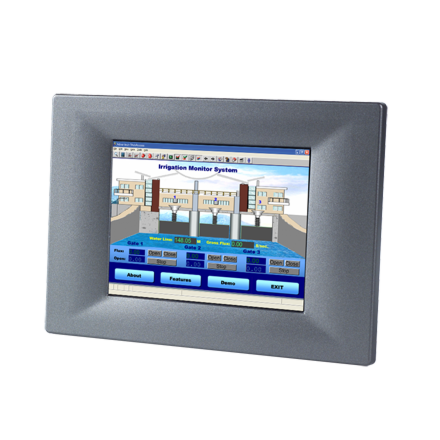
3.5" QVGA, TI AM3517 600MHz,256MB with
TPC-31T-E3AEStarting at $435.00
Main Features
- TI AM3517 processor on board
- 3.5" QVGA TFT LCD
- Super slim and compact design with plastic housing
- Fanless cooling system
- NEMA4/IP65 compliant front panel
- Supports Windows CE OS
- 1 x SD card slot
- Automatic data flow control RS-485

Frequently Asked Questions
The TPC-31/61 series uses a TI Cortex-A8 AM3517 processor running at 600 MHz, with 256MB DDR2 memory on board.
The unit has 512MB on-board micro SD card storage plus 1Mb FRAM for data backup. It also provides a Secure Digital slot for an external SD card for additional storage.
The TPC-31T provides 1 serial port (RS-232/RS-485 with auto data flow control), 1 USB 2.0 Host port, 1 CAN bus port, and 10/100Base-T Ethernet.
The TPC-31T accepts an input voltage of 18~32 VDC with a maximum current of 1 A.
The unit operates from 0~50°C (32~122°F) and can be stored from -20~60°C (-4~140°F). It is FCC Class A, CE, BSMI, and UL certified, and the front bezel is compliant with NEMA 4/IP65.
The TPC-31T uses a 3.5" TFT LCD with a maximum resolution of 320 x 240 (QVGA) and 64K colors. The touchscreen is a resistive type with glass construction, continuous resolution, and 80% typical light transmission, rated for 1 million touches with an 8mm diameter silicone rubber finger.
The TPC-31T is designed for Windows CE. Advantech offers Windows CE platform support specifically for this series, and it comes with built-in utilities such as TPC Configurator and Advantech Tools.
The TPC-31T measures 120.79 x 85.5 x 26.5 mm (4.76" x 3.37" x 1.04") and weighs 0.25 kg (0.55 lbs). The panel cutout size is 115 x 79.5 mm.
Yes, the TPC-31T has a programmable watchdog timer that can be set to 250 ms, 500 ms, or 1 second. It can also be configured and controlled through a Win32 API driver (WDT1:) or via settings such as 2, 5, 10, 15, 30, or 40 seconds depending on the value sent to the driver.
How-to Guides
- Open the package and check the packing list to confirm all items are included.
- Connect the power connector to an 18~32 VDC power line, either from a power adapter or an in-house power source.
- Check the pin assignment on the power receptor before connecting to avoid connecting to the wrong pins, which can damage the system.
- Plug the power lines into the system power receptor. The system will power on.
- Turn on the system and calibrate the touchscreen.
- Ensure the adhesive waterproof gasket is in position on the front bezel before installing.
- Install the panel computer into the panel opening.
- Locate the mount bracket, four short screws, and four long screws in the accessory pack.
- Fix the mount bracket on the rear cover with the four short screws, then fasten the four long screws. These screws push the mounting panel and secure the unit.
- Use a mounting panel with thickness less than 3.5 mm (0.137 inch).
- Go to Start -> Setting -> Control Panel -> Stylus.
- In the Stylus Properties window, select the Calibration tab.
- Click Recalibrate.
- A cross will appear in sequence: center point, upper-left, lower-left, lower-right, and upper-right.
- Use the stylus to tap the center of each cross until it moves to the next location.
- Open the WDT driver by calling CreateFile with the driver name "WDT1:".
- Use IOCTL_WDT_SET_TIMEOUT with a DeviceIoControl call to set the desired timeout index (0=2s, 1=5s, 2=10s, 3=15s, 4=30s, others=40s).
- Use IOCTL_WDT_ENABLE to enable the Watchdog timer.
- Periodically call IOCTL_WDT_STROBE within your application loop to reset the timer if you are managing triggering yourself (after using IOCTL_WDT_REBOOT).
- Use IOCTL_WDT_DISABLE to disable the Watchdog when done, and close the handle with CloseHandle.
- Prepare an SD card containing the new "MLO", "EBOOTSD.nb0", and "NK.nbl" files.
- Insert the SD card; it appears as HardDisk2 (External SD Card) alongside HardDisk (Internal Storage) under "My device".
- Copy the new "MLO" and "EBOOTSD.nb0" files to the root directory of HardDisk from HardDisk2.
- Copy the new "NK.nbl" file to the "WINCE" folder under HardDisk from HardDisk2.
- Reboot the system after the file update completes.
- Wait approximately 3 minutes while the system initializes.
- Verify the new image version under Version Information after initialization succeeds.
| Manufacturer | Advantech |
|---|---|
| Mounting | Panel Mount |
| Memory | 256MB DDR2 |
| Display Type | QVGA TFT LCD |
| Display Size | 3.5" |
| Max Resolution | 320 x 240 |
| Max Colors | 65,536 colors |
| Luminance | 200 |
| Viewing Angle | 120/110 |
| Backlight Lifetime | LED, 30,000 |
| Humidity | 10 ~ 95% RH @ 40 C, non-condensing |
| Operating Temperature | 0°C ~ 50°C (32°F ~ 122°F) |
| Storage Temperature | -20°C ~ 60°C (-4°F ~ 140°F) |
| EMC | CE, BSMI, UL, FCC Class A |
| Power Input Voltage | 18 ~ 32 VDC |
| Weight | 0.25 kg (0.55 lbs) |
| Dimension | 120.79mm x 85.5mm x 26.5 mm (4.76" x 3.37" x 1.04") |