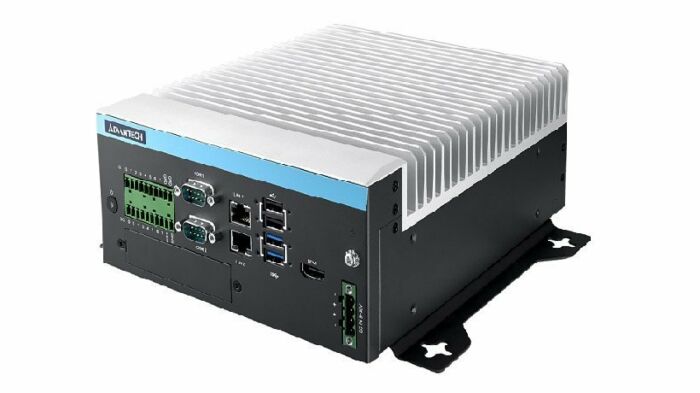
MIC-730AI Inference System with NVIDIA Jetson AGX Xavier
MIC-730AI- Fanless compact design
- NVIDIA Jetson Xavier NX embedded
- Supports 1x mPCIe and 1x M.2 (PCIex4 NVMe)
- 2x LAN ports
- Bundle with Linux 18.04
- Low power consumption
- Support PCIe add on card
- Supports 24/7 secure remote monitoring, control, and OTA deployment - powered by Allxon (support JetPack 4.4GA and above)

Frequently Asked Questions
The MIC-730AI is built on the NVIDIA Jetson AGX Xavier module. It uses an 8-core ARM v8.2 64-bit CPU with 8MB L2 + 4MB L3 cache, and a NVIDIA Volta GPU with 512 CUDA cores and 64 Tensor cores, delivering 11 TFLOPS (FP16) / 22 TOPS (INT8). It also includes a DLA rated at 5 TFLOPS (FP16) / 10 TOPS (INT8).
The unit provides:
- 2 x RJ45 (LAN1: Intel i210, LAN2: Marvell 88E1512), 10/100/1000 Mbps
- 1 x HDMI (max resolution 3840x2160 @ 60Hz)
- USB: 1 x USB2.0 internal, plus external 2 x USB2.0 and 2 x USB3.0
- 1 x Micro USB (OTG, internal, for system recovery)
- 16-bit DI/DO (8 in / 8 out)
- 2 x RS-232/RS-422/RS-485 COM ports (optional, via iModule)
- 1 x Power ON/OFF button (AT/ATX, default AT)
The system accepts a power supply voltage of 9-36V at 11-3A, and supports both AT and ATX power types. Optional AC/DC adaptors are available: 100-240V input to 230W/24V output, or 100-240V input to 150W/19V output.
Operating temperature depends on the nvpmodel power mode: MODE_30W_ALL supports -10 to +60°C, and MAXN supports -10 to +55°C, both with 0.7 m/s air flow. Operating humidity is rated at 95% at 40°C (non-condensing).
The MIC-730AI is certified UL/CB/CE/FCC/BSMI/CCC. It does not have RED certification. It is also RoHS compliant (2002/95/EC).
The system includes 32GB eMMC 5.1 onboard storage and 16/32 GB 256-bit LPDDR4x memory (2133MHz, 137GB/s). It also supports an internal 2.5" HDD/SSD (max 9.5mm) and 1 x M.2 (NVMe 2280, PCIex2) slot for additional storage.
The MIC-730AI supports 1 x MiniPCIe slot and 1 x M.2 (NVMe 2280, PCIex2) slot. It also supports PCIe add-on cards through optional iModules: MIC-75M10-00A1 (1 x PCIex8) or MIC-75M20-00C1 (1 x PCIex16 + 1 x PCIex4, x16 slot with x8 lanes).
The MIC-730AI ships bundled with Linux Ubuntu 18.04.
The core module dimensions are 192 x 230 x 87 mm (W x D x H), and the unit weighs 4.5 kg. It supports desktop or wall mount installation.
Yes. The MIC-730AI supports 24/7 secure remote monitoring, control, and OTA deployment through Allxon, provided the device is running JetPack 4.4GA or above. Enrollment is done via the Allxon device enrollment portal.
How-to Guides
- Locate the internal M.2 slot (NVMe 2280, PCIex2) inside the MIC-730AI chassis.
- Insert the M.2 2280 SSD into the slot.
- Secure the SSD using the M.2 screw included in the packing list.
- Locate the internal 2.5" HDD/SSD bay (supports drives up to 9.5mm thick).
- Mount the drive using the 2.5" HDD rubber mounts provided in the packing list.
- Connect the drive using the included SATA cable and SATA power cable.
- Select the appropriate iModule for your needs: MIC-75M10-00A1 for a single PCIex8 slot, or MIC-75M20-00C1 for a PCIex16 (x8 lanes) + PCIex4 configuration.
- Install the iModule using the PCM series module bracket or mounting bracket included in the packing list.
- Insert your PCIe add-on card into the iModule slot.
- Confirm your power source supplies 9-36V at 11-3A, matching the MIC-730AI's power input rating.
- Connect the power lines to the 4-pin power terminal block (included in the packing list).
- Set the power switch mode to AT or ATX as required (default is AT).
- Alternatively, use one of the optional AC/DC adaptors (100-240V to 24V/230W or 100-240V to 19V/150W) with the appropriate power cord for your region.
- Ensure the MIC-730AI is running JetPack 4.4GA or above.
- Go to the Allxon device enrollment page at https://allxon.com/jetson/device_enroll/.
- Follow the enrollment process to register the device on the Allxon Portal for 24/7 remote monitoring, control, and OTA deployment.
| Manufacturer | Advantech |
|---|---|
| Processor | 8 core ARM v8.2 CPU 64bit, 8MB L2 + 4MB L3 |
| Graphics | Volta GPU, 512Cuda core, 64tensor cores, 11 TFLOPS (FP16) 22 TOPS (INT8) |
| Memory | 13/32GB LPDDR4x 2133 MHz |
| Video Port | 1X HDMI |
| DIO | 8bit In / 8bit out |
| M.2 | NVMe storage |
| Mini PCI-E | 1x |
| 2.5" Drive | 1x |
| Power Adapter | 19-36V DC in |
| Power Input Voltage | 19-36V DC |
| Dimension | 192x 230x 87mm |
| Weight | 4.5kg unboxed |
| Operating Temperature | see manual |
| Humidity | 95% at 40C |
| Vibration | 0.5Grms@5-500Hz |
| CPU Cores | 8 |
| Base CPU Speed | Under 2.0 Ghz |
| Video Output | HDMI |
| LAN Ports | 1-4 |
| Serial Ports | 1-2 |
| USB 2.0 | 1-2 |
| USB 3.0 | 1-2 |
| Max Memory | 32 GB |
| Operating System | Linux |
| Form Factor | Fanless |
| Native Storage Type | 2.5" SSD, M.2 SATA S80 |