Neousys Nuvo-7531 Series Compact Fanless Computer
Nuvo-7531 SeriesStarting at $1,250.00
Main Features:
- 212 x 165 x 63 mm low-profile design
- Intel 9th/8th Gen Core 35W LGA1151 CPU
- Rugged, -25C to 60C fanless operation
- 4x GbE and 4x USB 3.1Gen1 with screw lock
- 1 hot swappable HDD/SSD tray and 1x M.2 2280 socket for storage
- 4-CH isolated DI and 4-CH isolated DO
- DVI-I + DP dual display outputs
- Optional ignition power control

Frequently Asked Questions
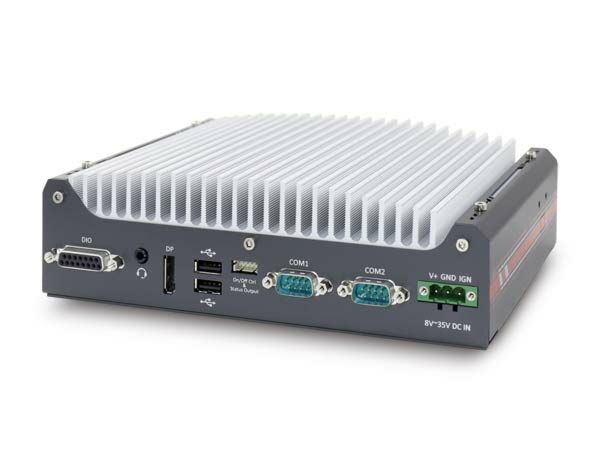
The Nuvo-7531 provides the following I/O:
- 4x Gigabit Ethernet ports (1x Intel I219-LM, 3x Intel I210-IT)
- 4x USB 3.1 Gen1 (5 Gbps) ports with screw-lock, front panel
- 2x USB 2.0 ports, rear panel
- 1x DVI-I output (up to 1920 x 1200) and 1x DisplayPort (up to 4096 x 2304) for dual display output
- 2x software-programmable RS-232/422/485 serial ports (COM1/COM2)
- 1x 3.5 mm 4-pole mic-in/speaker-out jack
- 4-CH isolated digital input and 4-CH isolated digital output via DB15 connector
The system accepts 8~35V DC input through a 3-pin pluggable terminal block, which also supports an optional ignition power control signal on Nuvo-7531-IGN models. Measured power consumption is up to 58W (Max.) @ 24V with an i5-8500T CPU (35W mode) and up to 100W (Max.) @ 24V with an i7-9700E CPU (65W mode).
Operating temperature is -25°C to 60°C with a 35W CPU, and -25°C to 60°C with a 65W CPU (optional fan kit required in the 65W configuration). Storage temperature is -40°C to 85°C. Note: for sub-zero operating temperature, a wide-temperature HDD or SSD is required, and i7 CPUs may experience thermal throttling under sustained full load at 60°C ambient. The system is rated for humidity 10%~90% non-condensing, MIL-STD-810G vibration (Method 514.6, Category 4) and shock (Method 516.6, Procedure I, Table 516.6-II), safety per EN62368-1, and EMC per CE/FCC Class A (EN 55032 & EN 55024).
The system has one hot-swappable 2.5" HDD/SSD tray (supports 7mm or 9.5mm drives, with supplied PORON spacers for 7mm drives), one M.2 2280 slot (SATA signal only), and a single 260-pin SODIMM slot supporting up to 32GB of DDR4-2666/2400 memory.
Yes. The system has three full-size mini PCI Express sockets with internal SIM sockets, allowing installation of WIFI or 3G/4G modules for wireless communication. Dedicated SMA antenna openings are located on the side of the chassis.
Neousys has tested the Nuvo-7531 with Microsoft Windows 10 (x64), Fedora 29, and Ubuntu 16.04.5 LTS / 18.04.0 LTS. For other Linux distributions, the kernel should be upgraded to 4.15.18 or later. Drivers can be installed automatically via the included Drivers & Utilities DVD, or manually in the sequence: chipset, graphics, audio, LAN, then ME driver. A separate WDT_DIO driver package is required to use the Watchdog Timer and DIO function APIs.
The Nuvo-7531 measures 212mm (W) x 165mm (D) x 63mm (H) and weighs 2.5 kg. It has built-in wall-mounting brackets as the standard mounting method, with an optional DIN-rail mounting kit (DINRAIL-31) available.
The system is designed for best thermal performance with 35W TDP CPUs without a fan. If a 65W CPU is installed, an optional fan kit (92mm x 92mm fan) is required to stay within the rated -25°C to 60°C operating range. Alternatively, a 65W CPU's SKU power limit can be configured in BIOS (down to 35W) to run fanless while giving more computing headroom than a native 35W part.
How-to Guides
- Power off the system and disconnect all cables.
- Access the M.2 slot either via the trapdoor on the bottom of the enclosure (remove the indicated screws) or by fully disassembling the enclosure.
- Insert the M.2 2280 SATA module into the slot at a 45-degree angle.
- Gently press the module down and secure it with an M3 P-head screw.
- Reinstall the enclosure or trapdoor when done.
Note: The M.2 slot only supports SATA signal M.2 SSDs, not NVMe.
- Disassemble the system enclosure to access the SODIMM slot (full disassembly may not be required).
- Locate the single SODIMM slot on the motherboard.
- Insert the gold fingers of the module into the slot at a 45-degree angle, then push down on the edge until the side clips secure the module.
- If installing a DRAM module for the first time, remove the thermal pad protective film attached to the bottom of the hot-swappable tray enclosure.
- Reinstall the system enclosure and panel.
- Access the mini-PCIe slots via the trapdoor on the bottom of the enclosure (remove indicated screws), or fully disassemble the enclosure.
- If using a cellular module, insert the corresponding SIM card into the SIM card holder with pins facing up, then slide the holder to secure it.
- Insert the mini-PCIe module into the slot at a 45-degree angle and secure it.
- Clip the IPEZ-to-SMA cable to the module and secure the antenna to the side panel opening.
- Reinstall the system enclosure, panel, and external antenna.
- Pull the lever on the front 2.5" hot-swappable slot to swing open the cover.
- If installing a 7mm thickness drive, attach the supplied PORON material to the corners of the non-label side of the drive.
- With the label side facing upward, insert the SATA connector side of the drive into the slot first, pushing firmly until fully seated.
- Push the lever closed until it snaps into position; use the supplied key to lock the tray if desired.
- Connect the vehicle Battery+ line (12V for sedan, 24V for bus/truck) to the V+ terminal on the 3-pin terminal block.
- Connect the vehicle Battery-/GND line to the GND terminal.
- Connect the ACC (ignition) line to the IGN terminal.
- Ensure the DC power source and IGN signal share the same ground.
- In Windows, set "When I press the power button" to "Shut down" so the ignition controller recognizes a completed shutdown.
- Use the ignition rotary switch on the motherboard to select the desired power-on/power-off delay mode (0-15).
Warning: IGN input accepts 8~35VDC; supplying more than 35VDC may damage the system.
| Manufacturer | Neousys |
|---|---|
| Short Description | The Nuvo-7531 is a compact fanless computer powered by the Intel 9th/8th Gen Core Processors. Due to its fanless design, this industrial pc has a wide operating temperature of -25C to 60C. Storage on the Nuvo-7531 comes in the form of a M.2 SATA interface and a swappable HDD/SSD tray for increased flexibility. Due to its rugged construction, the Nuvo-7531 can perform most industrial applications with ease. It is more compact than the standard 7000 series and is an Intel Core alternative to the POC series. |
| Processor | i7-9700TE/8500T, i5-9500TE/i5-8500T, i5-9500TE/i5-8500T, i3-9100TE/i3-8100T |
| Graphics | Integrated Intel UHD graphics 630 |
| Memory | up to 32GB 2400/2666MHz |
| Chipset | Intel H310 platform controller hub |
| PoE | No |
| Ethernet Standard | I219 I210 |
| Video Port | DisplayPort DVI-I |
| Audio | 1 mic-in speaker out |
| DIO | 4-CH isolated DI 4-CH isolated DO |
| PCI Express | none |
| M.2 | 1x SATA III |
| Mini PCI-E | 3x expansion with internal SIM |
| 2.5" Drive | 1 Hot Swappable Tray |
| DC Input | 8-35V DC |
| Power Adapter | 120V or 160V AC adapter |
| Remote Ctrl. & Status Output | option |
| Dimension | 63 x 212 x 165mm |
| Mounting | wall standard, DIN option |
| Operating Temperature | -25 - 60 C |
| Storage Temperature | -40 - 85C |
| Humidity | 10%-90% non-condensing |
| Vibration | MIL-STD-810G |
| EMC | CE/FCC Class A |
| Ultracapacitor Configuration | option |
| CPU Cores | 6, 8 |
| CPU Family | Intel Core |
| Base CPU Speed | 2.1 to 3.0 GHz, 3.1 to 3.5 GHz |
| Video Output | Display Port, DVI-I |
| LAN Ports | 1-4 |
| Serial Ports | 1-2 |
| USB 2.0 | 1-2 |
| USB 3.0 | 3-4 |
| Max Memory | 32 GB |
| Operating System | Windows 10, Linux |
| Effective Memory Speed | 2400 MHz, 2666 MHz |
| Form Factor | Fanless |
| Native Storage Type | 2.5" SSD, M.2 SATA S80 |
| On/Ignition | Remote On/Off, Built In Ignition Control |