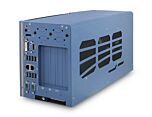
Nuvo-8111: AI Platform for Factory Automation Supporting NVIDIA 200W GPU and Intel 9th/8th-Gen Core Processors
Nuvo-8111 SeriesStarting at $1,340.00
Main Features
- Intel® 9th/ 8th-Gen Core™ i7/ i5/ i3, Pentium® and Celeron® LGA1151 CPU
- Supports NVIDIA® GPU up to 200W TDP
- An additional x4 PCIe, and a PCI slot for add-on cards
- -25°C to 60°C wide-temperature operation
- 2x GbE, 4x USB 3.1 Gen1 and 5x COM ports
- Dual DVI display outputs
- Up to 2x 2.5" SATA HDD/ SSD accommodation and 1x mSATA socket

Frequently Asked Questions
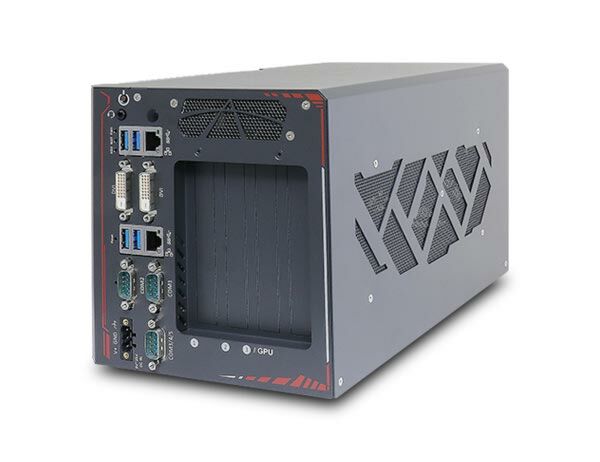
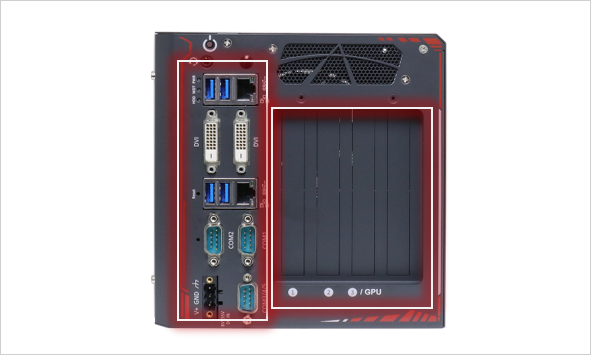
The Nuvo-8111 front I/O panel includes:
- 4x USB 3.1 Gen1 (5 Gbps) ports
- 2x Gigabit Ethernet ports (Intel I219-LM and Intel I210-IT)
- 2x DVI-D connectors supporting up to 1920x1200@60Hz
- 1x software-programmable RS-232/422/485 port (COM1)
- 1x software-programmable RS-422/485 port (COM2)
- 3x 3-wire RS-232 ports sharing a single DB9 connector (COM3/COM4/COM5)
- 1x 3.5mm audio jack for mic-in/speaker-out
- 1x 3-pin terminal block for DC power input
Internally, the system also provides 2x USB 2.0 ports via a box header, an mSATA slot (mux with USB 2.0), 2x SATA ports, and a pin header for status LED output and remote on/off control.
The system accepts 8-35V DC input via a 3-pin pluggable terminal block. Maximum power consumption is 68.2W @ 24V when configured with an i7-9700TE (35W TDP) CPU.
Warning: supplying voltage over the rated input will damage the system.
The system operates from -25°C to 60°C and can be stored from -40°C to 85°C, with 10%-90% non-condensing humidity. It is rated for MIL-STD-810G vibration (Method 514.6, Category 4) and shock (Method 516.6, Procedure I, 20g functional shock). It carries CE/FCC Class A EMC compliance per EN 55024 and EN 55032.
The Nuvo-8111 supports:
- One SODIMM slot for up to 32GB DDR4-2666 non-ECC memory
- 2x internal SATA ports for 2.5" HDD/SSD (up to 15mm thickness)
- 1x full-size mSATA socket, mux with USB 2.0 signals, which also has a Mini-SIM (2FF) card slot for 4G/5G modules
Neousys has tested the following operating systems on the Nuvo-8111:
- Microsoft Windows 10 (x64)
- Fedora 29
- Ubuntu 16.04.5 LTS and Ubuntu 18.04.0 LTS
For other Linux distributions, the kernel should be upgraded to 4.15.18 or later. On Linux, users may need to manually compile and install drivers for Intel graphics or the I210 GbE controller if not embedded in the kernel. Drivers are available for download from Neousys/CoastIPC.
The Nuvo-8111 measures 174 mm (W) x 330 mm (D) x 174 mm (H) and weighs 4.5 kg. An optional wall-mount bracket is available and can be installed using the supplied M4 screws.
The mSATA slot includes a Mini-SIM (2FF) card slot to support 4G/5G modules. There is also an SMA antenna aperture on the front panel for wireless (WIFI/3G/4G) communication.
The system supports an independent NVIDIA graphics card up to 200W TDP via its PCIe x16 Gen3 (16-lane) slot, such as an RTX 3060/3060 Ti, in addition to the integrated Intel UHD Graphics 630.
The system provides 3 expansion slots:
- 1x PCIe x16 slot @Gen3, 16-lane (supports up to a 200W NVIDIA graphics card)
- 1x PCIe x8 slot @Gen2 (wired as 4-lane)
- 1x PCIe x4 slot @Gen2 (wired as 1-lane)
Note: the I/O panel table also lists a 33MHz/32-bit 5V PCI slot, while the specification table lists PCI as N/A; please confirm current configuration before publishing.
How-to Guides
- Disassemble the system enclosure by removing the I/O panel, side panel, and rear panel screws, then lift off the L-shaped cover panel.
- Locate the SODIMM memory module slot on the motherboard.
- Insert the memory module's gold fingers into the slot at a 45-degree angle.
- Push down on the memory module until it clips into position.
- Reinstall the system enclosure and panel when done.
Note: the system supports a single SODIMM slot up to 32GB non-ECC DDR4-2666. Changing DRAM modules causes an approximately 30-60 second delay on the next boot.
- Disassemble the system enclosure to access internal components.
- Locate the mSATA slot and Mini-SIM card slot on the motherboard.
- Slide open the SIM slot holder, insert the Mini-SIM card with pins facing upward, then close and slide the holder to lock the card in place.
- Insert the mSATA (mPCIe) module at a 45-degree angle into the slot and secure it with an M3 P-head screw.
- Clip the IPEX-to-SMA cable onto the module and secure the antenna to the front or rear panel.
- Reinstall the system enclosure and panel when done.
- Disassemble the system enclosure to access internal components.
- Remove the screws securing the HDD/SSD tray, located beneath the daughterboard, and pull out the tray.
- With the SATA connectors facing inwards, secure the HDD/SSD to the tray using flathead screws from underneath. You may install one or two drives.
- Insert the tray about 3/4 of the way in, then firmly and gently push it fully into place to engage the SATA connectors.
- Secure the screws holding the tray in place.
- Reinstall the system enclosure and panel when done.
Note: supports HDD/SSD up to 15mm thickness.
- Disassemble the system enclosure to access internal expansion slots.
- Remove the last two PCIe panel covers.
- Gently lower the graphics card into the PCIe x16 slot, ensuring the gold finger is fully inserted and the I/O panel is properly seated, then secure with a screw.
- Depending on the graphics card's power demands, connect the corresponding 6-pin and/or 8-pin power cable from the daughterboard to the graphics card.
- Reinstall the system enclosure and panel when done.
Consult Neousys/CoastIPC before purchasing a graphics card to confirm installation compatibility.
- Press F2 during system boot to enter BIOS setup utility.
- Go to
Power>Wake On LANand set it toEnabled. - Press F10 to save changes and exit BIOS, allowing the system to boot into the operating system.
- In Windows, press
Windows key + E, right-click Network, select Properties > Change adapter settings. - Double-click the Intel I219 Gigabit Network Connection adapter and click Configure.
- Click the Power Management tab, enable the relevant Wake-on-LAN options, and click OK.
Make sure the Intel chipset and Ethernet drivers are properly installed before setting up WOL.
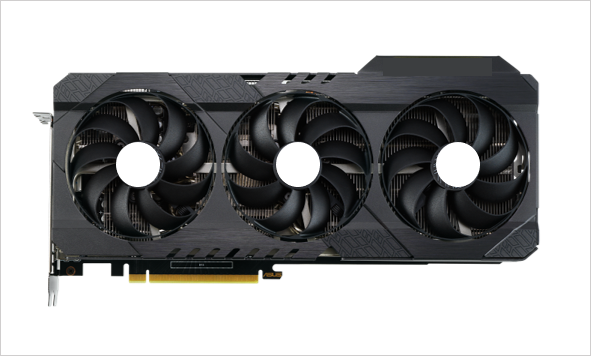
NVIDIA 200W GPU
Supports up to an NVIDIA 200W GPU such as an RTX 3060/ 3060Ti graphics card.
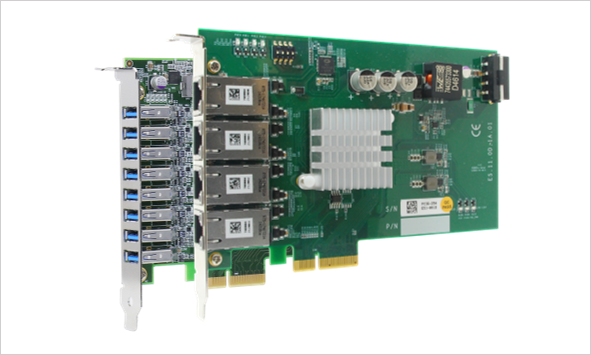
Add-on Card
Additional Gen2 x4 PCIe slot and a 5V PCI slot for add-on card installation.
Front-accessible I/O Design
Front-accessible GbE, USB, COM, and DVI output design for ease of connection.
Wide-temperature Operation
Supports wide-range operating temperature from -25°C to 60°C.

Nuvo-8111 series is a cost-effective box-PC with 3 expansion slots designed specifically to support an advanced mid to high-end 200W NVIDIA® graphics card, such as an RTX 3060/ 3060 Ti, to offer stunning edge AI performance. Offering tremendous GPU power up to 20 TFLOPS in FP32 for emerging GPU-accelerated applications, they boost the performance and efficiency of factory automation, image recognition, product inspection, pick and place robots, etc.
Nuvo-8111 series leverages an Intel® 9th/ 8th-Gen Core™ processor with H310 chipset. It has one x16 Gen3 PCIe slot for accommodating a GPU card, and an additional x4 PCIe and a PCI slot for industrial I/O cards such as DIO, AIO, communication or motion control card. It features front-accessible I/Os including two GbE, four USB 3.1 Gen1 and five COM ports for easy access when it is rack-mounted or placed inside a cabinet. Storage-wise, the system supports two 2.5” SATA SSDs/ HDDs plus one mSATA socket to house an mSATA SSD.
As edge AI demand continues to grow for traditional production and factory automation, Neousys Nuvo-8111 seeks to fulfill this need. With mid to high-end GPU support, expansion capability, compact and rugged design that plays an important role in bringing artificial intelligence to the edge and factory floors, the Nuvo-8111 is no doubt the most cost-effective AI platform for automation in its class!
| Manufacturer | Neousys |
|---|---|
| Processor | Supporting Intel® 9th/ 8th-Gen Core™ CPU (LGA1151 socket) - Intel® Core™ i7-9700TE/ i7-8700*/ i7-8700T
- Intel® Core™ i5-9500TE/ i5-8500*/ i5-8500T
- Intel® Core™ i3-9100TE/ i3-8100*/ i3-8100T
- Intel® Pentium® G5400T (4M Cache, 3.1GHz, 35W TDP)
- Intel® Celeron® G4900T (2M Cache, 2.9GhHz, 35W TDP) |
| Graphics | Integrated Intel UHD graphics 630, or independent NVIDIA RTX 3060/ 3060 Ti via x16 PEG port |
| Memory | Up to 32 GB DDR4 2666 SDRAM (one SODIMM slots) |
| Chipset | Intel H310 platform controller hub |
| Video Port | 2x DVI-D connectors for DVI outputs, supporting 1920x1200 resolution |
| Audio | 1x 3.5 mm jack for mic-in and speaker-out |
| PCI Express | 1x PCIe x16 slot @ Gen3, 16-lanes PCIE signals for GPU 2x PCIe x4 slot @ Gen3, 4-lanes PCIE signals |
| SATA HDD | 2x internal SATA ports for 2.5” HDD/ SSD installation |
| mSATA | 1x full-size mSATA port |
| DC Input | 1x 3-pin pluggable terminal block for 24V DC input |
| Dimension | 174 mm (W) x 330 mm (D) x 174 mm (H) |
| Weight | 4.5 kg |
| Mounting | Optional wall-mount bracket |
| Operating Temperature | -25°C to 60°C** |
| Storage Temperature | -40°C ~ 85°C |
| Humidity | 10%~90% , non-condensing |
| Vibration | Operating, MIL-STD-810G, Method 514.6, Category 4 |
| Shock | Operating, MIL-STD-810G, Method 516.6, Procedure I, Table 516.6-II |
| EMC | CE/FCC Class A, according to EN 55032 & EN 55035 |
| CPU Family | Intel Celeron, Intel Core, Intel Pentium |
| Video Output | DVI-D |
| Serial Ports | 1-2, 3-4 |
| USB 2.0 | 1-2 |
| USB 3.1 | 1-4 |
| Max Memory | 2 GB, 4 GB, 8 GB, 16 GB, 32 GB |