
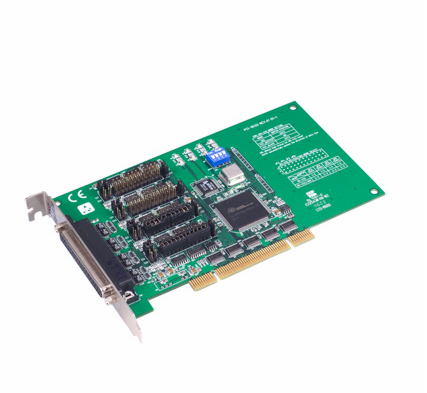
PCI-1612C-CE 4-port RS-232/422/485 PCI Comm. Card w/
PCI-1612C-CEMain Features:
- PCI bus specification 2.2
- Speeds up to 921.6 kbps
- 4-port RS-232/422/485
- 16PCI954 UARTs with 128-byte FIFOs standard
- I/O address automatically assigned by PCI Plug & Play
- OS supported: Windows 98/ME/2000/XP, Linux
- Interrupt status register for increased performance
- Space reserved for termination resistors
- Automatic RS-485 data flow control
- Powerful and easy to use utility (ICOM Tools)
- Universal PCI
- 2,500 VDC Surge Protection
- 2,500 VDC Isolation Protection

Frequently Asked Questions
The PCI-1612C-CE provides 4 ports that can each be configured as RS-232, RS-422, or RS-485. It uses an XR17V354 UART with 256-byte FIFOs and supports baud rates from 50 bps up to 921.6 kbps, plus any custom baud rate setting.
The card uses a single female DB37 connector. A DB37-to-4x-DB9 breakout cable (OPT4A) is used to bring out the 4 individual serial ports, and this cable is included with this series.
The card uses Universal PCI v2.2.
Typical power consumption is 260 mA at +3.3 V.
The card supports data bits of 5, 6, 7, or 8; parity of None, Odd, Even, Mark, and Space; and stop bits of 1, 1.5, or 2.
Operating temperature is -10 to 60°C (14 to 140°F), with operating humidity of 5 to 95% RH, non-condensing. Storage temperature is -25 to 85°C (-13 to 185°F).
The card is CE and FCC Class A certified. It provides ESD protection of 15KV (air) / 8KV (contact), EFT protection of 1000 V, surge protection of 1000 V, and isolation protection of 3000 VDC.
The card supports Windows 7/8/10 and Linux. Refer to the software release note for the exact supported OS versions. Bundled software is ICOM Tools.
The card measures 174.65 x 106.67 mm (6.88" x 4.2").
Both cards provide 15KV (air) / 8KV (contact) ESD protection, 1000 V EFT protection, and 1000 V surge protection. The PCI-1612C adds 3000 VDC isolation protection, which the PCI-1612B does not have.
How-to Guides
- Install the PCI-1612C-CE into an available Universal PCI slot on the host system.
- Connect the OPT4A cable (DB37 x1 to DB9 x4) to the card's female DB37 connector.
- Connect your RS-232/422/485 devices to the individual DB9 connectors on the OPT4A cable.
- For applications requiring screw-terminal wiring instead of DB9, use the optional OPT1-DB9E-AE DB9-to-10-pin wiring board.
- Confirm your operating system is Windows 7/8/10 or Linux.
- Install the bundled ICOM Tools software.
- Check the software release note to confirm which specific OS version is supported before installing drivers.
| Manufacturer | Advantech |
|---|
-
 MIC-7500 Advantech MIC-7500 Intel 6th Generation Core i Processor Compact Fanless System
Starting at $1,480.00
- MIC-7500 Advantech MIC-7500 Intel 6th Generation Core i Processor Compact Fanless System
Starting at $1,480.00