POC-500: AMD Ryzen V1000 Ultra Compact Embedded Controller
POC-500Starting at $1,200.00
- AMD Ryzen™ embedded V1000 series quad-core 15W/ 45W CPU
- -25°C to 70°C rugged wide-temperature operation
- Four Gigabit PoE+ ports with screw-lock
- Four USB 3.0 ports with screw-lock
- M.2 2280 M key NVMe (Gen3 x2) socket for fast storage access
- DP + VGA dual display outputs
- Front I/O access and DIN-rail mounting design
- MezIO™ compatible

Frequently Asked Questions
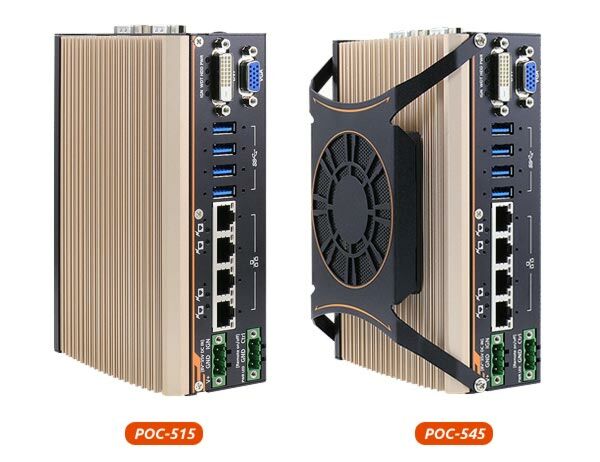
The front panel includes four IEEE 802.3at Gigabit PoE+ ports, four USB 3.1 Gen1 ports, one DisplayPort output, one VGA port, a 3-pin terminal block for DC input, and a 3-pin remote on/off connector. All PoE+ and USB ports use a screw-lock mechanism to secure cables.
The system has COM1, a software-programmable RS-232/422/485 port on a 9-pin D-Sub connector, plus COM2/3/4 which can be configured as three 3-wire RS-232 ports or COM2 alone as a single RS-422/485 port. Both COM1 and COM2/3/4 are implemented with an ITE8786 Super IO chip supporting baud rates up to 921,600 bps.
The system accepts 8 to 35VDC via a 3-pin pluggable terminal block. Supplying voltage over 35V will damage the system. The same terminal block can also accept an ignition signal input if the optional MezIO-V20 module is installed.
The POC-500 series operates from -25°C to 70°C and can be stored from -40°C to 85°C, with 10%~90% non-condensing humidity. For sub-zero or over 60°C operation, a wide temperature HDD or SSD is required. On POC-545/546, the 70°C upper limit is only supported when the external-accessible fan is installed.
The system is rated for MIL-STD-810G Method 514.6 (vibration, Category 4) and Method 516.6 Procedure I (shock), and is EMC certified as CE/FCC Class A according to EN 55032 and EN 55024. The data sheet also lists EN62368-1 safety certification.
The system has one M.2 2280 M-key NVMe socket (PCIe Gen3 x2) for SSD installation, and one 260-pin SO-DIMM socket supporting DDR4 memory up to 16GB per the user manual (the data sheet lists up to 32GB). POC-515/516 support DDR4-2400, while POC-545/546 also support DDR4-3200 in single-rank configuration. The POC-516 and POC-546 variants additionally include a SATA interface for a 2.5" SSD/HDD.
The POC-500 has driver support for Windows 10 64-bit. For Linux, Neousys recommends kernel versions no later than 4.10, and testing has been done with Ubuntu 18.04.1 LTS. For Linux, the AMD Vega graphics or Intel I350-AM4 GbE driver may need to be manually compiled if not embedded in the kernel.
The system has one full-size mini-PCIe slot with an internal SIM socket, allowing installation of a mini-PCIe module for 3G/4G network access. There are also SMA antenna openings on the COM port panel for wireless (WiFi/3G/4G/GPS) antenna installation.
The system is DIN-rail mounted as standard, using a DIN rail clip included in the accessory box. An optional wall-mount bracket (horizontal or vertical) is also available.
POC-515 and POC-545 include a MezIO expansion interface for Neousys MezIO modules. POC-516 and POC-546 instead come with 4-CH isolated digital input and 4-CH isolated digital output built in, plus a SATA interface for a 2.5" SSD/HDD, in place of the general MezIO expansion slot.
How-to Guides
- Disassemble the system enclosure.
- Locate the SO-DIMM slot on the motherboard.
- Insert the gold finger end of the SO-DIMM at a 45 degree angle into the slot.
- Gently push the SO-DIMM down until it clips into place.
- Reinstall the enclosure when done.
- Disassemble the system enclosure.
- Locate the M.2 2280 M-key slot after removing the enclosure and heat spreader.
- Insert the NVMe SSD into the slot at a 45° angle.
- Gently push it toward the motherboard and secure it with the supplied screw.
- Remove the protective film from the thermal pads before reinstalling the heat spreader.
- Secure the heat spreader with its two screws.
- Reinstall the enclosure when done.
- Disassemble the system enclosure.
- Locate the mini-PCIe and SIM slots on the motherboard.
- Insert the mini-PCIe module's gold finger at a 45 degree angle into the socket, press down, and secure it with a screw.
- Open the SIM slot by sliding the top section away from the VGA port and flipping it open.
- Insert the SIM card, close the flipped section, and slide it toward the VGA port to lock it in place.
- Clip on the mini-PCIe module's antenna cable per the module's manual.
- Remove an antenna cover from the enclosure and secure the SMA antenna connector.
- Reinstall the enclosure and attach the external SMA antenna.
- Secure the DIN rail clip to the rear side panel of the system enclosure using the M4 screws provided.
- Tilt the unit and hook the top clip edge of the DIN rail clip over the top of the DIN rail.
- Firmly press the bottom-front of the enclosure to clip the bottom edge of the mount plate onto the rail.
- Confirm the mount plate has clipped onto the DIN rail for a proper fit.
- Press F2 during boot to enter the BIOS setup utility.
- Go to the Power menu and set Wake On LAN to Enabled.
- In Windows, open the Local Area Connection properties for the corresponding Gigabit controller and click Configure.
- Open the Power Management tab and enable "Wake on Magic Packet" and, if desired, "Wake on Magic Packet from power off state".
- Send a magic packet containing the target system's MAC address to wake the system from S3, S4, or S5 state.
| Manufacturer | Neousys |
|---|---|
| Processor | POC-515: AMD Ryzen™ V1605B CPU (4C/ 8T, 2M Cache, 2.0/ 3.6 GHz,12W - 25W TDP)|POC-545: AMD Ryzen™ V1807B CPU (4C/ 8T, 2M Cache, 3.35/ 3.8 GHz,35W - 54W TDP) |
| Graphics | POC-515: Vega GPU with 8 compute units|POC-545: Vega GPU with 11 compute units |
| Memory | POC-515: Up to 16 GB DDR4-2400 SDRAMby one SODIMM socket|POC-545: Up to 16 GB DDR4-3200 SDRAM by one SODIMM socket |
| PoE | IEEE 802.3at PoE+ on port #1~ 4 |
| Video Port | 1x VGA connector, supporting 1920 x 1200 resolution|1x DisplayPort connector, supporting 4096 x 2160 resolution |
| Audio | 1x 3.5mm jack for mic-in and speaker-out |
| M.2 | 1x M.2 2280 M key NVMe socket (PCIe Gen3 x2)for NVMe SSD installation |
| Mini PCI-E | 1x full-size mini PCI Express socket with internal SIM socket |
| DC Input | 1x 3-pin pluggable terminal block for 8~35VDC DC input |
| Fan | POC-545: External-accessible 80mm x 80mm fan for system heat dissipation |
| Dimension | POC-515: 64(W) x116(D) x176(H) mm|POC-545: 81(W) x118(D) x176(H) mm |
| Weight | POC-515: 1.2kg|POC-545: 1.4kg |
| Operating Temperature | -25°C ~ 70°C*/** |
| Storage Temperature | -40°C ~85°C |
| Humidity | 10%~90% , non-condensing |
| Vibration | Operating, MIL-STD-810G, Method 514.6, Category 4 |
| Shock | Operating, MIL-STD-810G, Method 516.6, Procedure I, Table 516.6-II |
| EMC | CE/ FCC Class A, according to EN 55032 & EN 55024 |
| CPU Cores | 4 |
| CPU Family | AMD Ryzen |
| Base CPU Speed | Under 2.0 Ghz, 3.1 to 3.5 GHz |
| Video Output | Display Port, VGA |
| PoE Ports | 4 |
| LAN Ports | 1-4 |
| Serial Ports | 3-4 |
| USB 3.0 | 3-4 |
| Max Memory | 16 GB |
| Operating System | Windows 10, Linux |
| Effective Memory Speed | 2666 MHz, 3200 MHz |
| Form Factor | Fanless |
| Native Storage Type | M.2 NVMe SSD |
| On/Ignition | Remote On/Off |