
PCIe-GL26: NVIDIA Jetson Xavier NX AI-Enabled 6-Port GMSL2 Camera Frame Grabber Card
PCIe-GL26Starting at $2,725.00
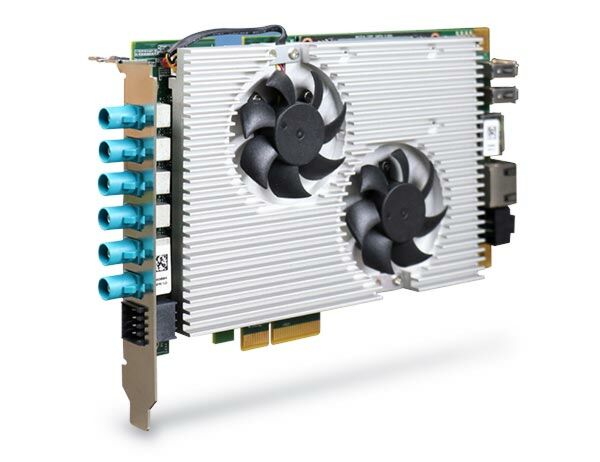
PCIe-GL26 is an AI-enabled automotive six-port GMSL2 camera frame grabber card. It is a turnkey industrial-grade frame grabber solution that incorporates drivers for selected GMSL2 cameras with video streaming sample codes.
- 6x GMSL2 FAKRA Z inputs supporting automotive GMSL2 cameras
- Turnkey solution with pre-installed GMSL2 camera driver for selected cameras
- Powered by NVIDIA® Jetson Xavier™ NX bundled with JetPack 4.6.1
- 21 TOPS AI performance with up to 22 streams simultaneous 1080p@30FPS video encoding capability
- x2 Gen3 PCI Express interface offering 10Gb/s total bandwidth
- 1x GPS PPS input for frame sync calibration
- 1x isolated CAN 2.0 and 1x RS232
- -25°C to 60°C operating temperature with airflow

Frequently Asked Questions
The PCIe-GL26 is an AI-enabled automotive six-port GMSL2 camera frame grabber card. It is a turnkey industrial-grade frame grabber solution with drivers for selected GMSL2 cameras and video streaming sample codes. It is powered by an NVIDIA Jetson Xavier NX module and is designed as an AI camera sensor hub for sensor fusion and data pre-processing in ADAS or autonomous vehicle applications.
The PCIe-GL26 provides:
- 6x GMSL2 ports (3Gbps) via FAKRA Z connectors, for automotive camera connections
- 1x isolated CAN 2.0 port
- 1x RS-232 serial port
- 1x GPS PPS input
- 1x Gigabit Ethernet port
- 2x USB 2.0 ports
- 1x micro USB (OTG) port
- 1x DisplayPort, supporting up to 3840x2160 at 60Hz
- 1x M.2 2242 M key socket (PCIe Gen3 x1) for an NVMe SSD
The CAN, RS-232, and GPS PPS signals are accessed via an 8-pin terminal block on the panel side.
The 8-pin terminal block carries isolated GPS PPS, CAN 2.0, and RS-232 signals:
- Pin 1: PPS0_H
- Pin 2: PPS0_L
- Pin 3: CAN_GND
- Pin 4: COM_GND
- Pin 5: CAN_L
- Pin 6: COM_RX
- Pin 7: CAN_H
- Pin 8: COM_TX
The PCIe-GL26 normally draws power through the PCIe slot of the host computer. It also has a 4-pin 12V DC input connector for cases where the card is not installed in a computer (i.e., without PCIe-supplied power), intended for independent development use. The 4-pin connector pinout is: Pin 1 = 12V, Pin 2 = NC, Pin 3 = Ground, Pin 4 = NC.
The PCIe-GL26 operates from -25°C to 60°C with airflow in 20W TDP mode, and can be stored from -40°C to 85°C. Humidity tolerance is 10% to 90%, non-condensing. Note that sub-zero or over-60°C operation requires a wide-temperature NVMe SSD. The card is rated CE Class A (EN 55032/55035) and FCC Class A (Part 15, Subpart B), both listed as pending in this manual.
The PCIe-GL26 is built around an NVIDIA Jetson Xavier NX System-on-Module, combining an NVIDIA Volta GPU and Carmel CPU. It is available with 8GB or 16GB LPDDR4x memory (running at 1600/1866 MHz depending on 15W/20W TDP mode) and includes 16GB of onboard eMMC 5.1 storage. It also has an M.2 2242 M key slot (PCIe Gen3 x1) for an additional NVMe SSD.
The PCIe-GL26 is a half-length, standard-height, single-slot PCIe card measuring 167.7 mm (W) x 111 mm (H) and weighing 0.43 kg, allowing it to fit in most host computers with a PCIe expansion slot.
Yes. A host computer can install up to four PCIe-GL26 cards, supporting up to 24 GMSL2 camera streams in total. Each card has a Board ID DIP switch that must be set to a unique ID (Board ID 0-3) so the API can distinguish between cards. Copper stands are required to maintain proper spacing between multiple cards.
The PCIe-GL26 ships with JetPack 4.6.1 installed as a turnkey solution. Because it is built on a Jetson Xavier NX module, the card cannot flash itself; a separate host machine and a micro USB to USB Type-A cable are required to reflash it with a Neousys pre-built system image if needed.
How-to Guides
- Remove the screws securing the heatsink and fan assembly to the PCB.
- Disconnect the two 3-pin fan power cables.
- Gently remove the heatsink from the board, noting the position of the two fan 3-pin plugs for reinstallation.
- Remove the heatsink as described in the heatsink removal procedure.
- Insert the NVIDIA Jetson Xavier NX module at a 45 degree angle into the slot, then press down until it clicks in on both sides.
- Remove the thermal pad protective film at the bottom of the heatsink.
- Reinstall the heatsink to complete the module installation.
- Remove the heatsink as described in the heatsink removal procedure.
- Insert the M.2 2242 NVMe SSD at a 45 degree angle into the M key slot.
- Press the SSD down and secure it with a screw.
- Remove the thermal pad protective film at the bottom of the heatsink.
- Reinstall the heatsink to complete the NVMe SSD installation.
- Position the heatsink above the PCIe-GL26 and connect the two 3-pin fan power connectors.
- Secure the heatsink with the indicated screws to complete the installation process.
- Save and close all work in progress on the host computer.
- Power off and unplug the power cable from the host computer.
- Open the chassis side panel of the host computer.
- Locate an x4 PCIe slot or a spare and compatible x16/x8 PCIe slot.
- Align and insert the PCIe-GL26's gold finger into the PCIe slot.
- Secure the card to the chassis with a screw.
- Reinstall the system's chassis panel to complete the hardware installation.
Note: the solder side component height of any adjacent PCIe card on the fan side must not exceed the PCIe standard of 2.67 mm, and should preferably stay below 2.3 mm to avoid contact with the PCIe-GL26's heatsink fan.
For multiple cards, set a unique Board ID via the DIP switch on each card and install NVMe SSDs before installing the cards into the host computer.
PCIe-GL26 is an AI-enabled automotive six-port GMSL2 camera frame grabber card. It is a turnkey industrial-grade frame grabber solution that incorporates drivers for selected GMSL2 cameras with video streaming sample codes.
PCIe-GL26 aims to provide superior outdoor vision capability with automotive GMSL2 camera connectivity to advanced x86 autonomous vehicle computing platforms. Automotive GMSL2 cameras are ideal for autonomous vehicle applications due to their advanced features, such as IP67 waterproof, high dynamic range (120dB HDR), auto white balance (AWB), and LED flicker mitigation (LFM). It also benefits computer vision applications in outdoor environments where illumination conditions are constantly changing. Powerful x86 computers with PCIe-GL26 can obtain high-quality images with minimal latency regardless of lighting conditions, from bright sunny days to pitch-black nights.
With a half-length, standard height, and single-slot form factor, PCIe-GL26 can be accommodated in most host computers with a PCIe expansion. With pre-built sample codes, a host computer can install up to four PCIe-GL26 cards and support up to 24x GMSL2 camera streams. Featuring a unique synchronization mechanism, it is capable of acquiring images from six GMSL2 cameras simultaneously within microseconds of channel-tochannel skew. It can also accept a GPS PPS signal to align image data with LIDAR or PCIe-GL26 in another host machine.
Powered by Jetson Xavier NX, PCIe-GL26 is much more than just a GMSL2 frame grabber card. With 21 TOPS AI performance, 6x GMSL2 camera inputs, 1x GPS PPS input, 1x RS232, and 1x isolated CAN 2.0, PCIe-GL26 is an AI camera sensor hub capable of sensor fusion and data pre-processing for ADAS or autonomous vehicles.
AI Frame Grabbers
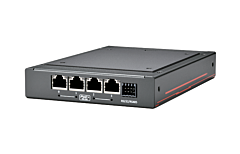
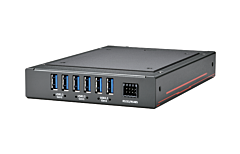
| Manufacturer | Neousys |
|---|---|
| Short Description |
PCIe-GL26 is an AI-enabled automotive six-port GMSL2 camera frame grabber card. It is a turnkey industrial-grade frame grabber solution that incorporates drivers for selected GMSL2 cameras with video streaming sample codes. |
| Processor | NVIDIA Jetson Xavier NX System-on-Module (SOM), comprising of NVIDIA Volta GPU and Carmel CPU |
| Memory | 8GB/ 16GB LPDDR4x (Xavier NX 8GB/ 16GB) @ 1600/ 1866 MHz (15W/ 20W TDP mode) |
| Video Port | 1x DisplayPort, supporting 3840x2160 at 60Hz |
| DIO | 1x GPS PPS input |
| M.2 | 1x M.2 2242 M key socket (PCIe Gen3 x1) for NVMe SSD |
| DC Input | 12V DC power input (for development only) |
| Dimension | 167.7 mm (W) x 111 mm (H) |
| Weight | 0.43kg |
| Operating Temperature | -25°C to 60°C with airflow (20W TDP mode) * |
| Storage Temperature | -40°C ~85°C |
| Humidity | 10%~90% , non-condensing |
| EMC | CE Class A, according to EN 55032/55035 (pending) |
| CPU Family | Jetson AGX Xavier |
| Video Output | Display Port |
| USB 2.0 | 1-2 |
| Max Memory | 8 GB, 16 GB |
| Effective Memory Speed | 1600 MHz, 1866 MHz |