
PCIe-NX156U3: NVIDIA Jetson Orin NX 100 TOPS Intelligent Frame Grabber Card with 6x USB 3.2 Ports
PCIe-NX156U3Starting at $1,985.00
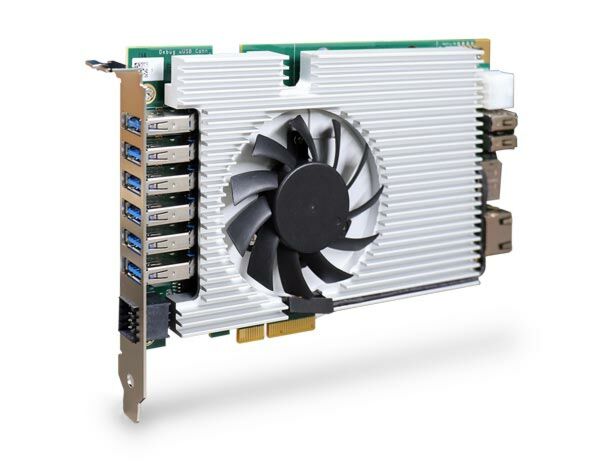
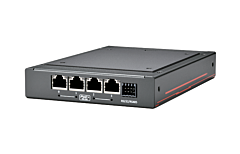
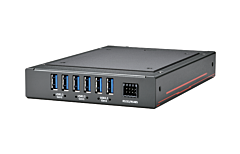
PCIe-NX156U3 is an intelligent 6-port USB 3.2 frame grabber card powered by NVIDIA’s Jetson Orin NX designed to enable AI capabilities for modern vision inspections. It delivers 100 INT8 TOPS AI performance via its 1024 CUDA cores, 32 Tensor cores, and 2 NVDLA engines. It also features two USB 3.2 Gen2 ports and four USB 3.2 Gen1 ports; each port provides 10 Gbps (Gen2) or 5 Gbps (Gen1) data bandwidth, and up to 1500mA current for USB camera connectivity.
- Powered by NVIDIA Jetson Orin NX bundled with JetPack 5.1
- Single-slot width, standard PCIe half-length card form factor
- 6x USB 3.2 ports, each port with user-configurable 900mA and 1500mA current limit
- 100 TOPS AI inference performance
- Software-programmable per-port power on/off control
- 1x isolated RS-485 and 1x RS-232
- x1 Gen2 PCI Express interface offering 2.5Gb/s total bandwidth
- -25°C to 60°C operating temperature with airflow

Frequently Asked Questions
The PCIe-NX156U3 provides two USB 3.2 Gen 2 ports (10Gbps, SuperSpeed+) and four USB 3.2 Gen 1 ports (5Gbps) on its deployment I/O panel. Both are backward compatible with USB 2.0, 1.1, and 1.0 devices. It also has two USB 2.0 ports and one micro USB (OTG) port on the onboard development connectivity, and the total current available for USB camera connectivity is up to 1500mA.
The card has an 8-pin terminal block providing 1x RS-232 port and 1x isolated RS-485 port. The pinout is: pin 3 = RS-485_DATA+, pin 4 = RS-485_DATA-, pin 5 = RS-485_GND, pin 6 = RS-232_GND, pin 7 = RS-232_TX, pin 8 = RS-232_RX. Pins 1 and 2 are unused.
The card is normally powered through the PCIe bus (x1, Gen2 PCI Express). It also has a 6-pin connector supporting 12V DC input, which is used for standalone development or when total power consumption exceeds 66W. On the 6-pin connector, pins 1, 3, and 5 are 12V, and pins 2, 4, and 6 are GND. A DIP switch (DIP 4) lets you choose whether the card is powered by PCIe or by the 6-pin 12V input.
The PCIe-NX156U3 operates from -25°C to 60°C with airflow in 20W TDP mode, and storage temperature is -40°C to 85°C. Humidity range is 10% to 90%, non-condensing. It is CE/FCC Class A compliant per EN 55032/55035. Note that for sub-zero or over-60°C operation, a wide-temperature NVMe SSD is required.
The Jetson Orin NX module comes with 8GB or 16GB LPDDR5 memory at 3200MHz. Storage is provided via a single M.2 2242 M-key socket (PCIe Gen4 x2) for an NVMe SSD.
The card is compatible with Windows and Linux and ships with JetPack 5.x pre-installed as a turnkey solution. It includes drivers for selected Ethernet/GigE cameras along with video streaming sample code. Relevant drivers may need to be installed before using the Ethernet, DisplayPort, or USB 2.0 ports.
The card measures 167.7 mm (W) x 111 mm (H) and weighs 0.4 kg.
Both cards share the same NVIDIA Jetson Orin NX SOM, memory, M.2 storage slot, dimensions, and environmental ratings. The difference is in deployment I/O: the PCIe-NX156U3 offers two USB 3.2 Gen2 and four USB 3.2 Gen1 ports (up to 1500mA for USB cameras), while the PCIe-NX154PoE offers four 2.5GBASE-T Ethernet ports with IEEE 802.3at PoE+ (max 25.5W per port, 50W total budget) for powering GigE or IP cameras.
Yes. Using the DIP 1/DIP 2 switches, you can set a unique board ID (NX side and host side IP addresses) so that up to four cards can be installed in the same host computer. DIP 3 controls whether the card boots into OS or recovery mode, and DIP 4 selects whether the card is powered by PCIe or by the 6-pin 12V input.
How-to Guides
- Remove the screws at the bottom of the PCB and gently separate the fan/heatsink from the PCB to access the M.2 slot.
- Insert the M.2 2242 NVMe SSD into the slot at a 45-degree angle.
- Press the SSD down and secure it with a screw.
- Remove the thermal pad protective film at the bottom of the heatsink.
- Reinstall the heatsink, matching the screw locations, and secure the screws to complete the process.
- Remove the heatsink as described in the SoM/expansion slot access procedure (remove PCB screws and separate the fan/heatsink).
- Turn the PCB board around and push the two retaining clips on the side outward; the SoM will lift away from the PCB automatically.
- Remove the original SoM and insert the new SoM into the slot at a 45-degree angle.
- Gently press the SoM module toward the PCB until the retaining clips click onto it.
- Reinstall the heatsink when done.
- Identify the 6-pin connector: pins 1, 3, and 5 are 12V; pins 2, 4, and 6 are GND.
- Use this input only for standalone development use, or when the system's total power consumption exceeds 66W (i.e. when not relying on PCIe bus power).
- Set DIP switch 4 to select power source: Off = power by PCIe, On = power by 6-pin (12V) input.
- Save and close all work in progress on the host computer, then power it off and unplug the power cable.
- Open the chassis side panel of the host computer, referring to its user manual as needed.
- Locate an x4 PCIe slot, or a spare and compatible x16/x8 PCIe slot.
- Align and insert the PCIe-NX15x gold finger into the PCIe slot, ensuring the I/O bezel is properly seated.
- Secure the card to the chassis with a screw.
- Reinstall the host computer's chassis panel to complete installation.
- Verify the host computer's motherboard PCIe slots can accommodate multiple cards, and set a unique board ID on each card using DIP switches 1/2.
- For two cards, use the provided female-female 20mm copper stands and secure with a screw.
- For more than two cards, use male-female copper stands for the cards positioned in the middle, ensuring the motherboard's PCIe slots are positioned to accommodate the number of cards.
- Once the copper stands are installed, gently lower the cards into the host computer's PCIe slots and secure them with the indicated screws.
- Reinstall the chassis panel to complete the hardware installation.
PCIe-NX156U3 is an intelligent 6-port USB 3.2 frame grabber card powered by NVIDIA’s Jetson Orin NX designed to enable AI capabilities for modern vision inspections. It delivers 100 INT8 TOPS AI performance via its 1024 CUDA cores, 32 Tensor cores, and 2 NVDLA engines. It also features two USB 3.2 Gen2 ports and four USB 3.2 Gen1 ports; each port provides 10 Gbps (Gen2) or 5 Gbps (Gen1) data bandwidth, and up to 1500mA current for USB camera connectivity.
PCIe-NX156U3 aims to enable AI inference and increase USB camera connectivity for existing 19" rack-mount or commercial off-the-shelf box AOI systems. With a standard single-slot half-length PCIe card form factor, PCIe-NX156U3 communicates with the host via the PCIe x4 slot Gen2 x1 signal. Its AI capabilities offloads deep-learning vision computing from the host computer, actions such as image capture, pre-processing, and inference are all performed by PCIe-NX156U3 while utilizing minimum host computer resources.
Capable of wide temperature -25°C to 60°C operation and Windows and Linux OS compatibility make PCIe-NX156U3 the perfect upgrade for legacy machine vision systems to leverage deep learning-based image processing such as package inspection, object sorting, surface defect detection, assembly verification, and robotic guidance, etc. It is a revolutionary AI-enabling frame grabber card for next-generation inspection applications.
AI Frame Grabbers
| Manufacturer | Neousys |
|---|---|
| Short Description |
PCIe-NX156U3 is an intelligent 6-port USB 3.2 frame grabber card powered by NVIDIA’s Jetson Orin NX designed to enable AI capabilities for modern vision inspections. It delivers 100 INT8 TOPS AI performance via its 1024 CUDA cores, 32 Tensor cores, and 2 NVDLA engines. It also features two USB 3.2 Gen2 ports and four USB 3.2 Gen1 ports; each port provides 10 Gbps (Gen2) or 5 Gbps (Gen1) data bandwidth, and up to 1500mA current for USB camera connectivity. |
| Processor | Supporting NVIDIA Jetson Orin NX system-on-module (SOM), comprising NVIDIA Ampere GPU and ARM Cortex CPU |
| Memory | 8GB/ 16GB LPDDR5 @ 3200 MHz on SOM |
| Video Port | 1x DisplayPort, supporting 3840x2160 at 60Hz |
| M.2 | 1x M.2 2242 M key socket (PCIe Gen4 x2) for NVMe SSD |
| DC Input | 12V DC power input (for standalone development, or when total power consumption is more than 66W) |
| Dimension | 167.7 mm (W) x 111 mm (H) |
| Operating Temperature | -25°C to 60°C with airflow (20W TDP mode) * |
| Storage Temperature | -40°C ~85°C |
| Humidity | 10%~90% , non-condensing |
| EMC | CE Class A, according to EN 55032/55035 (pending) FCC Class A, according to FCC Part 15, Subpart B (pending) |