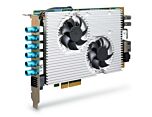
PCIe-NX154PoE: NVIDIA Jetson Orin NX 100 TOPS Intelligent Frame Grabber Card with 4x PoE+ Ports
PCIe-NX154PoEStarting at $2,060.00
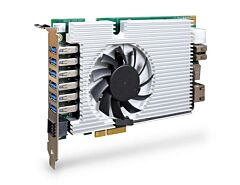
PCIe-NX154PoE is an intelligent 4-port 2.5GbE PoE+ frame grabber card fueling 100 TOPS AI inference performance for modern vision inspection, intelligent video analytics and surveillance/ security applications. Powered by NVIDIA's Jetson Orin NX system-on-module, PCIe-NX154PoE delivers 100 INT8 TOPS AI performance via its 1024 CUDA cores, 32 Tensor cores and 2 NVDLA engines. It also features four 2.5GbE PoE+ ports with a 50W total PoE power budget to connect and power industrial GigE cameras or IP cameras.
- Powered by NVIDIA® Jetson Orin™ NX bundled with JetPack 5.1
- Single-slot half-length PCIe card form factor
- 4x PoE+ 2.5 GbE ports with a 50W total power budget
- 100 TOPS AI inference performance capable of up to four simultaneous streams of 4K@30FPS video decoding
- 1x isolated RS-485 and 1x RS-232
- x1 Gen2 PCI Express interface offering 2.5Gb/s total bandwidth
- -25°C to 60°C operating temperature with airflow

Frequently Asked Questions
The card provides:
- 4x 2.5GBASE-T Ethernet ports with PoE+ (IEEE 802.3at), for connecting and powering GigE/IP cameras
- 1x Gigabit Ethernet port (development)
- 2x USB 2.0 ports and 1x micro USB (OTG) for development
- 1x DisplayPort supporting up to 3840x2160 at 60Hz
- 1x RS-232 port and 1x isolated RS-485 port via an 8-pin terminal block
- 1x M.2 2242 M key socket (PCIe Gen4 x2) for an NVMe SSD
The card normally draws power from the host computer's PCIe x4 slot. A 6-pin 12V DC input is also available on the card, used for standalone development or when total power consumption exceeds 66W. Each of the four PoE+ ports (IEEE 802.3at) can deliver up to 25.5W to a connected device, with a combined total power budget of 50W across all four ports.
The card operates from -25°C to 60°C with airflow, in the Orin NX 20W TDP mode, with no throttling at 60°C. Storage temperature range is -40°C to 85°C, and humidity tolerance is 10% to 90% non-condensing. For sub-zero or over 60°C operation, a wide-temperature NVMe SSD is required. The card is certified CE/FCC Class A according to EN 55032 and EN 55035.
The card has 8GB or 16GB of LPDDR5 memory (@3200MHz) on the Jetson Orin NX system-on-module. Storage is provided via a single M.2 2242 M key socket (PCIe Gen4 x2) for an NVMe SSD.
The card is compatible with Windows and Linux host computers. It ships with JetPack 5.x pre-installed as a turnkey solution.
The PCIe-NX154PoE is a single-slot, half-length PCIe card measuring 167.7 mm (W) x 111 mm (H) and weighing 0.4 kg. It uses an x1 Gen2 PCI Express bus interface and can be installed in a PCIe x4 slot (or a spare x8/x16 slot).
Both cards share the same NVIDIA Jetson Orin NX processor, memory options, dimensions, and environmental specifications. The difference is in camera connectivity: the PCIe-NX154PoE has 4x 2.5GbE PoE+ ports with a 50W total power budget for GigE/IP cameras, while the PCIe-NX156U3 has 2x USB 3.2 Gen2 (10Gbps) and 4x USB 3.2 Gen1 (5Gbps) ports, supporting up to 1500mA current for USB camera connectivity.
The 8-pin terminal block provides the following signals:
- Pin 3: RS-485_DATA+
- Pin 4: RS-485_DATA-
- Pin 5: RS-485_GND
- Pin 6: RS-232_GND
- Pin 7: RS-232_TX
- Pin 8: RS-232_RX
How-to Guides
- Remove the screws at the bottom of the PCB board and gently separate the fan/heatsink from the board to access the M.2 slot.
- Insert the M.2 2242 NVMe SSD into the slot at a 45-degree angle.
- Press the SSD down and secure it with a screw.
- Remove the thermal pad protective film at the bottom of the heatsink.
- Reinstall the heatsink, matching the screw locations, and secure the screws.
- Remove the heatsink by removing the screws at the bottom of the PCB and separating the fan/heatsink assembly.
- Turn the PCB board around and push the two retaining clips on the side outward; the SoM will lift away from the PCB.
- Remove the original SoM and insert the new SoM into the slot at a 45-degree angle.
- Gently press the SoM towards the PCB until the retaining clips click into place.
- Reinstall the heatsink when done.
Use this input only for standalone development or when total power consumption exceeds 66W (the card is otherwise powered through the PCIe slot).
- Identify the 6-pin connector on the card: pins 1, 3, 5 are 12V and pins 2, 4, 6 are GND.
- Connect a 12V DC power source to the 12V and GND pins using the supplied wafer-to-terminal cable.
- Confirm the correct polarity and voltage before applying power.
- Locate the DIP switch (DIP 1-4) on the top right corner of the card.
- Set DIP 1 and DIP 2 to configure the board's high/low ID bits, which determine the NX-side and host-side default IP addresses (e.g., 150.150.50.50 / 150.150.50.51 for the first card).
- Set DIP 3 to choose between booting into OS (off) or recovery mode (on).
- Set DIP 4 to choose the power source: PCIe (off) or 6-pin 12V input (on).
- Repeat with unique DIP 1/2 settings for each additional card when installing multiple cards in one host.
- Save and close all work in progress on the host computer, then power it off and unplug the power cable.
- Open the chassis side panel of the host computer.
- Locate a compatible x4 PCIe slot or a spare x8/x16 PCIe slot.
- Align and insert the card's gold finger into the PCIe slot, ensuring the I/O bezel is properly seated.
- Secure the card to the chassis with a screw.
- Reinstall the host computer's chassis panel to complete installation.
PCIe-NX154PoE is an intelligent 4-port 2.5GbE PoE+ frame grabber card fueling 100 TOPS AI inference performance for modern vision inspection, intelligent video analytics and surveillance/ security applications. Powered by NVIDIA's Jetson Orin NX system-on-module, PCIe-NX154PoE delivers 100 INT8 TOPS AI performance via its 1024 CUDA cores, 32 Tensor cores and 2 NVDLA® engines. It also features four 2.5GbE PoE+ ports with a 50W total PoE power budget to connect and power industrial GigE cameras or IP cameras.
With a standard single-slot half-length PCIe card form factor and utilizing 2.5GbE for host communication, PCIe-NX154PoE can be installed into a single PCIe x4 slot while operate on Gen2 x1 signals. This makes it an easy integration into any existing computer system, such as a 19" rack-mount IPC or commercial off-the-shelf box PC. When installed into a vision computer system, PCIe-NX154PoE provides necessary camera connectivity, and it also offloads the deep-learning image processing from host CPU/GPU since image capture, video streaming, pre-processing, and inference are all computed on PCIe-NX154PoE.
Wide temperature -25°C to 60°C operation capability, and compatibility with Windows and Linux operating systems make PCIe-NX154PoE the perfect upgrade for legacy machine vision systems to leverage deep learning-based image processing such as object detection, classification, tracking, facial recognition, etc. It’s a revolutionary frame grabber card with intelligence for next-generation computer vision applications.
AI Frame Grabbers
| Manufacturer | Neousys |
|---|---|
| Short Description |
PCIe-NX154PoE is an intelligent 4-port 2.5GbE PoE+ frame grabber card fueling 100 TOPS AI inference performance for modern vision inspection, intelligent video analytics and surveillance/ security applications. Powered by NVIDIA's Jetson Orin NX system-on-module, PCIe-NX154PoE delivers 100 INT8 TOPS AI performance via its 1024 CUDA cores, 32 Tensor cores and 2 NVDLA engines. It also features four 2.5GbE PoE+ ports with a 50W total PoE power budget to connect and power industrial GigE cameras or IP cameras. |
| Processor | Supporting NVIDIA® Jetson Orin™ NX system-on-module (SOM), comprising NVIDIA® Ampere GPU and ARM Cortex CPU |
| Memory | 8GB/16GB LPDDR5 @ 3200 MHz on SOM |
| PoE | 4x IEEE 802.3at PoE+. Max 25.5W per port. Total 50W power budget for 4 ports. |
| Ethernet Standard | 4x 2.5GBASE-T Ethernet ports. |
| Video Port | 1x DisplayPort, supporting 3840x2160 at 60Hz |
| M.2 | 1x M.2 2242 M key socket (PCIe Gen4 x2) for NVMe SSD |
| DC Input | 12V DC power input (for standalone development, or when total power consumption is more than 66W). |
| Dimension | 167.7 mm (W) x 111 mm (H) |
| Weight | TBD |
| Operating Temperature | -25°C to 60°C with airflow (20W TDP mode) |
| Storage Temperature | -40°C ~85°C |
| Humidity | 10%~90% , non-condensing |
| EMC | CE Class A, according to EN 55032/55035 (pending) |
| Video Output | Display Port |
| PoE Ports | 4 |
| LAN Ports | 1-4 |
| Serial Ports | 1-2 |
| USB 2.0 | 1-2 |
| Max Memory | 16 GB |
| Effective Memory Speed | 3200 MHz |